Adobe Photoshop
Image editing tool that helps businesses edit and enhance photos, create digital drawings & store files in a centralized repository.
What is Adobe Photoshop?
Adobe Photoshop is one of the world's most recognized and widely used graphic design and image editing software solutions. Developed by Adobe, Photoshop has become the industry standard for photo editing, digital art creation, graphic design, image manipulation, and creative content production. Used by photographers, graphic designers, digital artists, marketing professionals, publishers, web designers, and businesses of all sizes, Adobe Photoshop offers a comprehensive set of tools for creating and enhancing visual content.
As digital content continues to play a critical role in branding, marketing, advertising, social media, and online communication, the demand for professional image editing software has grown significantly. Adobe Photoshop addresses this need by providing advanced editing capabilities that allow users to transform images, create original artwork, design marketing materials, and produce professional-quality visuals.
The software combines powerful image editing tools, artificial intelligence-powered features, layer-based design functionality, typography controls, and creative effects within a single platform. Whether users are retouching photographs, creating social media graphics, designing website assets, producing advertising materials, or developing digital illustrations, Photoshop provides the flexibility and precision required for professional creative work.
Today, Adobe Photoshop remains one of the most influential graphic design software platforms available, helping individuals and organizations create compelling visual experiences while supporting creative workflows across multiple industries.
About Adobe Photoshop Software
Adobe Photoshop is a professional image editing and graphic design software platform designed to help users create, edit, enhance, and manipulate digital images and visual content. Originally introduced in 1990, Photoshop has evolved from a simple photo editing application into a comprehensive creative design solution used worldwide.
The software enables users to work with raster graphics, photographs, digital artwork, marketing materials, website graphics, product images, social media content, and other visual assets. Photoshop is widely known for its layer-based editing system, which allows designers to make precise adjustments while maintaining complete control over individual design elements.
Adobe Photoshop is part of Adobe Creative Cloud, giving users access to cloud-based collaboration, file storage, creative assets, and integration with other Adobe applications such as Illustrator, Lightroom, InDesign, Premiere Pro, and After Effects. This interconnected ecosystem helps creative professionals manage projects efficiently while maintaining consistency across multiple design workflows.
From basic image corrections to advanced digital compositing, Adobe Photoshop supports a wide range of creative tasks that help businesses, agencies, and creators produce professional visual content. Its extensive feature set makes it a preferred choice for anyone seeking powerful graphic design software and image editing software capabilities.
Key Objectives of Adobe Photoshop Software
Enable Professional Image Editing
Adobe Photoshop helps users perform advanced image enhancements, retouching, color corrections, and visual improvements with precision and control.
Support Creative Design Projects
The software provides tools for creating graphics, illustrations, advertisements, marketing materials, and digital artwork.
Improve Visual Communication
Photoshop enables organizations and individuals to create compelling visual content that enhances communication and audience engagement.
Streamline Creative Workflows
Integrated tools, templates, automation features, and Creative Cloud connectivity help users work more efficiently.
Enhance Brand Consistency
Businesses can use Photoshop to create and maintain professional visual assets that align with brand guidelines.
Support Multi-Industry Design Needs
The platform provides versatile design tools suitable for photographers, marketers, agencies, publishers, and creative professionals.
Adobe Photoshop Categories
Primary Category
Adobe Photoshop primarily belongs to the Graphic Design Software category. It provides professional tools for visual content creation, image editing, digital artwork, marketing design, branding, and creative asset development. The platform is widely used by organizations and creative professionals seeking advanced graphic design capabilities.
Primary Category:
Secondary Categories
Adobe Photoshop extends beyond graphic design by offering tools that support photography, digital illustration, visual content creation, publishing, marketing design, and creative production workflows.
Secondary Categories:
Key Features of Adobe Photoshop
Advanced Photo Editing
Adobe Photoshop is widely recognized for its professional-grade photo editing capabilities. It enables users to modify, enhance, and transform images with precision.
Advanced Photo Editing Features Include:
- Image retouching
- Photo enhancement
- Exposure correction
- Color adjustments
- Skin retouching
- Background editing
- Image restoration
- Professional photo manipulation
These capabilities make Photoshop one of the most powerful photo editing software solutions available.
Layer-Based Editing
Layers are one of Photoshop's most important features, allowing users to work on different elements of a design independently.
Layer-Based Editing Features Include:
- Unlimited layers
- Layer groups
- Layer masks
- Adjustment layers
- Smart objects
- Layer effects
- Blend modes
- Non-destructive editing
These tools provide flexibility and control when creating complex designs and image compositions.
AI-Powered Generative Fill
Adobe Photoshop incorporates Adobe Firefly AI technology to help users generate and modify content quickly.
AI-Powered Generative Fill Features Include:
- AI image generation
- Object replacement
- Background generation
- Content expansion
- Smart image editing
- Text-based image modifications
- Automated content creation
- Context-aware editing
These AI tools significantly reduce editing time while improving creative possibilities.
Object Selection and Removal
Photoshop simplifies complex image editing tasks through advanced object selection and removal tools.
Object Selection Features Include:
- One-click object selection
- Subject detection
- Background removal
- Content-aware fill
- Object isolation
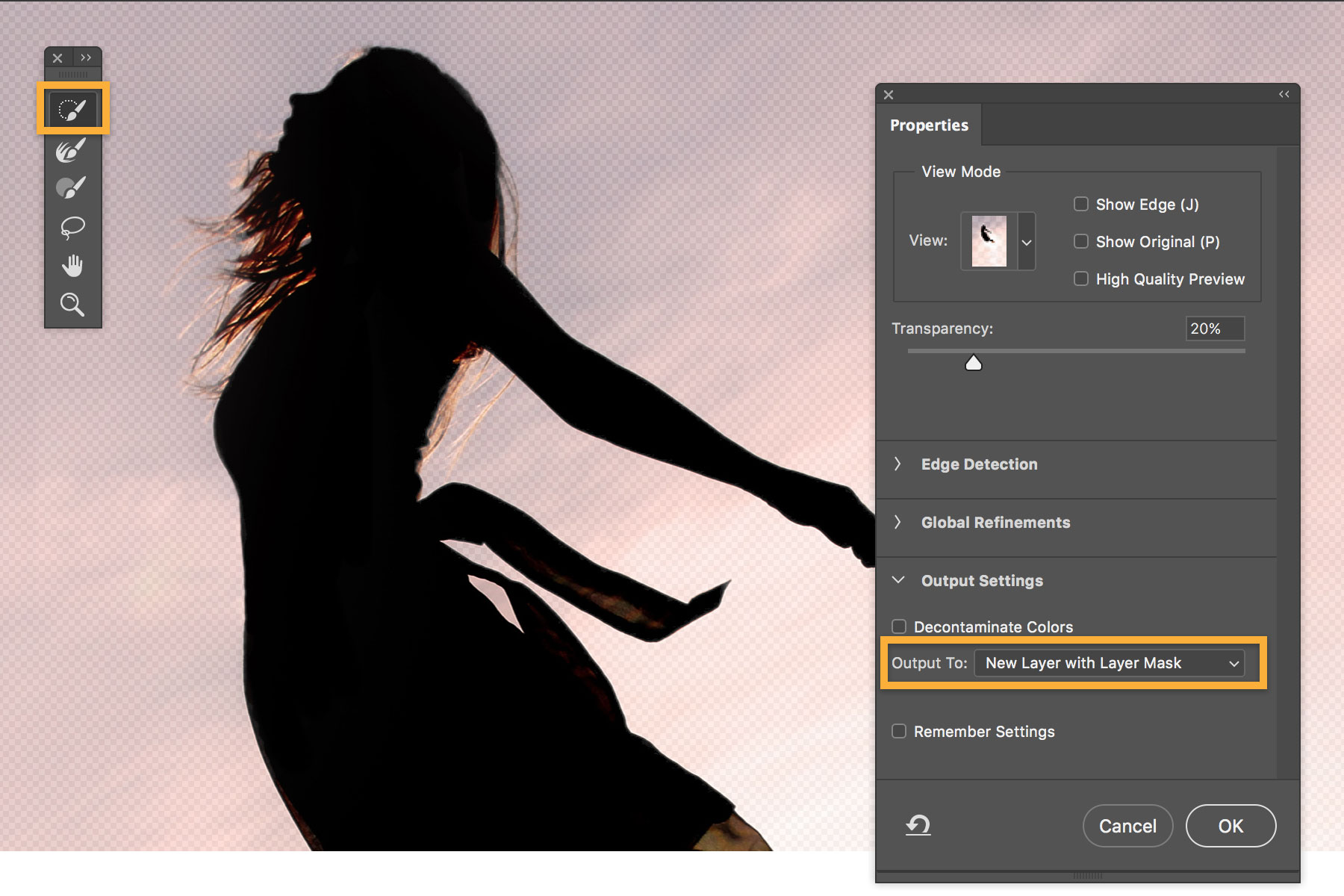
- Edge refinement
- Smart masking
- Automated selections
These capabilities help users create clean and professional edits efficiently.
Color Correction and Enhancement
Photoshop offers industry-leading color management tools for photographers and designers.
Color Correction Features Include:
- Brightness adjustments
- Contrast controls
- White balance correction
- Color grading
- Hue adjustments
- Saturation management
- Curves adjustments
- Levels controls
These tools help achieve accurate and visually appealing color results.
Advanced Retouching Tools
Professional retouching is one of Photoshop's strongest capabilities.
Retouching Features Include:
- Spot healing brush
- Clone stamp tool
- Patch tool
- Content-aware removal
- Skin smoothing
- Blemish removal
- Wrinkle reduction
- Detail enhancement
These features are commonly used by photographers, marketers, and creative professionals.
Graphic Design Tools
Adobe Photoshop is widely used for creating marketing materials, digital graphics, and branding assets.
Graphic Design Features Include:
- Banner creation
- Social media graphics
- Marketing materials
- Advertising creatives
- Branding assets
- Poster design
- Flyer creation
- Web graphics
These tools make Photoshop a complete graphic design software solution.
Typography and Text Editing
Photoshop includes comprehensive text editing capabilities that support professional design projects.
Typography Features Include:
- Custom fonts
- Text formatting
- Character styling
- Paragraph controls
- Text effects
- Text warping
- Typography presets
- Vertical and horizontal text support
These capabilities help designers create visually appealing content with professional typography.
Smart Objects
Smart Objects enable non-destructive editing and provide greater flexibility when working with design elements.
Smart Object Features Include:
- Non-destructive editing
- Reusable assets
- Linked objects
- Embedded objects
- Editable transformations
- Resolution preservation
- Filter flexibility
- Asset management
These features help maintain image quality throughout the editing process.
Masking and Compositing
Photoshop provides advanced masking and compositing tools for creating complex visual designs.
Masking and Compositing Features Include:
- Layer masks
- Clipping masks
- Vector masks
- Transparency control
- Image compositing
- Background blending
- Selective editing
- Visual effects creation
These tools are essential for professional image manipulation and creative design projects.
Digital Painting and Drawing
Adobe Photoshop includes powerful digital art tools that support illustration and creative design workflows.
Digital Painting Features Include:
- Custom brushes
- Pencil tools
- Paint brushes
- Brush customization
- Pressure sensitivity support
- Texture brushes
- Drawing layers
- Artistic effects
These capabilities make Photoshop popular among digital artists and illustrators.
Filters and Effects
Photoshop includes a vast library of filters and effects that enhance images and creative projects.
Filter and Effect Features Include:
- Blur effects
- Sharpen filters
- Artistic filters
- Distortion effects
- Lighting effects
- Noise reduction
- Stylization filters
- Creative enhancements
These tools help users achieve unique visual styles and professional-quality results.
Camera RAW Processing
Photographers can process RAW image files directly within Photoshop.
Camera RAW Features Include:
- RAW image editing
- Exposure adjustments
- Highlight recovery
- Shadow enhancements
- Color corrections
- Lens corrections
- Noise reduction
- Detail sharpening
These capabilities allow photographers to maximize image quality before final editing.
Content-Aware Technology
Content-aware tools intelligently analyze images and automate editing tasks.
Content-Aware Features Include:
- Content-aware fill
- Content-aware move
- Object removal
- Smart healing
- Background reconstruction
- Automated blending
- Image extension
- Intelligent editing suggestions
These tools improve productivity and reduce manual editing effort.
Selection Tools
Photoshop provides numerous selection tools that help users isolate specific areas of an image.
Selection Tool Features Include:
- Marquee tools
- Lasso tools
- Quick selection tool
- Magic wand tool
- Object selection tool
- Select subject feature
- Edge refinement tools
- AI-powered selections
These capabilities support precise editing and image manipulation.
Vector Editing Support
While primarily a raster graphics editor, Photoshop also includes vector design capabilities.
Vector Editing Features Include:
- Shape tools
- Pen tool
- Path editing
- Vector masks
- Custom shapes
- Scalable graphics
- Path manipulation
- Precision drawing
These tools help designers create scalable visual elements.
Web and UI Design Tools
Photoshop is commonly used for creating website layouts and user interface designs.
Web Design Features Include:
- Website mockups
- UI design creation
- Mobile app designs
- Landing page layouts
- Responsive design assets
- Interface prototyping
- Icon creation
- Design previews
These capabilities support modern web and application design workflows.
Cloud Integration
Adobe Photoshop integrates seamlessly with Adobe Creative Cloud.
Cloud Integration Features Include:
- Cloud storage
- Asset synchronization
- Cross-device access
- Shared libraries
- Team collaboration
- Cloud documents
- Creative Cloud connectivity
- Automatic updates
These features improve workflow efficiency and collaboration.
PSD File Support
Photoshop's PSD format is widely recognized as an industry-standard design file format.
PSD File Features Include:
- Layer preservation
- Editable designs
- Smart object support
- Transparency retention
- Project organization
- Cross-application compatibility
- High-quality asset management
- Professional workflow support
PSD files help designers maintain flexibility throughout the creative process.
Export and Publishing Tools
Photoshop provides extensive export options for digital and print projects.
Export Features Include:
- JPEG export
- PNG export
- PDF export
- SVG export
- Web optimization
- Print-ready outputs
- Social media exports
- High-resolution publishing
These capabilities ensure projects can be delivered across multiple platforms and formats.
Benefits of Using Adobe Photoshop Software
Professional-Quality Design Output
Users can create high-resolution visual content suitable for commercial, marketing, and publishing purposes.
Improved Creative Flexibility
Photoshop offers extensive tools that support virtually any creative design requirement.
Enhanced Productivity
Automation features, templates, and AI-powered tools help reduce repetitive tasks and improve efficiency.
Better Brand Presentation
Businesses can create consistent and professional marketing materials that strengthen brand identity.
Multi-Industry Applications
The software supports a wide range of industries including advertising, photography, publishing, education, eCommerce, and media.
Seamless Adobe Ecosystem Integration
Integration with Creative Cloud applications helps users streamline creative workflows across multiple platforms.
Integrations of Adobe Photoshop Software
Adobe Illustrator Integration
Supports seamless transfer of vector graphics and design assets.
Adobe Lightroom Integration
Enables photographers to move images between editing and photo management workflows.
Adobe InDesign Integration
Supports publishing and print design projects.
Adobe Premiere Pro Integration
Allows designers to create graphics and visual assets for video production.
Adobe After Effects Integration
Facilitates motion graphics and visual effects workflows.
Adobe Creative Cloud Integration
Provides cloud storage, asset management, and collaborative capabilities.
Adobe Express Integration
Supports simplified content creation and marketing design workflows.
Additional Business Integrations
Additional Integrations Include:
- Dropbox
- Google Drive
- Microsoft OneDrive
- Slack
- Microsoft Teams
- Trello
- Asana
- Monday.com
- Box
- Behance
- Frame.io
- WordPress
- Shopify
- WooCommerce
- Canva
- Figma
- Zapier
- HubSpot
- Mailchimp
- Google Workspace
Here is Part 2 for Adobe Photoshop Software.
Pros and Cons of Adobe Photoshop Software
Pros | Cons |
Industry-leading image editing capabilities | Subscription-based pricing may be expensive for some users |
Advanced AI-powered editing tools | Can have a steep learning curve for beginners |
Extensive design and creative features | Requires relatively powerful hardware for optimal performance |
Excellent integration with Adobe Creative Cloud | Some advanced features may be overwhelming for casual users |
Supports professional photography workflows | Not ideal for simple editing tasks |
Powerful layer-based editing system | Large project files can consume significant storage space |
Widely recognized industry standard | Certain features require internet connectivity |
Who Should Use Adobe Photoshop?
Photographers
Adobe Photoshop is an essential tool for professional and aspiring photographers who require advanced photo editing software. It enables users to retouch portraits, enhance landscapes, correct colors, remove distractions, and create visually stunning images suitable for commercial, editorial, and personal projects.
Graphic Designers
Graphic designers use Photoshop to create marketing materials, branding assets, advertisements, social media graphics, banners, brochures, and digital campaigns. The software's flexibility makes it one of the most valuable graphic design software solutions available.
Digital Artists
Illustrators and digital artists benefit from Photoshop's advanced brush tools, drawing capabilities, and creative features. Artists can create concept art, digital paintings, character designs, and custom illustrations with professional precision.
Marketing Teams
Marketing professionals use Adobe Photoshop to develop promotional materials, advertising creatives, social media visuals, website graphics, and email campaign assets that support brand awareness and customer engagement.
eCommerce Businesses
Online retailers use Photoshop to optimize product images, create marketing graphics, remove backgrounds, improve product presentation, and enhance visual content for websites and marketplaces.
Enterprises
Large organizations use Adobe Photoshop to maintain brand consistency, create professional visual assets, support marketing initiatives, and manage large-scale creative production workflows.
Adobe Photoshop Use Cases
Professional Photo Retouching
Photographers use Photoshop to enhance image quality, correct imperfections, adjust lighting, and create polished commercial photography.
Social Media Content Creation
Marketing teams create engaging social media graphics, promotional visuals, advertisements, and branded content for multiple platforms.
Branding and Marketing Design
Businesses develop logos, brand assets, advertising materials, presentations, and marketing collateral using Photoshop's design capabilities.
Product Image Editing
eCommerce companies optimize product photography, remove backgrounds, enhance details, and prepare images for online stores and catalogs.
Digital Illustration
Artists create custom artwork, concept designs, digital paintings, and creative illustrations using Photoshop's extensive drawing tools.
Website and UI Design Assets
Designers produce web graphics, banners, icons, landing page visuals, and interface elements that support digital experiences.
Print Design Preparation
Publishing professionals prepare high-resolution assets for magazines, brochures, posters, packaging, and print advertising campaigns.
Content Creation for Businesses
Organizations use Photoshop to create visual content that supports internal communication, customer engagement, and marketing initiatives.
Top Adobe Photoshop Alternatives
Canva
Canva provides an easy-to-use graphic design platform suitable for businesses, marketers, and individuals seeking simplified design workflows.
Affinity Photo
Affinity Photo is a professional photo editing software solution that offers advanced image editing capabilities without a recurring subscription.
GIMP
GIMP is an open-source image editing software platform that provides many professional editing tools at no cost.
Adobe Express
Adobe Express offers simplified design and content creation capabilities for users seeking quick and accessible creative workflows.
Pixlr
Pixlr is a cloud-based image editing platform designed for quick graphic creation and online photo editing.
Adobe Photoshop vs Competitors
Feature | Adobe Photoshop | Canva | Affinity Photo | GIMP |
Advanced Photo Editing | ✓ | Limited | ✓ | ✓ |
Layer-Based Editing | ✓ | Limited | ✓ | ✓ |
AI-Powered Tools | ✓ | ✓ | Limited | No |
Professional Retouching | ✓ | Limited | ✓ | Limited |
Digital Illustration | ✓ | Limited | ✓ | ✓ |
Creative Cloud Integration | ✓ | No | No | No |
Web-Based Access | Limited | ✓ | No | No |
Ease of Use | Medium | High | Medium | Medium |
Best For | Professionals & Businesses | Beginners & Marketers | Professional Editors | Budget-Conscious Users |
Why Choose Adobe Photoshop?
Adobe Photoshop remains the global benchmark for graphic design software and image editing software because of its unmatched combination of power, flexibility, and professional capabilities. For decades, creative professionals have relied on Photoshop to produce high-quality visual content across photography, advertising, publishing, branding, digital marketing, and creative industries.
One of the primary reasons organizations choose Adobe Photoshop is its versatility. The platform supports everything from basic image adjustments to highly advanced creative projects involving digital compositing, illustration, branding, and visual storytelling. This flexibility enables businesses to manage diverse creative requirements using a single software solution.
Photoshop's integration with Adobe Creative Cloud further strengthens its value. Users can seamlessly connect projects with Adobe Illustrator, Lightroom, InDesign, Premiere Pro, and After Effects, creating efficient workflows across creative teams and departments.
The addition of artificial intelligence features has also transformed productivity. AI-powered tools help users automate complex editing tasks, generate content, expand images, and accelerate creative processes while maintaining professional quality standards.
For businesses, agencies, photographers, designers, and content creators seeking a reliable graphic design software platform capable of delivering professional results, Adobe Photoshop continues to be one of the most powerful and trusted solutions available.
Frequently Asked Questions
What is Adobe Photoshop Software?
Adobe Photoshop is a professional graphic design software and image editing software platform used for photo editing, digital artwork creation, image manipulation, branding, marketing design, and visual content production. It provides advanced editing tools, layer-based workflows, AI-powered capabilities, and creative features that support professional design projects across multiple industries.
What is Adobe Photoshop used for?
Adobe Photoshop is used for photo retouching, image enhancement, graphic design, social media content creation, digital illustration, product image editing, advertising design, branding projects, website graphics, and print production. Businesses and creative professionals use the software to create high-quality visual assets that support marketing, communication, and creative objectives.
Is Adobe Photoshop suitable for beginners?
Yes, Adobe Photoshop can be used by beginners, although the software offers a wide range of advanced features that may require time to master. New users can start with basic editing tools and gradually explore more sophisticated functionality as their skills develop. Adobe also provides tutorials, learning resources, and guided workflows to support skill development.
Which industries commonly use Adobe Photoshop?
Adobe Photoshop is widely used in photography, marketing, advertising, publishing, media, eCommerce, education, entertainment, technology, real estate, healthcare, and creative services industries. Any organization that relies on visual communication can benefit from Photoshop's extensive capabilities.
Does Adobe Photoshop integrate with other Adobe products?
Yes, Adobe Photoshop integrates seamlessly with Adobe Creative Cloud applications including Illustrator, Lightroom, InDesign, Premiere Pro, After Effects, Adobe Express, and Acrobat. These integrations help creative professionals streamline workflows and maintain consistency across projects.
What are the key benefits of Adobe Photoshop?
The major benefits of Adobe Photoshop include professional image editing capabilities, advanced design tools, AI-powered automation, high-quality output, creative flexibility, extensive file format support, and integration with the Adobe ecosystem. These features help users create professional visual content efficiently and effectively.
What are the best alternatives to Adobe Photoshop?
Popular Adobe Photoshop alternatives include Canva, Affinity Photo, GIMP, Adobe Express, and Pixlr Each alternative offers different strengths in areas such as ease of use, pricing, editing capabilities, and design functionality. Businesses should compare features and requirements before selecting the most suitable option.
Where can I compare Adobe Photoshop alternatives?
Businesses and creative professionals can compare Adobe Photoshop alternatives on software discovery platforms such as Krowdbase. Comparing features, pricing, integrations, use cases, customer reviews, pros and cons, and business suitability helps users identify the right graphic design software for their specific needs. Evaluating Adobe Photoshop alongside Canva, Affinity Photo, GIMP, Pixlr, and Adobe Express can support informed software selection decisions.
Conclusion
Adobe Photoshop has earned its reputation as one of the most powerful and widely used graphic design software and image editing software platforms in the world. Its extensive capabilities support professional photography, digital illustration, marketing design, branding, advertising, publishing, and visual content creation across virtually every industry.
The platform combines advanced editing tools, AI-powered functionality, layer-based workflows, professional retouching capabilities, and seamless Creative Cloud integration to deliver a comprehensive creative solution. Whether users are enhancing photographs, designing marketing materials, creating digital artwork, or managing complex visual projects, Photoshop provides the flexibility and precision required to achieve professional results.
Adobe Photoshop continues to evolve with new technologies and intelligent features that improve productivity while expanding creative possibilities. Its strong ecosystem, extensive feature set, and industry-wide adoption make it a preferred choice for businesses, agencies, creative teams, photographers, and designers worldwide.
While alternatives such as Canva, Affinity Photo, GIMP, Adobe Express, and Pixlr may suit specific requirements, Adobe Photoshop remains the benchmark against which most graphic design software solutions are measured. For organizations seeking professional-grade creative capabilities, Adobe Photoshop continues to be a leading solution for visual content creation and design excellence.
Screenshots


Video
Features
FAQ
The official website of Adobe Photoshop is https://www.adobe.com/products/photoshop.html
Adobe Photoshop belongs to the Graphic Design, Photo Editing category.
Adobe Photoshop offers features such as Custom Fonts, Watermarking.
Adobe Photoshop is used in industries such as Graphic Design, Media, Publishing.
Adobe Photoshop is built for Small Business, Mid Size Business, Enterprise
Adobe Photoshop supports English, French, German, Spanish, Italian, Portuguese, Dutch, Japanese, Korean, Chinese, Russian, Arabic
Adobe Photoshop supports Android, iPhone/iPad, Web-based, Mac, Windows devices.
The starting price of Adobe Photoshop is USD 22.99/per month.
No, Adobe Photoshop does not offer a free trial.
Adobe Photoshop was founded in 1982.
Adobe Photoshop has approximately 1000+ employees.
Adobe Photoshop is located in United States.
Adobe Photoshop was founded by Adobe Inc..
Need help choosing this software?
Have questions about features, pricing, integrations, or implementation? Send an enquiry to the vendor and get the information you need.
Pricing
Starting at:
$22.99/per month
Free Trial Available
Vendor Details
- Vendor
- Adobe Inc.
- Founded
- 1982
- Locations
- United States
- Company Size
- 1000+
- Social Media


