Arina|Oct 24, 2026
Do you want to get notified when new software or services are added to Krowdbase? Sign up for our newsletter and stay ahead with the latest tools, providers, features, and updates.

Sep 28, 2026
Accounting teams often turn to automation when spreadsheets, manual reconciliations, and recurring journal entries start taking too much time.
The goal should not be to automate everything. It should be to identify repetitive processes where software can improve consistency, reduce manual errors, and give accountants more time to review exceptions and make decisions.
The best tool depends on where the complexity exists. Lease accounting, reconciliations, month-end close, fixed assets, and transaction matching all require different types of automation.
Before evaluating software, document the current workflow.
List each step from data collection through calculation, review, approval, and posting.
Then identify where the team spends the most time.
Look for processes that involve:
● Repeated spreadsheet calculations
● Manual data entry
● Multiple approval steps
● Frequent reconciliation differences
● Recurring journal entries
● Large volumes of supporting documents
● Work dependent on one employee's knowledge
Automation is most useful when the process is already understood.
If the underlying workflow is inconsistent, adding software can make the problem harder to diagnose.
Some accounting tasks are difficult because the calculations themselves are complex.
Lease schedules, fixed asset depreciation, debt calculations, prepaid expenses, and accruals often require recurring calculations and detailed supporting records.
Platforms such as FinQuery are designed around these technical accounting areas.
For example, a company managing a large lease portfolio may benefit from software that calculates lease liabilities, creates amortization schedules, and produces journal entries rather than maintaining separate spreadsheets for every agreement.
The same principle applies to fixed assets or debt.
● Supported accounting standards
● Calculation transparency
● Journal entry output
● Audit trail quality
● Reporting flexibility
● ERP integration
● Ability to handle modifications
● User permissions
● Supporting documentation
Do not choose a system because it covers the most accounting areas.
Choose one that solves the processes creating the greatest risk or workload.
Reconciliations are another strong candidate for automation.
A company processing thousands of bank, payment, payroll, or intercompany transactions should not require accountants to compare every line manually.
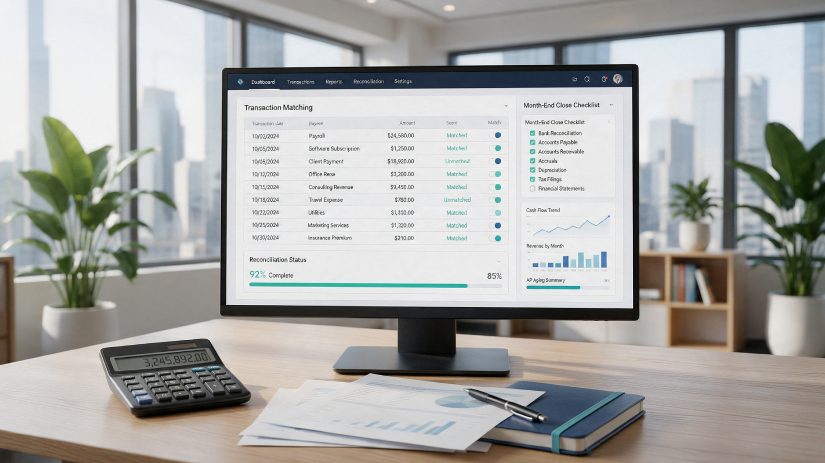
Reconciliation platforms can apply matching rules automatically and surface only the differences requiring investigation.
BlackLine is one example of software built around reconciliation and financial close workflows.
The important question is not whether the platform can automate matching.
It is whether the team can configure rules that reflect actual transaction patterns without creating too many false exceptions.
Start with a high-volume account that has predictable matching criteria.
Measure how many transactions can be matched automatically and how much review time remains.
Month-end close problems are often coordination problems rather than calculation problems.
Teams may struggle to see which tasks are complete, which entries are waiting for approval, and which reconciliations are still outstanding.
Close management platforms such as FloQast can help centralize task ownership, deadlines, reconciliations, and review status.
Before adopting a close tool, standardize the close checklist.
Each task should have an owner, deadline, dependency, and review requirement.
Then decide which parts of the process can be automated.
The software should make the close easier to monitor, not simply recreate an existing spreadsheet in another format.
Recurring journal entries are usually easier to automate than unusual transactions.
Examples include recurring accruals, depreciation, prepaid amortization, and scheduled allocations.
Create templates for predictable entries.
The template should define the accounts, calculation logic, documentation requirements, reviewer, and reversal rules where appropriate.
Avoid fully automating entries that require significant judgment.
Material estimates, impairment decisions, unusual contracts, and one-time transactions should continue to receive appropriate review.
Automation should reduce repetitive preparation while preserving control over accounting conclusions.
Spreadsheets remain useful for analysis, but they become risky when they function as permanent accounting systems.
Problems often appear when workbooks contain hidden formulas, manual overrides, broken references, or assumptions that only one employee understands.
Review the spreadsheets used every month.
Ask whether each workbook is primarily analytical or operational.
If a spreadsheet repeatedly performs the same accounting calculation, it may be a candidate for a dedicated system.
Prioritize workbooks that affect material balances or require substantial manual review.
Accounting automation loses much of its value when employees still have to export data from one system and enter it into another.
Map how information moves between the ERP, bank accounts, billing platform, procurement system, payroll system, and accounting tools.
Identify repeated exports and uploads.
Then determine whether native integrations, APIs, or controlled import processes can reduce manual movement.
Be clear about which system owns each type of data.
For example, the ERP may remain the system of record for the general ledger while a specialized subledger performs calculations and sends summarized entries back.
This avoids conflicting records.
A well-designed automation system should direct accountants toward unusual items.
Instead of reviewing every transaction equally, establish rules that identify exceptions.
These might include unusually large balances, missing documentation, unmatched transactions, overdue reconciliations, or changes outside expected thresholds.
This approach can make accounting teams more efficient without reducing control.
Routine transactions follow the standard process.
Items outside that process receive more attention.
Review exception rules periodically because business activity changes over time.
Do not evaluate software only through a generic product demonstration.
Use a sample of actual accounting scenarios.
For a lease accounting tool, test a normal lease, modification, renewal, and early termination.
For reconciliation software, test accounts with both clean matches and complicated exceptions.
For close management tools, recreate part of the current close calendar.
The test should answer practical questions.
Can the team understand the output? Can reviewers trace calculations? Can the system handle unusual situations? Does it reduce manual work without creating a new layer of administration?
Automation should create measurable improvement.
Compare performance before and after implementation.
Useful metrics include:
● Days required to close
● Manual journal entry volume
● Reconciliation completion time
● Number of unresolved exceptions
● Spreadsheet usage
● Audit adjustments
● Review hours
● Time spent preparing recurring schedules
Do not assume a tool is successful simply because it has been implemented.
If accountants are spending the same amount of time working around the system, review the workflow and configuration.
Different tools address different types of accounting complexity.
A company with a large lease, fixed asset, debt, or prepaid portfolio may need specialized technical accounting software.
A team struggling with hundreds of account reconciliations may benefit more from a reconciliation platform.
A company whose biggest problem is coordinating month-end close may need workflow and close-management software instead.
The most useful evaluation question is simple:
Which accounting process consumes the most time or creates the greatest risk today?
Start there.
Accounting automation works best when it removes repetitive work while making the process easier to review.
Map the workflow first. Standardize the process. Then automate calculations, matching, approvals, data transfers, or reporting where doing so creates a clear benefit.
Use specialized tools only where they solve a specific accounting problem.
The objective is not to build the largest possible accounting technology stack.
It is to create a system where routine work moves efficiently, exceptions receive attention, and accountants have enough visibility to understand how every material number was produced.