Arina|Oct 24, 2026
Do you want to get notified when new software or services are added to Krowdbase? Sign up for our newsletter and stay ahead with the latest tools, providers, features, and updates.

Oct 23, 2026
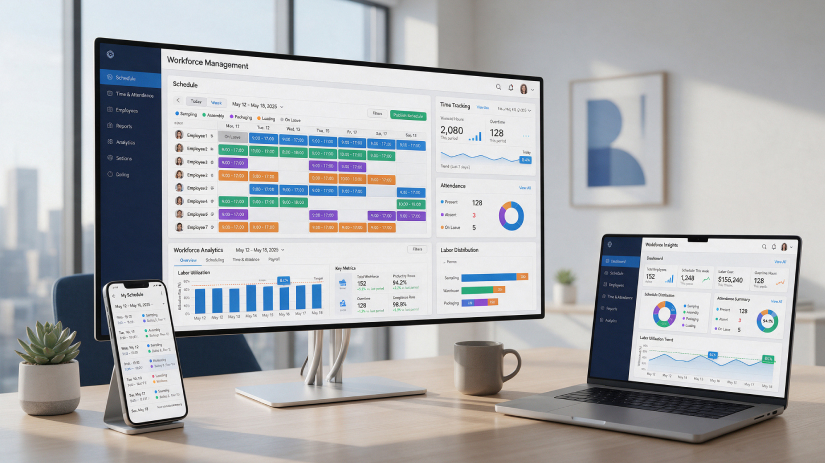
Managing employees is one of the most important responsibilities for any business. Whether you run a small restaurant, a growing retail chain, a healthcare facility, or a large enterprise, keeping track of employee schedules, working hours, attendance, and labor costs can quickly become complicated.
What starts as a simple spreadsheet often turns into a time-consuming process involving multiple managers, frequent schedule changes, payroll corrections, and last-minute staffing issues.
For businesses operating across the United States, these challenges can become even more complicated when different work locations, overtime requirements, state labor regulations, and employee availability need to be considered.
This is where workforce management software makes a difference.
Modern workforce management platforms help businesses organize employee schedules, monitor attendance, manage leave requests, track labor expenses, and connect workforce information with payroll and HR systems.
However, choosing the right solution is not always straightforward. Some platforms are designed for large enterprises with thousands of employees, while others focus on affordable scheduling and time-tracking tools for small businesses.
In this guide, we compare the 15 best workforce management software in the USA for 2026, including their features, pricing, advantages, limitations, and ideal use cases.
Whether you're looking for employee scheduling software, workforce planning tools, or an integrated HR and payroll platform, this comparison will help you identify the solutions worth considering.
You can also explore the Best Workforce Management Software in the USA on Krowdbase to discover more platforms, compare product capabilities, and evaluate software based on your business requirements.
Workforce management software, commonly known as WFM software, is a digital solution that helps businesses plan, organize, track, and manage their employees' daily work activities.
Instead of relying on spreadsheets, paper timesheets, emails, and manual scheduling, businesses can use a centralized platform to manage their workforce more efficiently.
A typical workforce management system includes features such as:
The functionality varies depending on the platform.
For example, a small business may only need software that allows managers to create schedules and employees to clock in using their phones.
A larger organization may require advanced workforce forecasting, automated scheduling, labor cost analysis, and integrations with enterprise payroll systems.
Businesses focused specifically on shift planning can also explore Employee Scheduling Software to compare platforms designed for managing staff schedules, availability, and shift changes.
Workforce management has become increasingly important as businesses manage distributed teams, changing employee expectations, and more complicated operational requirements.
A company operating in several U.S. states may need to coordinate different schedules, employee classifications, overtime rules, paid leave policies, and payroll processes.
Managing these activities manually increases the possibility of errors and creates additional administrative work.
A well-configured workforce management platform can help organizations address several challenges.
Better employee scheduling: Managers can create and adjust schedules based on availability, qualifications, and operational needs.
More accurate attendance records: Digital time tracking makes it easier to maintain consistent records of employee working hours.
Improved payroll preparation: Approved timesheets can be transferred to supported payroll applications, reducing repetitive data entry.
Stronger labor cost control: Managers can compare scheduled and actual hours to identify unnecessary overtime and staffing inefficiencies.
Improved workforce visibility: Reporting dashboards can help businesses understand attendance patterns, staffing requirements, and labor utilization.
Accurate attendance information is especially important for hourly employees. Organizations that need specialized tools can compare Time and Attendance Software in the USA to evaluate time clocks, timesheet management, attendance reporting, and related features.
Before looking at each platform individually, here's a quick comparison of the software solutions covered in this guide.
Software | Best For | Key Strength | Pricing |
UKG Pro Workforce Management | Large enterprises | Advanced workforce planning | Custom pricing |
ADP Workforce Now | Growing businesses | Integrated HR and payroll | Custom pricing |
Workday HCM | Enterprise organizations | Workforce and HR management | Custom pricing |
Dayforce | Complex hourly workforces | Scheduling and labor forecasting | Custom pricing |
Rippling | Growing companies | Workforce and HR automation | Modular pricing |
Paycor | Small and mid-sized businesses | HR, payroll, and attendance | Custom pricing |
Deputy | Retail and hospitality | Employee shift scheduling | From $5/user/month |
When I Work | Shift-based teams | Scheduling and communication | From $2.50/user/month |
Homebase | Small businesses | Scheduling and time tracking | Free plan available |
Connecteam | Mobile and field teams | Mobile workforce management | Free small-team plan |
TCP Software | Complex timekeeping requirements | Attendance and labor management | Custom pricing |
Humanity Scheduling | Shift-based businesses | Advanced staff scheduling | Custom pricing |
Paycom | Mid-sized and large businesses | Payroll and HR integration | Custom pricing |
Clockify | Remote and project-based teams | Time tracking and timesheets | Free plan available |
Zoho Workerly | Staffing agencies | Temporary employee scheduling | Free and paid plans |
Best for: Large enterprises and organizations with complex workforce requirements
UKG Pro Workforce Management is an enterprise workforce management solution designed to help organizations manage employee time, scheduling, attendance, and labor operations.
For large businesses, workforce management involves much more than assigning employees to shifts. Managers must consider workforce availability, labor demand, operational costs, employee qualifications, and complicated scheduling requirements.
UKG provides capabilities that help organizations bring these activities into a more structured workforce management environment.
The platform is particularly relevant to businesses operating multiple locations or managing large hourly workforces.
Industries such as healthcare, manufacturing, logistics, and retail may benefit from its advanced workforce planning capabilities.
UKG Pro Workforce Management uses custom enterprise pricing. Organizations need to request a quotation based on workforce size, selected functionality, and implementation requirements.
UKG offers comprehensive functionality for managing complex workforce operations. Its scheduling, forecasting, and reporting capabilities can be particularly useful for organizations with significant labor management requirements.
The platform may require considerable implementation planning, configuration, and training. Smaller businesses with straightforward scheduling needs may find a simpler application more practical.
UKG is worth considering for large organizations that need detailed workforce planning, sophisticated scheduling, and centralized labor management across multiple departments or locations.
Best for: Businesses looking for integrated workforce management, payroll, and HR
ADP Workforce Now is a comprehensive human capital management platform that helps organizations manage payroll, employee records, HR administration, and workforce-related activities.
For many businesses, one of the biggest challenges is ensuring that employee working hours and attendance records are accurately reflected in payroll.
When scheduling, attendance, and payroll operate through separate systems, managers often need to reconcile information manually.
ADP Workforce Now helps businesses connect these processes.
It is particularly suitable for organizations that want workforce management functionality within a broader HR and payroll platform.
ADP Workforce Now offers customized pricing based on business size, employee count, and selected services.
Its integration between payroll, HR, and workforce management can help organizations reduce repetitive administrative work and maintain more consistent employee information.
Some capabilities depend on the selected package. Businesses that only need employee scheduling may not require the broader HCM system.
ADP Workforce Now is suitable for growing and established businesses that want payroll processing, workforce information, and HR administration managed through connected systems.
Organizations evaluating these capabilities can also explore Human Resources Management Software in the USA on Krowdbase to compare additional HR and employee management platforms.
Best for: Large enterprises seeking integrated workforce and human capital management
Workday HCM is an enterprise human capital management platform that includes workforce management capabilities alongside broader HR functionality.
Large organizations often require consistent employee management processes across multiple departments, offices, and geographical locations.
Workday provides an environment where organizations can manage employee information, time tracking, absence requests, scheduling, and workforce-related reporting.
The platform is especially relevant for businesses seeking to connect daily workforce activities with wider HR operations.
Workday provides customized enterprise quotations. Pricing depends on the organization's requirements, selected products, and implementation scope.
Workday offers extensive HR capabilities and helps organizations manage employee information within an integrated enterprise environment.
Implementation can be complex, and the platform may not be cost-effective for smaller businesses that need basic scheduling or time-tracking functionality.
Workday is suitable for enterprise organizations that need workforce management connected with broader HR processes and long-term employee management strategies.
Best for: Businesses with complex hourly staffing and labor forecasting requirements
Dayforce is an integrated HCM and workforce management platform designed to help businesses coordinate employee scheduling, time tracking, payroll, and HR operations.
Many businesses have staffing requirements that change depending on demand.
For example, a retail business may require additional employees during holidays and weekends, while a healthcare organization must maintain appropriate staffing across different shifts.
Dayforce provides workforce management capabilities that support demand-based scheduling and labor planning.
Dayforce uses custom pricing based on selected modules, workforce size, and business requirements.
Dayforce connects important workforce management processes with payroll and HR. Its forecasting capabilities make it relevant to organizations with changing staffing demands.
Smaller organizations may not require the platform's full functionality, and implementation may involve additional planning and training.
Dayforce is worth evaluating for retail, healthcare, hospitality, and other businesses where scheduling requirements change frequently.
Best for: Growing businesses looking to automate employee management
Rippling is a workforce and HR management platform that combines employee administration, payroll, time tracking, and related business processes.
As businesses expand, managing employee information across multiple applications can become increasingly difficult.
New employees must be added to payroll systems, scheduling applications, internal directories, and other workplace tools.
Rippling focuses on connecting employee-related processes and reducing repetitive administrative tasks.
Its modular structure allows businesses to select capabilities based on their operational requirements.
Rippling uses modular, quote-based pricing. The total cost depends on the selected products and number of employees.
Rippling's connected approach to employee administration can help growing companies improve operational consistency and reduce duplicated work.
Costs may increase as businesses add more modules and functionality. Companies should carefully review which workforce features are included in their proposed subscription.
Rippling is a good option for expanding businesses that want to connect workforce management with employee onboarding, payroll, and other HR operations.
Best for: Small and mid-sized businesses looking for workforce management and payroll functionality
Paycor is an HR and payroll platform offering capabilities for employee time tracking, workforce scheduling, payroll administration, and employee management.
Small and mid-sized businesses often need workforce management tools without the complexity of a large enterprise implementation.
Paycor provides connected capabilities for managing employee information and routine HR processes.
Its timekeeping and workforce features can help businesses track employee hours and support payroll preparation.
Paycor offers customized pricing based on company size and selected functionality.
Paycor brings workforce management, payroll, and HR activities into a broader platform, making it relevant for companies seeking consolidated employee administration.
Businesses should confirm whether specific scheduling and workforce functions are included in their selected package.
Paycor is suitable for small and mid-sized organizations looking to manage employee attendance and payroll alongside general HR administration.
Best for: Retail, hospitality, restaurants, and shift-based businesses
Deputy is a workforce management platform focused on employee scheduling, attendance tracking, and labor management.
Businesses employing hourly workers frequently deal with last-minute schedule changes, employee availability requests, unexpected absences, and overtime.
Deputy provides tools that help managers coordinate these activities without relying entirely on spreadsheets or messaging applications.
Employees can access their schedules, request shift changes, and submit availability information.
More advanced plans support automated scheduling, labor forecasting, and operational reporting.
Deputy's published starting prices are:
Prices are in USD and exclude applicable taxes. Billing arrangements and optional add-ons can affect the total cost.
Deputy provides strong scheduling functionality and helps shift-based businesses coordinate employees more efficiently.
Some advanced forecasting, reporting, and automation features require higher subscription plans.
Deputy is especially suitable for restaurants, hospitality businesses, retailers, and other organizations that rely on rotating shifts and hourly employees.
Companies that prefer a cloud-based scheduling system can also compare Cloud-Based Employee Scheduling Software on Krowdbase.
Best for: Small and mid-sized businesses requiring straightforward shift scheduling
When I Work is an employee scheduling and time-tracking platform designed to simplify shift management and workplace communication.
For businesses managing hourly employees, keeping everyone informed about schedule changes can be challenging.
When I Work allows managers to create schedules, assign shifts, and communicate updates.
Employees can view their assigned working hours, submit availability, and request shift swaps through the platform.
This reduces dependence on manual scheduling and separate communication channels.
Published starting rates include:
Actual pricing depends on selected functionality, billing arrangements, and workforce requirements.
When I Work is approachable for businesses that want straightforward scheduling and employee communication.
It may not provide the same level of workforce forecasting and enterprise HR functionality as more comprehensive platforms.
When I Work is suitable for businesses that want to simplify shift planning, communicate schedule changes, and manage employee availability.
Best for: Small businesses, local retailers, and restaurants
Homebase is a workforce management solution designed primarily for small businesses and hourly employees.
Many small business owners manage scheduling, attendance, hiring, and payroll alongside their everyday responsibilities.
Homebase helps bring these activities into one system.
The platform allows managers to create schedules, monitor employee working hours, communicate with staff, and prepare timesheet information.
Its pricing model is particularly interesting because several paid plans are charged per location rather than per employee.
Homebase offers the following standard monthly pricing:
Payroll and certain additional services are charged separately. Annual billing can reduce the effective monthly subscription price.
Homebase is accessible to small businesses, particularly those employing hourly workers at a limited number of locations.
Businesses operating several locations should calculate their total subscription costs carefully. Advanced features are available only in higher-tier plans.
Homebase is suitable for restaurants, cafés, local retailers, and other smaller businesses that want accessible scheduling and time-tracking tools.
Best for: Deskless employees, field service teams, and mobile workforces
Connecteam is a mobile-focused workforce management platform designed for businesses whose employees work outside traditional office environments.
Construction teams, cleaning services, maintenance workers, technicians, and delivery-related businesses often need access to schedules and workplace information while working at different locations.
Connecteam supports these requirements through mobile scheduling, time tracking, communication, and operational management tools.
For example, a field service manager can use the platform to distribute shifts, monitor time records, and communicate operational updates.
Connecteam offers a free plan for eligible small teams. Paid Operations plans start at approximately $29 per month for the first 30 users when billed annually, with additional charges depending on users, billing terms, and selected product hubs.
Connecteam provides strong mobile accessibility and combines workforce management with communication and operational task management.
Businesses requiring several product hubs may face higher subscription costs. Organizations should also evaluate employee privacy considerations when using location-based tracking.
Connecteam is suitable for construction businesses, field service organizations, cleaning companies, and businesses with employees working across multiple job sites.
Best for: Organizations requiring detailed timekeeping and workforce scheduling
TCP Software provides workforce management solutions focused on time and attendance, scheduling, and labor management.
Some organizations require more detailed workforce records than a basic digital time clock can provide.
For example, healthcare facilities, educational institutions, and public sector organizations may need structured timekeeping procedures and detailed workforce reporting.
TCP offers products designed to support these requirements.
TCP Software provides customized pricing depending on the selected products and business requirements.
TCP's focus on timekeeping and workforce administration makes it relevant for organizations with specialized operational processes.
TCP offers multiple products, so businesses need to determine which solution provides the functionality they require.
TCP is suitable for organizations that prioritize detailed attendance management, scheduling controls, and workforce reporting.
Businesses focused primarily on monitoring employee working hours can also explore Attendance Tracking Software to compare other specialized timekeeping solutions.
Best for: Businesses requiring advanced employee scheduling
Humanity Scheduling is an employee scheduling solution within TCP Software's workforce management portfolio.
The platform focuses on helping organizations organize shift schedules, manage employee availability, and coordinate staffing requirements.
For businesses where employee coverage changes throughout the week, a dedicated scheduling system can make daily operations easier to manage.
Humanity provides tools that help managers build schedules and respond to employee availability changes.
Businesses should contact TCP Software for current Humanity Scheduling pricing and availability.
Humanity is focused on employee scheduling and can help businesses coordinate shifts and staff availability.
Organizations should verify current product capabilities, integrations, and purchasing arrangements with TCP Software.
Humanity Scheduling is worth considering for businesses with frequent shift changes and more advanced scheduling requirements.
Best for: Mid-sized and large businesses looking for integrated payroll and HR management
Paycom is an HR and payroll management platform that includes timekeeping and workforce-related functionality.
For organizations employing hundreds or thousands of workers, maintaining accurate information across HR, payroll, and attendance systems can become a significant challenge.
Paycom focuses on connecting employee management processes within a comprehensive software platform.
Its workforce-related features support time tracking, scheduling, payroll processing, and employee self-service.
Paycom provides customized pricing based on company size and selected products.
Paycom's connected approach can help organizations manage workforce information and payroll through a single broader HR environment.
Its extensive HR functionality may not be necessary for businesses that only need a simple scheduling application.
Paycom is suitable for mid-sized and larger organizations seeking integrated payroll, timekeeping, and employee administration.
Best for: Remote teams, agencies, consultants, and project-based organizations
Clockify is a time-tracking and timesheet management platform commonly used by businesses that need to understand how employees spend their working hours.
Unlike traditional shift scheduling platforms, Clockify primarily focuses on recording time spent on projects, tasks, and activities.
This makes it particularly useful for marketing agencies, software development teams, consulting businesses, and organizations managing billable work.
Employees can track their working hours, categorize time entries, and submit timesheets.
Managers can then review reports to understand time utilization and project-related labor costs.
Clockify offers a free plan and several paid subscriptions.
Its Basic plan starts at $3.99 per seat per month when billed annually. The Standard plan starts at $5.49 per seat per month with annual billing and adds capabilities such as approvals and attendance-related functionality.
Clockify is accessible and useful for businesses that need reliable time records and project-based reporting.
It is not designed to replace advanced workforce forecasting or comprehensive enterprise shift scheduling.
Clockify is a strong option for agencies, consultants, remote teams, and project-based businesses that need to track employee time and billable work.
Best for: Staffing agencies and temporary workforce management
Zoho Workerly is a workforce scheduling and staffing management platform designed primarily for temporary staffing agencies.
Managing temporary employees involves different challenges from managing a permanent workforce.
Staffing agencies need to track worker availability, coordinate assignments, manage client requirements, approve timesheets, and prepare billing information.
Zoho Workerly supports these processes through a centralized platform.
Zoho Workerly offers a limited free plan for up to five temporary workers and two active jobs.
Its Premium plan starts at $52 per month for 25 temporary workers with annual billing. Additional workers and optional client portal licenses can increase the total cost.
Zoho Workerly provides specialized functionality for managing temporary staffing assignments and related workflows.
It may not be the ideal choice for businesses managing only permanent employees with standard shift schedules.
Zoho Workerly is suitable for staffing agencies and businesses that need to organize temporary employee assignments, timesheets, and client-related processes.
Every business has different workforce requirements. The platform that works well for a large enterprise may not be the most practical choice for a small restaurant.
The following comparison highlights suitable options based on common business requirements.
Business Type | Software to Consider | Main Reason |
Large enterprises | UKG Pro Workforce Management, Workday | Advanced workforce operations |
Retail chains | Deputy, Dayforce | Scheduling and labor planning |
Restaurants and hospitality | Homebase, Deputy | Hourly employee scheduling |
Small businesses | Homebase, When I Work | Accessible scheduling tools |
Growing businesses | Rippling, Paycor | HR and workforce integration |
Healthcare organizations | UKG, Dayforce, TCP Software | Complex staffing and timekeeping |
Manufacturing businesses | UKG, Dayforce | Shift planning and labor management |
Mobile and field employees | Connecteam | Mobile attendance and operations |
Project-based organizations | Clockify | Timesheets and project tracking |
Staffing agencies | Zoho Workerly | Temporary workforce coordination |
Payroll-focused organizations | ADP Workforce Now, Paycom | Connected payroll and HR |
These recommendations provide a useful starting point, but the final choice should reflect the organization's exact operational requirements.
Workforce management software pricing varies depending on employee count, business size, selected features, and the vendor's pricing model.
Some providers charge per employee, while others charge per location or offer customized enterprise contracts.
Understanding these differences is important when evaluating the total cost of workforce management software.
Under this model, businesses pay a monthly subscription based on the number of employees or users.
For example, a platform costing $5 per user per month would cost approximately $250 per month for 50 users, excluding taxes and additional services.
This pricing structure is common among scheduling and time-tracking platforms.
Some providers charge businesses based on the number of operating locations.
Homebase, for example, offers paid plans based on the number of business locations.
This pricing model can be useful for businesses employing numerous hourly workers at a limited number of sites.
Businesses pay for a base platform and add optional capabilities as needed.
Additional modules may include payroll processing, workforce analytics, advanced scheduling, employee communication, or HR administration.
Rippling and other broader HR platforms use variations of this approach.
Large enterprise platforms generally provide customized quotations.
Pricing may depend on workforce size, implementation requirements, selected modules, support services, and contractual terms.
Organizations considering UKG, Workday, Dayforce, or similar platforms should request detailed commercial proposals.
Beyond the monthly subscription, businesses should evaluate:
A lower advertised price does not always translate into a lower total cost.
For example, a business may choose an inexpensive scheduling tool but later discover that important reporting or payroll capabilities require additional subscriptions.
The most useful comparison considers the features actually required rather than the starting price alone.
Choosing workforce management software requires more than comparing product names or subscription prices.
A practical evaluation should begin with an understanding of how your organization operates.
Consider the number of employees, locations, departments, and working arrangements within your organization.
A business employing 20 people at one location has different scheduling requirements from a retail chain operating 50 stores.
Similarly, a company employing field workers may need mobile attendance functionality, while a hospital may require more sophisticated shift planning.
Document your requirements before contacting vendors.
Employee scheduling is one of the most important functions of workforce management software.
Look for features that support your actual scheduling process, including employee availability, recurring shifts, shift swapping, and absence coverage.
Businesses with frequently changing staffing requirements should also consider automated scheduling and labor forecasting.
Accurate attendance records help businesses prepare payroll, monitor overtime, and understand employee working patterns.
Evaluate whether the platform supports mobile clock-ins, digital timesheets, attendance approvals, and reporting.
Also consider whether employees can easily review and correct their time records through appropriate approval procedures.
Managing employee leave can be especially complicated for organizations operating across multiple states.
Businesses may need to track vacation, sick leave, unpaid absences, and other leave categories.
A suitable workforce management system should help managers maintain accurate records and respond to employee requests.
Organizations dealing with complicated time-off requirements can explore Absence Management Software on Krowdbase to compare dedicated leave administration tools.
Workforce management information often needs to flow into payroll or HR systems.
Before purchasing, verify that the platform integrates with your existing applications.
Ask vendors how approved working hours, overtime, leave records, and employee updates move between systems.
The goal should be to reduce duplicate work rather than introduce another disconnected application.
Workforce management systems can help businesses maintain time records and configure workforce rules, but software does not automatically guarantee compliance.
Depending on the business, relevant considerations may include:
Businesses should confirm that the selected platform supports the rules applicable to their operations.
Even highly capable software can become difficult to manage if employees find it complicated.
Look for intuitive navigation, accessible mobile applications, and straightforward employee self-service.
Employees should be able to view schedules, check working hours, and submit requests without unnecessary confusion.
Employee experience also extends beyond scheduling and attendance. Businesses interested in improving workplace communication, feedback, and staff satisfaction can explore Employee Engagement Software to compare related solutions.
Consider whether the platform can support your business as it grows.
A company may begin with 30 employees but expand to several hundred over the next few years.
Evaluate whether the software supports additional locations, changing staffing requirements, new integrations, and more advanced reporting.
Also calculate the total cost of ownership rather than relying only on entry-level subscription rates.
The right workforce management platform can provide operational benefits across the organization.
Manual scheduling, attendance tracking, and timesheet approvals often require repetitive work.
Digital workforce management tools can help automate routine processes, allowing managers to focus more on daily operations and employee support.
Scheduling software can help managers identify conflicts, review employee availability, and coordinate shift coverage.
This is especially valuable for businesses with frequent schedule changes.
Workforce management systems provide information about working hours, overtime, and staffing requirements.
Managers can use this information to evaluate labor expenses and identify opportunities to improve scheduling efficiency.
Digital time tracking can reduce the amount of manual data entry needed before payroll processing.
When workforce and payroll systems are properly integrated, approved working hours can move through a more consistent process.
Employees benefit from having clearer access to schedules, shift updates, and time-off information.
Self-service features can also reduce the number of routine requests that managers need to handle manually.
Advanced workforce management platforms provide reporting and forecasting capabilities.
These tools can help organizations review historical staffing patterns and make more informed decisions about future workforce requirements.
Even when a company has identified several promising products, the selection process can go wrong if important requirements are overlooked.
A low monthly subscription may appear attractive, but missing functionality can create additional expenses.
Compare the actual features included in each plan before making a decision.
If managers and employees find the software difficult to use, administrative work may continue outside the platform.
Testing the user experience is an important part of product evaluation.
Workforce management rarely operates independently.
A product that cannot share data with the organization's payroll or HR systems may create unnecessary manual tasks.
Enterprise platforms offer extensive capabilities, but not every business needs advanced forecasting, detailed labor analytics, or complex workforce rules.
Choose a solution that matches the organization's current needs while allowing reasonable room for growth.
Marketing materials can explain features, but demonstrations show how those features work.
Before purchasing, ask vendors to demonstrate real scenarios such as shift changes, attendance corrections, overtime monitoring, and payroll exports.
Finding the right workforce management platform often means comparing several related software categories.
For example, a business searching for employee scheduling may also need a dedicated time-tracking system or integrated payroll functionality.
A company struggling primarily with employee absences might benefit from a specialized leave management solution rather than investing immediately in an enterprise workforce management platform.
Krowdbase helps businesses explore software across different categories and evaluate products based on relevant features, pricing information, and business requirements.
Instead of relying only on individual vendor websites, buyers can use Krowdbase to discover alternative products and build a more informed shortlist.
Some useful categories include:
Krowdbase also provides information across other business software categories, helping organizations compare different approaches before committing to a platform.
Whether you're replacing an outdated scheduling system or exploring workforce management software for the first time, comparing multiple solutions can help you understand which capabilities matter most.
Workforce management software has become an important tool for businesses that want to improve employee scheduling, attendance management, payroll preparation, and labor cost visibility.
However, there is no single platform that suits every organization.
Large enterprises with complicated workforce requirements may benefit from UKG Pro Workforce Management, Workday, or Dayforce.
Businesses looking to connect workforce management with HR and payroll can evaluate ADP Workforce Now, Rippling, Paycor, and Paycom.
For restaurants, retailers, and other businesses employing hourly workers, Deputy, When I Work, and Homebase offer more focused scheduling and attendance capabilities.
Connecteam is particularly relevant for field-based employees, while Clockify supports project-based time tracking. TCP Software and Humanity Scheduling address specialized timekeeping and scheduling needs, and Zoho Workerly is designed for temporary staffing agencies.
Before selecting a solution, consider your workforce size, scheduling complexity, payroll requirements, existing software, and long-term growth plans.
Compare the features you will actually use, request demonstrations where appropriate, and calculate the full subscription and implementation costs.
For businesses looking to research more options, Krowdbase provides a useful starting point.
Explore the best workforce management software in the USA, compare available solutions, and discover related software categories to help your business make a more informed purchasing decision.