
Affinity Designer
Professional Graphic Design Software for Vector Illustration, UI Design, Branding, and Creative Projects
What is Affinity Designer?
Affinity Designer is a professional graphic design software developed for designers, illustrators, creative professionals, marketing teams, branding agencies, publishers, and digital artists who require powerful vector and raster design capabilities within a single application. Known for its speed, precision, and affordability, Affinity Designer has become a popular alternative to traditional graphic design software solutions used for branding, illustration, user interface design, print production, digital artwork, and marketing asset creation.
Modern businesses and creative professionals require design software that can handle complex projects while maintaining performance and accuracy. Affinity Designer addresses these requirements by providing advanced vector editing tools, pixel-based editing capabilities, artboards, typography controls, asset management features, and export options that support both digital and print workflows.
Unlike many graphic design software platforms that rely on subscription-based pricing models, Affinity Designer offers a one-time purchase model, making it attractive for freelancers, startups, small businesses, and enterprises seeking professional-grade design capabilities without recurring costs. The software combines precision vector drawing with high-performance raster editing, enabling designers to switch seamlessly between creative workflows without leaving the application.
As businesses continue to invest in branding, digital marketing, user experience design, advertising, publishing, and visual communication, the demand for reliable graphic design software continues to grow. Affinity Designer provides the tools necessary to create logos, illustrations, marketing materials, social media graphics, web assets, packaging designs, icons, user interfaces, and professional artwork while maintaining exceptional quality and performance.
About Affinity Designer Software
Affinity Designer is a professional graphic design software solution created by Serif to help designers produce vector graphics, digital illustrations, branding assets, marketing materials, and creative designs with precision and efficiency. The software combines vector design software and raster editing capabilities within a unified environment, allowing users to create complex designs without relying on multiple applications.
Since its introduction, Affinity Designer has gained recognition as one of the leading graphic design software platforms available for creative professionals. The software is widely used by graphic designers, illustrators, UI/UX designers, marketing teams, publishers, advertising agencies, content creators, and businesses seeking professional design tools.
One of Affinity Designer's most notable strengths is its dual-environment workflow. Users can seamlessly switch between vector and pixel editing modes, allowing them to create detailed illustrations, edit images, refine artwork, and develop professional designs without interrupting their creative process. This flexibility helps designers maintain productivity while managing a variety of design projects.
The software supports professional design workflows across desktop and tablet environments, enabling users to work efficiently whether they are creating logos, branding materials, illustrations, website graphics, advertising campaigns, social media assets, or print publications. By combining advanced design tools with a user-friendly interface, Affinity Designer delivers a powerful solution for creative professionals and organizations looking to produce high-quality visual content.
Key Objectives of Affinity Designer Software
Enable Professional Graphic Design
Affinity Designer provides advanced tools that help creative professionals produce high-quality graphics, illustrations, and branding materials suitable for digital and print applications.
Improve Creative Efficiency
The software is designed to streamline design workflows by combining vector and raster editing capabilities within a single platform, reducing the need for multiple applications.
Support Precision Design Work
Affinity Designer enables users to create highly detailed artwork using precise drawing tools, alignment controls, grids, guides, and measurement systems.
Enhance Brand Development
Businesses can use the software to design logos, brand identities, marketing materials, packaging designs, and visual assets that strengthen brand recognition.
Facilitate Digital Content Creation
The platform supports the creation of web graphics, social media visuals, application interfaces, digital advertisements, and other online marketing materials.
Deliver Professional Publishing Assets
Designers can create illustrations, print-ready graphics, brochures, magazines, and publishing assets that meet professional production standards.
Affinity Designer Categories
Primary Category
Affinity Designer primarily belongs to the Graphic Design Software category. The platform provides comprehensive design capabilities that enable users to create professional graphics, illustrations, branding assets, marketing materials, user interface designs, and visual content for both digital and print environments.
Primary Category:
Secondary Categories
Affinity Designer extends beyond traditional graphic design by supporting illustration, vector graphics creation, digital publishing, user interface design, branding development, and creative content production. Its broad functionality makes it suitable for multiple creative disciplines and design workflows.
Secondary Categories:
Key Features of Affinity Designer
Vector Design Tools
Affinity Designer is widely recognized for its professional vector design capabilities, enabling designers to create scalable graphics, illustrations, branding assets, and digital artwork with precision.
Vector Design Features Include:
- Pen tool
- Node editing
- Shape creation tools
- Boolean operations
- Smart geometry controls
- Vector brush support
- Precision drawing tools
- Curve editing
- Corner tools
- Non-destructive editing
These capabilities help designers create high-quality vector artwork suitable for both digital and print projects.
Dual Vector and Raster Environment
One of Affinity Designer's most unique advantages is its ability to combine vector and raster design workflows within a single application.
Dual Environment Features Include:
- Vector Persona
- Pixel Persona
- Seamless switching between modes
- Raster brush support
- Pixel editing tools
- Mixed workflow support
- Combined design environment
- Non-destructive editing
This flexibility allows designers to work with both illustration and image editing tools without switching applications.
Precision Drawing Tools
Affinity Designer offers advanced drawing tools that support highly accurate design creation.
Precision Drawing Features Include:
- Snapping controls
- Smart guides
- Grid systems
- Alignment tools
- Measurement controls
- Distance indicators
- Dynamic guides
- Pixel-perfect design tools
These tools help ensure design accuracy across branding, UI, illustration, and print projects.
Shape Creation and Editing
The software includes a comprehensive collection of shape creation and editing tools.
Shape Editing Features Include:
- Rectangle tools
- Ellipse tools
- Polygon tools
- Star tools
- Custom shape creation
- Shape combinations
- Shape subtraction
- Shape intersection
- Shape expansion
- Shape customization
These capabilities simplify the creation of logos, icons, diagrams, and illustrations.
Pen and Node Tools
The Pen Tool is one of Affinity Designer's most powerful features for creating custom vector artwork.
Pen and Node Features Include:
- Bézier curve creation
- Node editing
- Path manipulation
- Curve refinement
- Smooth node controls
- Sharp node controls
- Path joining
- Path splitting
- Advanced curve editing
These tools provide precise control over vector illustrations and graphic elements.
Professional Typography Tools
Typography plays a critical role in graphic design, and Affinity Designer provides advanced text editing functionality.
Typography Features Include:
- Artistic text
- Frame text
- Character styling
- Paragraph styling
- OpenType support
- Text wrapping
- Kerning controls
- Tracking controls
- Baseline adjustments
- Text effects
These features help designers create visually appealing and professional text layouts.
Advanced Color Controls
Affinity Designer includes professional color management capabilities for both digital and print workflows.
Color Management Features Include:
- RGB color support
- CMYK color support
- Pantone compatibility
- Global colors
- Color palettes
- Swatches management
- Gradient editing
- Transparency controls
- Color picker tools
- Color harmony tools
These capabilities ensure consistent color accuracy across projects.
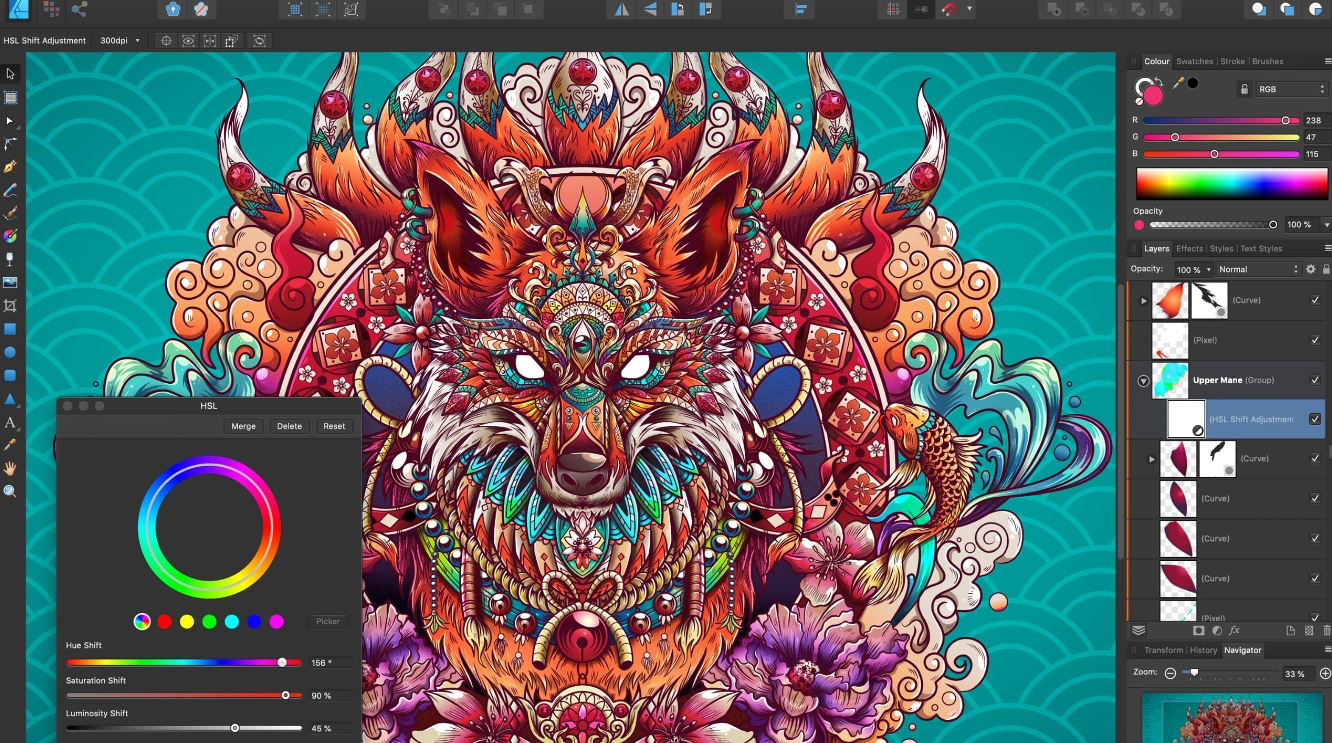
Layer Management
Efficient layer management helps designers organize complex projects and maintain workflow efficiency.
Layer Management Features Include:
- Unlimited layers
- Layer grouping
- Layer locking
- Layer visibility controls
- Layer effects
- Nested layers
- Clipping layers
- Layer masking
- Layer organization tools
These features improve productivity when working on large design projects.
Artboards
Artboards allow designers to manage multiple design variations within a single project file.
Artboard Features Include:
- Multiple artboards
- Custom artboard sizes
- Artboard duplication
- Design variations
- Device-specific layouts
- Multi-page workflows
- Responsive design layouts
- Easy project organization
These tools are especially valuable for UI/UX designers and branding professionals.
Pixel Persona
Pixel Persona provides raster editing capabilities directly within Affinity Designer.
Pixel Persona Features Include:
- Raster brushes
- Pixel-based editing
- Texture painting
- Image enhancements
- Brush customization
- Pixel selection tools
- Eraser tools
- Retouching tools
This functionality eliminates the need to switch between multiple design applications.
Custom Brushes
Affinity Designer provides a flexible brush engine that supports various illustration styles.
Brush Features Include:
- Vector brushes
- Raster brushes
- Pressure-sensitive brushes
- Texture brushes
- Custom brush creation
- Brush libraries
- Brush stabilization
- Brush dynamics
These capabilities support digital artists, illustrators, and creative professionals.
Non-Destructive Effects
The software enables designers to apply effects without permanently altering original artwork.
Non-Destructive Editing Features Include:
- Live effects
- Editable adjustments
- Layer effects
- Reversible modifications
- Dynamic previews
- Effect stacking
- Editable filters
- Design flexibility
These features allow experimentation while preserving original design elements.
Symbols and Asset Management
Affinity Designer includes tools for managing reusable design components.
Symbol Features Include:
- Symbol creation
- Linked objects
- Reusable assets
- Asset libraries
- Component synchronization
- Design consistency
- UI asset management
- Brand asset organization
These capabilities are particularly useful for UI/UX design projects.
Export Persona
Export Persona streamlines the process of preparing design assets for delivery and publishing.
Export Features Include:
- Asset exporting
- Slice exporting
- Batch exports
- PNG export
- JPG export
- SVG export
- PDF export
- Web optimization
- Multi-format exports
These tools simplify the delivery of assets across various platforms.
UI and UX Design Tools
Affinity Designer has become a popular solution for interface and user experience design.
UI/UX Design Features Include:
- Wireframe creation
- Mobile app design
- Web interface design
- Icon creation
- Design systems
- Asset management
- Responsive layouts
- Prototype preparation
These capabilities support modern digital product design workflows.
Advanced Grids and Guides
The platform includes advanced layout systems that improve design precision.
Grid and Guide Features Include:
- Column grids
- Baseline grids
- Custom guides
- Snapping systems
- Layout controls
- Alignment guides
- Dynamic spacing tools
- Precision positioning
These features help designers maintain consistency throughout projects.
File Compatibility
Affinity Designer supports a wide range of file formats commonly used by design professionals.
File Compatibility Features Include:
- AI file support
- PSD compatibility
- SVG support
- PDF support
- EPS support
- JPG support
- PNG support
- TIFF support
- Export flexibility
This compatibility improves collaboration across different design environments.
Performance Optimization
Affinity Designer is known for its speed and efficient resource utilization.
Performance Features Include:
- Fast rendering
- Smooth zooming
- Real-time previews
- Hardware acceleration
- Large file support
- Efficient memory usage
- Quick document loading
- Responsive interface
These capabilities help designers work efficiently on complex projects.
Cross-Platform Support
Affinity Designer is available across multiple operating systems and devices.
Cross-Platform Features Include:
- Windows support
- macOS support
- iPad support
- Cross-device workflows
- Consistent user experience
- File synchronization support
This flexibility allows designers to work wherever they are most productive.
Benefits of Using Affinity Designer Software
Professional Design Capabilities
The software provides enterprise-grade tools that enable users to create high-quality visual content suitable for commercial applications.
Cost-Effective Solution
Its one-time purchase model makes professional graphic design software more accessible for freelancers, startups, and growing businesses.
Unified Design Workflow
Combining vector and raster editing within one platform improves efficiency and reduces workflow complexity.
High Performance
Affinity Designer delivers fast rendering and responsive performance, even when managing demanding design projects.
Versatile Creative Applications
The software supports branding, illustration, publishing, marketing, digital content creation, and user interface design workflows.
Cross-Platform Accessibility
Users can work across multiple supported devices while maintaining design consistency and productivity.
Integrations of Affinity Designer
Affinity Photo Integration
Supports seamless workflows between graphic design and professional photo editing projects.
Affinity Publisher Integration
Allows users to incorporate design assets directly into publishing and layout projects.
Apple iCloud Integration
Supports cloud-based file management and synchronization.
Dropbox Integration
Enables secure file storage, sharing, and collaboration.
Google Drive Integration
Facilitates asset management and project accessibility across teams.
OneDrive Integration
Provides cloud storage support for design files and creative assets.
Adobe PSD Compatibility
Allows users to work with PSD files and collaborate across different creative environments.
Additional Business Integrations
Additional Integrations Include:
- Microsoft 365
- Google Workspace
- Wacom Tablets
- Unsplash
- Pexels
- Shutterstock Assets
- Creative Asset Libraries
- Brand Asset Repositories
- Digital Publishing Workflows
- Print Production Systems
- DAM Platforms
- Marketing Content Platforms
- Social Media Publishing Tools
- Cloud Storage Services
- Content Management Systems
Pros and Cons of Affinity Designer Software
Pros | Cons |
Affordable one-time purchase with no recurring subscription fees | Limited third-party plugin ecosystem compared to some competitors |
Powerful vector and raster design capabilities in one application | Fewer collaborative cloud-based features |
Excellent performance and speed for large design projects | Industry adoption is lower than some established alternatives |
Professional-grade typography and illustration tools | Learning curve for users transitioning from other design software |
Supports both print and digital design workflows | Some advanced publishing workflows require Affinity Publisher |
Clean and intuitive user interface | Limited built-in stock asset marketplace |
Strong compatibility with professional design file formats | Fewer training resources compared to long-established design platforms |
Who Should Use Affinity Designer?
Freelance Graphic Designers
Freelance designers can benefit significantly from Affinity Designer because it offers professional-grade graphic design software capabilities without requiring ongoing subscription costs. Freelancers can create logos, branding materials, illustrations, social media graphics, marketing assets, brochures, packaging designs, and digital artwork while maintaining profitability. The software's combination of vector graphics software and illustration software functionality makes it particularly useful for professionals managing diverse client requirements.
Small Businesses
Small businesses often require graphic design software for creating marketing materials, promotional content, social media visuals, product packaging, business presentations, and brand assets. Affinity Designer provides a cost-effective solution that allows organizations to manage design projects internally while maintaining professional visual standards. Its intuitive interface also reduces training requirements for smaller teams.
Marketing Teams
Marketing departments use Affinity Designer to develop campaign assets, advertising creatives, digital banners, email graphics, infographics, event materials, social media content, and promotional collateral. The software supports rapid content creation while ensuring consistency across brand communication efforts.
Branding Agencies
Branding agencies can leverage Affinity Designer to create comprehensive visual identity systems including logos, typography treatments, icon libraries, packaging concepts, brand guidelines, and corporate communication materials. Its precision tools support the development of sophisticated brand assets suitable for both digital and print environments.
Illustrators and Digital Artists
Illustrators and digital artists frequently use Affinity Designer to create character designs, editorial illustrations, concept artwork, digital paintings, comics, icons, and custom graphics. The ability to seamlessly combine vector illustration software and pixel editing tools provides exceptional creative flexibility.
UI and UX Designers
User interface designers can use Affinity Designer to create wireframes, application interfaces, website layouts, icons, design systems, and user experience assets. Artboards, alignment tools, grids, and precision controls help maintain consistency throughout interface development projects.
Publishers and Print Designers
Publishing professionals can create book illustrations, magazine graphics, brochures, catalogs, advertisements, posters, and editorial layouts using Affinity Designer. The software's print-ready capabilities ensure high-quality output suitable for commercial production.
Enterprises
Large organizations often require professional graphic design software for internal marketing, corporate communications, branding initiatives, product development, and creative operations. Affinity Designer provides enterprise teams with powerful design capabilities while helping reduce software licensing expenses.
Affinity Designer Use Cases
Logo Design and Brand Identity Development
Businesses and agencies use Affinity Designer to create logos, visual identity systems, brand guidelines, icon sets, and supporting brand assets. The software's vector design capabilities ensure scalability and consistency across all branding applications.
Marketing Material Creation
Marketing teams utilize Affinity Designer to develop brochures, flyers, advertisements, social media graphics, email campaign visuals, event materials, and promotional content that support customer acquisition and brand awareness initiatives.
Digital Illustration
Artists and designers create custom illustrations, editorial graphics, concept art, product illustrations, character designs, and digital artwork using the software's advanced drawing tools and creative capabilities.
Social Media Content Design
Organizations use Affinity Designer to produce engaging visual content for social media platforms. Designers can create graphics optimized for multiple formats while maintaining visual consistency across campaigns.
User Interface Design
UI designers use Affinity Designer to create application interfaces, web layouts, design systems, icons, wireframes, and interactive design assets that support modern digital experiences.
Packaging Design
Businesses use the software to develop packaging concepts, product labels, retail displays, and branding materials that help products stand out in competitive markets.
Print Design Projects
Affinity Designer supports professional print workflows including posters, brochures, business cards, catalogs, magazines, banners, and publishing assets intended for commercial printing.
Infographic Development
Organizations frequently use Affinity Designer to create visually engaging infographics that communicate complex information in an accessible and attractive format.
Advertising Creative Production
Creative agencies develop campaign visuals, display advertisements, digital banners, outdoor advertising concepts, and promotional materials using Affinity Designer's professional design tools.
Publishing and Editorial Graphics
Publishers use the software to create editorial illustrations, magazine graphics, publication assets, and supporting visual content for books, newspapers, and digital publications.
Top Affinity Designer Alternatives
Adobe Illustrator
Adobe Illustrator is one of the most recognized vector graphics software solutions available. It provides extensive illustration, branding, typography, and creative design capabilities suitable for professionals and enterprises.
CorelDRAW Graphics Suite
CorelDRAW is a professional graphic design software platform that supports vector illustration, page layout, typography, branding, and print production workflows.
Inkscape
Inkscape is an open-source vector graphics software solution that provides powerful design tools for users seeking a free alternative for illustration and graphic design projects.
Sketch
Sketch is a design-focused platform primarily used by UI and UX professionals for interface design, prototyping, and digital product development.
Figma
Figma is a cloud-based collaborative design platform widely used for user interface design, design systems, prototyping, and team-based creative projects.
Canva
Canva provides an easy-to-use design environment that enables businesses and non-designers to create marketing materials, presentations, social media content, and branding assets quickly.
Vectr
Vectr offers simplified vector graphic creation capabilities suitable for beginners and organizations seeking lightweight design tools.
Affinity Designer vs Competitors
Feature | Affinity Designer | Adobe Illustrator | CorelDRAW | Figma |
Vector Design Tools | ✓ | ✓ | ✓ | ✓ |
Raster Editing Support | ✓ | Limited | Limited | No |
One-Time Purchase | ✓ | No | No | No |
UI Design Capabilities | ✓ | ✓ | Limited | ✓ |
Typography Tools | ✓ | ✓ | ✓ | ✓ |
Illustration Features | ✓ | ✓ | ✓ | Limited |
Print Design Support | ✓ | ✓ | ✓ | Limited |
Cloud Collaboration | Limited | Limited | Limited | ✓ |
Ease of Use | High | Medium | Medium | High |
Best For | Designers & Illustrators | Creative Professionals | Print Designers | UI/UX Teams |
Why Choose Affinity Designer?
Affinity Designer stands out in the graphic design software market because it delivers professional-grade creative capabilities without requiring a recurring subscription. For businesses, agencies, freelancers, and creative professionals seeking a reliable graphic design software solution, Affinity Designer provides an excellent balance between functionality, performance, affordability, and usability.
One of the primary reasons users choose Affinity Designer is its ability to combine vector graphics software and raster editing functionality within a single application. This integrated workflow eliminates the need to switch between multiple design tools, improving efficiency and simplifying project management. Designers can create logos, illustrations, interface assets, marketing materials, and digital artwork while maintaining complete creative control.
Performance is another major advantage. Affinity Designer is optimized for modern hardware and can handle complex projects containing thousands of objects, multiple artboards, advanced effects, and detailed illustrations without significant slowdowns. This performance benefit helps designers maintain productivity even when working on demanding commercial projects.
The software also offers advanced typography controls, precision alignment tools, professional export options, asset management capabilities, and support for both digital and print workflows. These features make it suitable for a broad range of design disciplines, including branding, publishing, advertising, marketing, packaging, and user experience design.
For organizations seeking cost-effective graphic design software that delivers professional results, Affinity Designer represents a compelling alternative to traditional subscription-based solutions. Its combination of affordability, flexibility, and powerful design capabilities continues to attract creative professionals around the world.
Frequently Asked Questions
Is Affinity Designer easy to use?
Affinity Designer offers an intuitive interface that supports both beginners and experienced designers. It combines vector and raster design capabilities within a single application, helping users create professional illustrations, branding assets, UI designs, and marketing materials efficiently.
Where can I compare Affinity Designer with other graphic design software?
If you're evaluating Affinity Designer alongside other graphic design solutions, platforms like Krowdbase allow you to compare features, design capabilities, supported workflows, integrations, pros and cons, and software categories side by side. This makes it easier to identify the right design software for your requirements.
Where can I find Affinity Designer alternatives?
Businesses and creative professionals researching Affinity Designer alternatives can explore software comparison platforms such as Krowdbase to discover comparable graphic design software solutions, including Adobe Illustrator, CorelDRAW, Sketch, Inkscape, Figma, and other leading design platforms.
How do I choose the best graphic design software?
Choosing the best graphic design software depends on factors such as design requirements, collaboration needs, supported file formats, platform compatibility, performance, learning curve, and budget. Krowdbase helps users compare graphic design solutions based on features, use cases, and business requirements.
Where can I discover software similar to Affinity Designer?
Software discovery platforms like Krowdbase provide detailed software profiles, feature comparisons, alternative recommendations, and category-based listings that help designers and businesses find solutions similar to Affinity Designer.
Can I compare graphic design software features before making a decision?
Yes. Before selecting a design platform, it is important to compare features such as vector editing, illustration tools, typography controls, layer management, export options, collaboration capabilities, and file compatibility. Krowdbase enables users to evaluate these factors across multiple graphic design software solutions.
What are the best graphic design software options available today?
The best graphic design software depends on individual needs and creative workflows. Popular options include Affinity Designer, Adobe Illustrator, CorelDRAW, Sketch, Figma, Inkscape, and other leading graphic design platforms. Krowdbase helps users discover, compare, and evaluate these solutions in one place.
Who should use Affinity Designer?
Affinity Designer is suitable for graphic designers, illustrators, branding professionals, UI/UX designers, marketing teams, content creators, and businesses that need professional design tools for creating digital and print-ready graphics.
Where can businesses discover new software solutions?
Krowdbase is a software discovery platform where businesses can explore graphic design software, creative tools, project management platforms, CRM software, marketing solutions, productivity applications, and thousands of other business software products to support growth and innovation.
Why use Krowdbase for software research?
Krowdbase helps businesses and professionals make informed software decisions by providing detailed software information, feature breakdowns, use cases, alternatives, comparisons, and category-specific recommendations. This simplifies software evaluation and helps organizations identify solutions that align with their goals.
Conclusion
Affinity Designer has established itself as one of the most capable graphic design software solutions available for designers, illustrators, marketers, publishers, agencies, and businesses seeking professional creative tools. By combining vector graphics software functionality with integrated raster editing capabilities, the platform provides a versatile environment for managing a wide range of creative projects.
The software supports logo design, branding, illustration, publishing, packaging, marketing content creation, social media design, user interface development, and print production through a comprehensive collection of professional tools. Its performance, affordability, and flexible workflow capabilities make it particularly attractive to freelancers, small businesses, growing organizations, and enterprise creative teams.
Affinity Designer's one-time purchase model also distinguishes it from many competing graphic design software platforms, allowing businesses to access professional design capabilities without recurring subscription costs. Combined with powerful typography controls, precision editing features, asset management tools, and export options, the software provides excellent value for creative professionals.
While alternatives such as Adobe Illustrator, CorelDRAW, Figma, Sketch, Canva, and Inkscape each offer unique strengths, Affinity Designer remains a strong choice for organizations seeking reliable, high-performance graphic design software. Its ability to support both digital and print workflows while maintaining professional quality standards continues to make it one of the leading solutions for modern design and visual communication projects.
Screenshots
Features
FAQ
The official website of Affinity Designer is https://www.affinity.studio/
Affinity Designer belongs to the Vector Graphics, Graphic Design category.
Affinity Designer offers features such as Preview Functionality.
Affinity Designer is used in industries such as Graphic Design, Design.
Affinity Designer is built for Small Business, Mid Size Business, Enterprise
Affinity Designer supports English, German, French, Spanish, Italian, Portuguese, Chinese
Affinity Designer supports Mac, iPhone/iPad, Windows devices.
The starting price of Affinity Designer is USD 4999/one time.
Yes, Affinity Designer offers a free trial.
Affinity Designer was founded in 1987.
Affinity Designer has approximately 101-500 employees.
Affinity Designer is located in United Kingdom.
Affinity Designer was founded by Serif Europe.
Need help choosing this software?
Have questions about features, pricing, integrations, or implementation? Send an enquiry to the vendor and get the information you need.
Pricing
Starting at:
$4999/one time
Free Trial Available
Vendor Details
- Vendor
- Serif Europe
- Founded
- 1987
- Locations
- United Kingdom
- Company Size
- 101-500
- Social Media

