
CalendarBridge
Syncs all your calendars across all your Google and Microsoft accounts and makes scheduling as simple as sharing a link.
What is CalendarBridge?
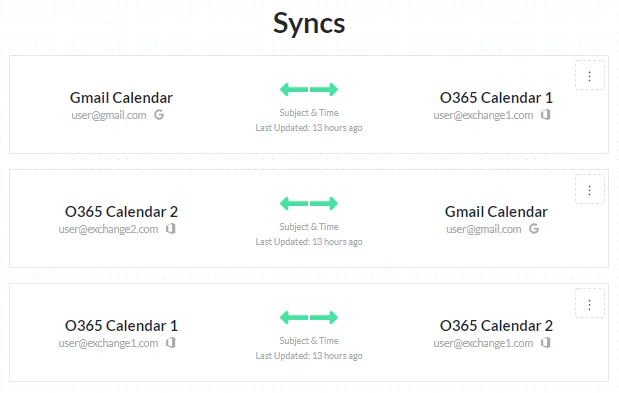
CalendarBridge is a calendar synchronisation and scheduling service that keeps multiple Google and Microsoft calendars in sync and simplifies meeting booking through shareable links. Professionals frequently maintain several calendars, for example across a main employer, client organisations, consulting engagements and personal accounts, which makes it easy to be double-booked because each calendar is unaware of commitments in the others. Manually copying events is tedious and error-prone. CalendarBridge addresses this problem by automatically synchronising events between calendars, with control over how much detail is shared, so that availability is accurate everywhere. Its approach respects privacy by allowing events to appear as busy blocks rather than full details, which is useful when calendars belong to different organisations with confidentiality expectations or when personal commitments should remain private from colleagues. Setup typically takes only minutes, and synchronisation runs continuously in the background once configured.
Key features include two-way or one-way synchronisation across Google Workspace, Gmail and Microsoft 365 or Outlook calendars, configurable privacy settings, and filtering options that determine which events are copied. Scheduling pages let others book meetings based on combined availability across all connected calendars, with support for multiple meeting types, buffers, minimum notice periods and custom booking questions. Group and team scheduling features help coordinate meetings involving several people, while integrations with Zoom, Microsoft Teams and Google Meet add conferencing links automatically. Reminders and confirmation emails reduce no-shows. The service is cloud-based and requires no software installation, making it quick to set up for individuals and teams. CalendarBridge is used by consultants, contractors, executives, recruiters, venture capitalists and other professionals who juggle several organisations or roles, as well as teams that want a straightforward alternative to more complex scheduling tools. Pricing starts from around USD 4 per month with a free trial available; there is no permanently free version.
Screenshots
Video
Categories
Features
FAQ
The official website of CalendarBridge is https://calendarbridge.com/
CalendarBridge belongs to the Calendar, Scheduling category.
CalendarBridge offers features such as Calendar Management, Calendar Sync, Calendar/Reminder System, Scheduling, Alerts/Notifications, Availability Management, Booking Management, Mobile Access, Online Booking, Real-time Scheduling.
Yes, CalendarBridge offers a free trial.
Need help choosing this software?
Have questions about features, pricing, integrations, or implementation? Send an enquiry to the vendor and get the information you need.
Pricing
Starting at:
$4/per month
Free Trial Available