ManageEngine Password Manager Pro
Privileged Password Manager for Enterprises
What is ManageEngine Password Manager Pro?
ManageEngine Password Manager Pro is a privileged access management (PAM) and enterprise password management software designed to help organizations securely store, manage, monitor, and control access to privileged accounts, passwords, SSH keys, certificates, and other sensitive credentials. As cyber threats continue to evolve, businesses require centralized password management solutions that protect privileged accounts from unauthorized access while ensuring compliance with industry regulations. ManageEngine Password Manager Pro addresses these security challenges by providing a secure password vault, role-based access control, password automation, session monitoring, and detailed audit reporting within a single platform.
Traditional methods of storing privileged passwords using spreadsheets, shared documents, or unsecured files expose organizations to security risks and compliance violations. ManageEngine Password Manager Pro eliminates these vulnerabilities by encrypting privileged credentials, automating password rotation, enforcing access policies, and recording privileged sessions. This significantly reduces insider threats, improves operational security, and strengthens overall cybersecurity posture.
The platform supports both on-premises and enterprise environments, making it suitable for organizations managing large numbers of privileged accounts across servers, databases, network devices, cloud services, and business applications. Whether businesses need to manage administrator credentials, secure remote access, automate password changes, or monitor privileged activities, ManageEngine Password Manager Pro provides comprehensive privileged credential management capabilities.
Today, ManageEngine Password Manager Pro is widely used across industries including banking, financial services, healthcare, government, education, manufacturing, IT services, telecommunications, and enterprise organizations. Its combination of password vaulting, privileged access management, compliance reporting, and session monitoring makes it a trusted solution for organizations seeking enterprise-grade password security.
About ManageEngine Password Manager Pro
ManageEngine Password Manager Pro is an enterprise-grade privileged access management software developed by ManageEngine, a division of Zoho Corporation. The platform is designed to secure privileged credentials, automate password management, monitor privileged user activities, and provide centralized control over sensitive enterprise accounts.
Unlike traditional password managers that primarily store personal passwords, ManageEngine Password Manager Pro focuses on securing privileged enterprise accounts that have elevated access to critical IT infrastructure. The platform enables IT administrators to control who can access privileged credentials, automatically rotate passwords, manage SSH keys, monitor remote sessions, and generate detailed compliance reports.
The software supports a broad range of enterprise systems including Windows servers, Linux environments, databases, cloud infrastructure, virtual machines, network devices, and business applications. Through centralized password vaulting and granular access controls, organizations can minimize credential exposure while improving operational efficiency.
ManageEngine Password Manager Pro is widely adopted by IT administrators, cybersecurity teams, managed service providers (MSPs), compliance officers, and enterprise security professionals who require secure credential management across complex IT environments. Its scalable architecture, automation capabilities, and extensive integration options make it one of the leading Privileged Access Management Software solutions available today.
Key Objectives of ManageEngine Password Manager Pro
Centralize Privileged Credential Management
ManageEngine Password Manager Pro provides a secure centralized repository for storing privileged passwords, SSH keys, certificates, and sensitive credentials, eliminating insecure password storage practices.
Strengthen Enterprise Security
The platform protects privileged accounts through encryption, role-based access control, password policies, and multi-factor authentication, significantly reducing the risk of credential compromise.
Automate Password Management
Organizations can automate password generation, password rotation, credential updates, and access provisioning, reducing manual administration while improving security consistency.
Monitor Privileged Access
The software records privileged sessions, tracks user activities, and generates audit logs that provide complete visibility into privileged account usage across enterprise environments.
Support Regulatory Compliance
ManageEngine Password Manager Pro helps businesses comply with security standards such as PCI DSS, HIPAA, SOX, ISO 27001, and GDPR through comprehensive auditing, reporting, and password management controls.
Improve Operational Efficiency
By automating repetitive password administration tasks and centralizing credential management, the platform enables IT teams to improve productivity while reducing administrative overhead.
Secure Remote Administrative Access
The platform enables administrators to securely access servers, databases, and network devices without exposing privileged passwords, improving enterprise security while simplifying remote administration.
ManageEngine Password Manager Pro Categories
Primary Categories
Secondary Categories
- Identity Management Software
- Password Management Software
- Access Governance Software
- Computer Security Software
- Cybersecurity Software
- Managed Service Providers (MSP) Software
- Multi-Factor Authentication Software
- Identity Management Software
- Password Management Software
- Access Governance Software
- Computer Security Software
- Cybersecurity Software
- Managed Service Providers (MSP) Software
- Multi-Factor Authentication Software
Key Features of ManageEngine Password Manager Pro
Secure Password Vault
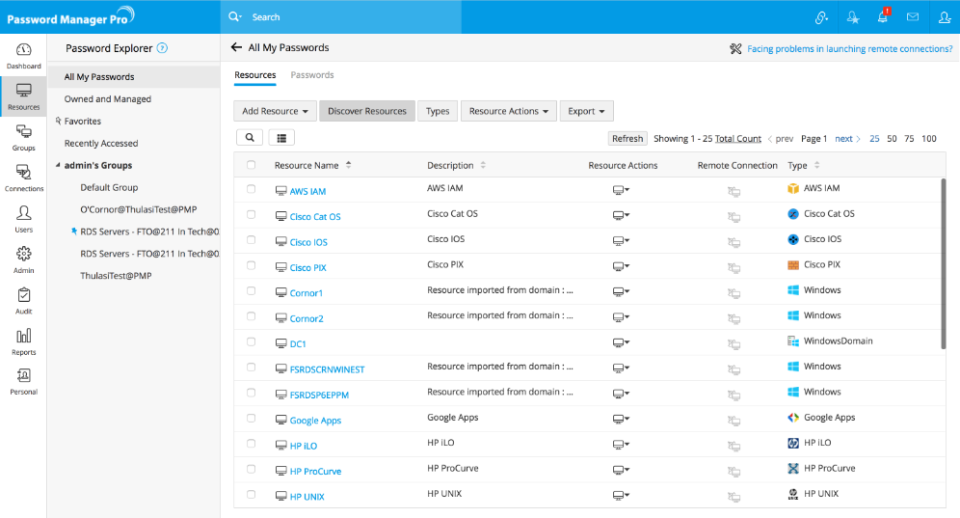
ManageEngine Password Manager Pro provides a centralized encrypted password vault that securely stores privileged credentials, administrator accounts, SSH keys, certificates, and sensitive enterprise passwords. Strong encryption mechanisms ensure that confidential information remains protected against unauthorized access.
Key Capabilities Include:
- Centralized password vault
- AES encryption
- Secure credential storage
- Password organization
- Role-based access
- Password categorization
- Secure sharing
- Enterprise-grade security
Privileged Access Management
The platform enables organizations to control, monitor, and secure privileged accounts across enterprise infrastructure. Administrators can define granular permissions while minimizing unauthorized privileged access.
Key Capabilities Include:
- Privileged account management
- Role-based permissions
- Access approval workflows
- Privileged credential control
- Administrative account security
- User access governance
- Access delegation
- Secure authentication
Automated Password Rotation
ManageEngine Password Manager Pro automatically changes privileged passwords according to predefined security policies, reducing the risk associated with static credentials and improving password hygiene across enterprise environments.
Key Capabilities Include:
- Automatic password changes
- Scheduled password rotation
- Password policy enforcement
- Credential synchronization
- Secure password generation
- Rotation automation
- Compliance support
- Reduced manual effort
Remote Session Management
The platform allows administrators to establish secure remote sessions without exposing privileged passwords. Users can access servers, databases, and network devices directly through the platform while maintaining credential confidentiality.
Key Capabilities Include:
- Secure remote access
- Password-less login
- RDP session management
- SSH connectivity
- Database access
- Browser-based sessions
- Secure administration
- Session protection
Session Recording and Monitoring
ManageEngine Password Manager Pro records privileged sessions for auditing and compliance purposes. Security teams can monitor administrative activities, investigate incidents, and review user actions performed during remote sessions.
Key Capabilities Include:
- Session recording
- Live session monitoring
- User activity tracking
- Audit playback
- Security investigations
- Compliance monitoring
- Administrative oversight
- Forensic analysis
SSH Key Management
The platform simplifies SSH key lifecycle management by generating, distributing, rotating, and revoking SSH keys across Linux servers and enterprise environments while maintaining centralized visibility.
Key Capabilities Include:
- SSH key generation
- Key distribution
- Key rotation
- Key revocation
- Linux server management
- Secure authentication
- Key lifecycle management
- Centralized administration
Certificate Management
ManageEngine Password Manager Pro helps organizations manage SSL certificates and digital certificates by monitoring expiration dates, maintaining inventories, and improving certificate visibility across enterprise systems.
Key Capabilities Include:
- Certificate inventory
- SSL certificate tracking
- Expiration monitoring
- Digital certificate management
- Renewal alerts
- Compliance support
- Centralized visibility
- Security improvement
Role-Based Access Control
Organizations can define detailed access permissions based on user roles, departments, responsibilities, or security policies. This ensures that employees only access credentials necessary for their assigned tasks.
Key Capabilities Include:
- Role-based permissions
- Granular access control
- User group management
- Permission delegation
- Secure access policies
- Administrative controls
- Access restrictions
- Enterprise governance
Audit Logs and Compliance Reporting
The platform generates detailed audit trails for every privileged action, enabling organizations to meet regulatory compliance requirements while maintaining complete visibility into credential usage.
Key Capabilities Include:
- Audit logs
- Compliance reports
- User activity tracking
- Security reporting
- Regulatory documentation
- Access history
- Log management
- Compliance auditing
Multi-Factor Authentication (MFA)
ManageEngine Password Manager Pro strengthens privileged account security by supporting multi-factor authentication, adding an extra verification layer before users gain access to sensitive credentials.
Key Capabilities Include:
- Multi-factor authentication
- Two-factor verification
- Identity validation
- Secure login
- Access protection
- Authentication policies
- Enhanced account security
- Enterprise authentication
Business Integrations
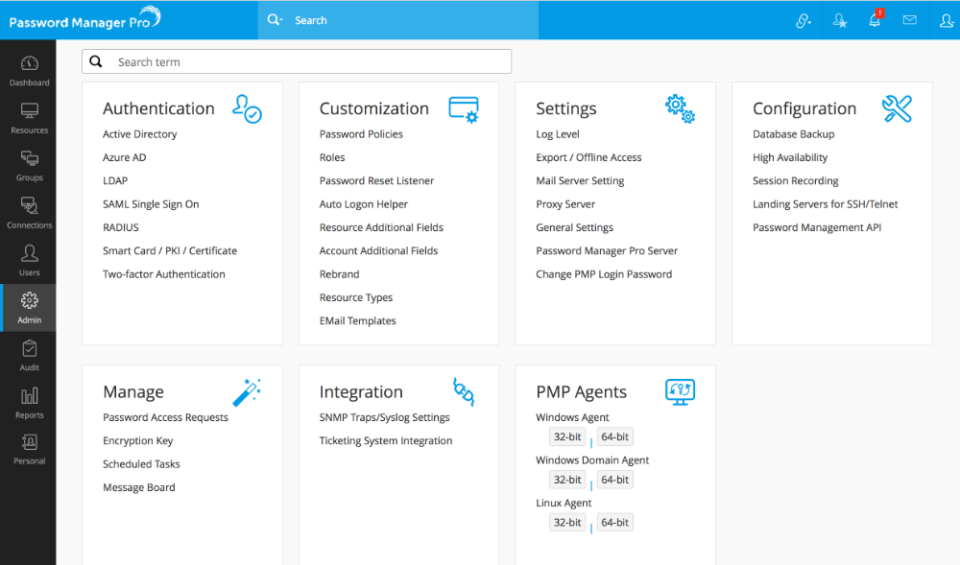
ManageEngine Password Manager Pro supports integrations with enterprise directories, identity providers, IT service management platforms, security tools, DevOps systems, cloud services, and other ManageEngine products. These integrations allow organizations to connect privileged credential management with their existing IT infrastructure while improving authentication, access governance, incident management, and security monitoring.
The software is primarily deployed on premises, enabling businesses to maintain direct control over privileged credentials, passwords, secrets, and sensitive digital identities within their own infrastructure. It also supports browser-based access and integration capabilities that help IT teams incorporate password management into existing administrative workflows.
Microsoft Active Directory
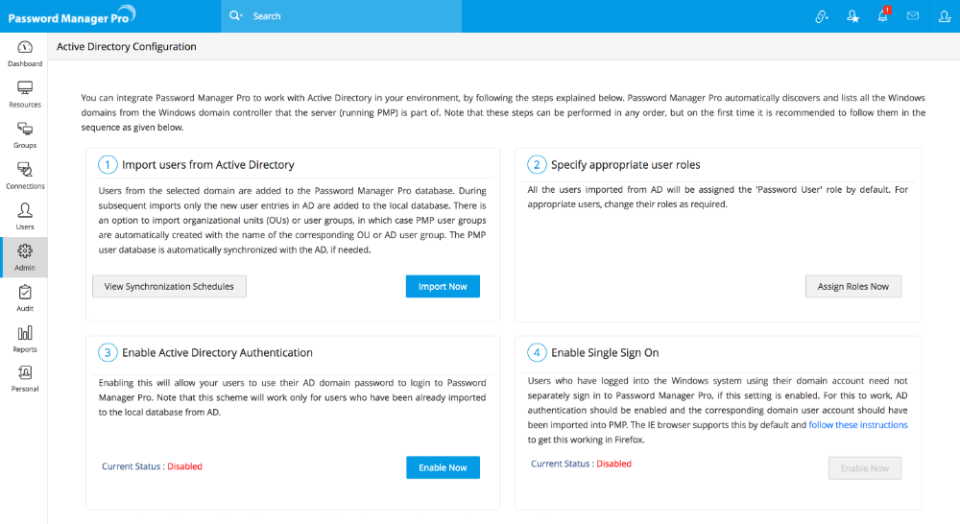
ManageEngine Password Manager Pro can work with Microsoft Active Directory environments to simplify user onboarding, authentication, permission management, and enterprise identity administration. Organizations can import users and groups from their directory instead of manually creating every account.
Directory integration helps businesses maintain consistent access permissions and reduce administrative workloads. When employees change roles or leave the organization, administrators can update or revoke access through centralized identity management processes.
Microsoft Entra ID
Organizations using Microsoft Entra ID can connect identity authentication workflows with Password Manager Pro to strengthen access to privileged credentials. This integration helps businesses apply centralized identity policies while securing access to administrative passwords and enterprise resources.
It is particularly beneficial for organizations operating hybrid IT environments where on-premises infrastructure and cloud identities must be managed together.
Azure Key Vault
ManageEngine Password Manager Pro supports integration with Azure Key Vault for managing Azure-related credentials and certificate workflows. It can help organizations create certificate requests and update certificate-related information within Azure environments.
This integration allows IT teams to improve visibility into cloud credentials and reduce the risk of unmanaged secrets across Microsoft Azure infrastructure.
ManageEngine ServiceDesk Plus
Integration with ManageEngine ServiceDesk Plus enables organizations to connect privileged password access with IT service requests and approval workflows. Administrators can grant temporary access to credentials based on approved service tickets.
This helps businesses maintain accountability while ensuring that privileged credentials are only accessed for legitimate and authorized IT activities.
ManageEngine ADManager Plus
ADManager Plus integration can support user lifecycle management and Active Directory administration workflows. Organizations can combine identity administration with privileged credential security to improve access governance.
The integration is particularly useful for IT teams responsible for creating, modifying, disabling, and monitoring enterprise user accounts.
ManageEngine Log360
Organizations can connect Password Manager Pro with security information and event management tools such as ManageEngine Log360 to improve privileged activity monitoring. Security events related to password access, failed authentication, credential sharing, and administrative activity can be reviewed alongside other infrastructure events.
This supports faster incident investigation and improved visibility into potential security risks.
ManageEngine Key Manager Plus
Password Manager Pro integrates with ManageEngine Key Manager Plus to extend SSH key and SSL/TLS certificate management. This integration can help businesses discover certificates, monitor expiration, identify vulnerabilities, renew certificates, and deploy them across enterprise endpoints.
SIEM Platforms
Password Manager Pro can work alongside security information and event management platforms to forward privileged access events, password activity, audit logs, and authentication information.
Connecting password management with a SIEM platform allows security teams to identify unusual behaviour, investigate suspicious activity, and maintain centralized security reporting.
DevOps and CI/CD Tools
ManageEngine Password Manager Pro supports integration capabilities for CI/CD environments, helping organizations remove hard-coded credentials from scripts and development pipelines. Applications and automation tools can retrieve credentials securely rather than storing passwords in plain text.
This improves DevOps security while reducing the risk of sensitive credentials being exposed through source code repositories or configuration files.
Remote Administration Tools
The software supports secure remote connections to enterprise systems through protocols such as RDP, SSH, Telnet, VNC, and SQL. Organizations can allow administrators to launch remote sessions without directly revealing privileged passwords.
Password Manager Pro can also record selected privileged sessions for auditing, investigation, and compliance purposes.
Additional Business Integrations
Additional platforms and technologies that can be used within Password Manager Pro workflows include:
- Microsoft Active Directory
- Microsoft Entra ID
- Azure Key Vault
- ManageEngine ServiceDesk Plus
- ManageEngine ADManager Plus
- ManageEngine Log360
- ManageEngine Key Manager Plus
- SAML identity providers
- RADIUS authentication
- RSA SecurID
- Duo Security
- Google Authenticator
- Microsoft Authenticator
- ServiceNow
- Splunk
- Syslog servers
- Jira Service Management
- Jenkins
- Ansible
- Kubernetes
- Docker
- Windows servers
- Linux servers
- Unix systems
- Network devices
- Databases
- VMware environments
- Amazon Web Services
- Microsoft Azure
- Web browsers
Pros and Cons of ManageEngine Password Manager Pro
Pros | Cons |
Centralized vault for privileged passwords, secrets, keys, and certificates | Primarily designed for on-premises deployment |
Supports automated password generation and scheduled rotation | Initial deployment may require technical expertise |
Provides granular role-based access controls | Advanced features vary between editions |
Allows passwordless remote access to enterprise resources | Interface may require training for first-time administrators |
Supports RDP, SSH, Telnet, VNC, and SQL session management | Licensing costs increase with administrator and key requirements |
Records privileged sessions for auditing and investigations | May be more comprehensive than small businesses require |
Includes SSH key and certificate management capabilities | Mobile-first administration capabilities are limited |
Supports two-factor authentication and identity integrations | Complex environments may require professional implementation |
Generates detailed access, activity, and compliance reports | Some integrations require additional configuration |
Can remove embedded credentials from DevOps pipelines | Full PAM requirements may require upgrading to PAM360 |
No fixed limit on ordinary users or managed resources in commercial editions | Enterprise customisation may require vendor support |
Integrates with other ManageEngine security and IT management products | The free edition supports only limited administrators and resources |
Who Should Use ManageEngine Password Manager Pro?
Large Enterprises
Large enterprises managing hundreds or thousands of privileged accounts can use ManageEngine Password Manager Pro to centralize credentials, enforce password policies, monitor administrative activities, and automate password rotation.
Its scalable architecture makes it suitable for complex environments containing multiple offices, departments, servers, databases, cloud platforms, network devices, and business applications.
Mid-Sized Businesses
Mid-sized organizations can use the software to replace spreadsheets, shared documents, and informal password-sharing practices. The platform provides structured access controls and centralized credential security without requiring businesses to build a custom privileged access management system.
IT Departments
IT administrators can securely manage domain administrator accounts, server credentials, database passwords, service accounts, network device credentials, and application secrets from one platform.
The software reduces the need to remember or manually distribute passwords while providing controlled access to authorized employees.
Cybersecurity Teams
Security teams can use Password Manager Pro to reduce privileged account risks, investigate suspicious activity, review audit logs, monitor remote sessions, and enforce password policies.
Centralized visibility allows security professionals to identify weak passwords, expired credentials, unauthorized access attempts, and policy violations.
Managed Service Providers
Managed service providers can use the MSP edition of Password Manager Pro to manage privileged credentials for multiple customers from a centralized environment.
Each customer’s resources and passwords can be logically separated, enabling service providers to deliver secure IT administration without mixing client information.
Compliance Officers
Compliance teams can use audit trails, access reports, session recordings, password history, and approval records to support regulatory assessments and internal audits.
Password Manager Pro can help organizations align privileged credential controls with standards and frameworks such as PCI DSS, HIPAA, SOX, GDPR, NIST, ISO/IEC 27001, and other security requirements.
DevOps Teams
Development and operations teams can use the software to remove embedded passwords from scripts, applications, configuration files, and CI/CD pipelines.
Applications can access required credentials through controlled integration methods, reducing the risk of secrets being exposed in source code.
Financial Institutions
Banks, insurance companies, investment firms, and financial service providers can protect sensitive administrator accounts while maintaining detailed records of credential access.
The software supports controlled access, session monitoring, automated password rotation, and compliance reporting for security-sensitive financial environments.
Healthcare Organizations
Healthcare organizations can use Password Manager Pro to protect privileged access to clinical applications, patient information systems, databases, servers, and network infrastructure.
Access tracking and audit reporting can assist healthcare businesses in strengthening security and supporting compliance requirements.
Government Agencies
Government departments can use the platform to secure administrative credentials, enforce role-based access, and monitor privileged activities across sensitive infrastructure.
Its on-premises deployment model may appeal to organizations that require greater control over credential storage and data location.
ManageEngine Password Manager Pro Use Cases
Privileged Password Vaulting
Organizations can securely store administrator passwords, service account credentials, application secrets, database passwords, and network device credentials in an encrypted centralized vault.
Authorized users can access required credentials according to predefined roles and approval policies.
Automated Password Rotation
IT teams can configure passwords to change automatically based on schedules, security policies, user activity, or access events.
Automated rotation helps prevent passwords from remaining unchanged for extended periods and reduces the risk associated with shared credentials.
Secure Remote Administration
Administrators can connect to Windows servers, Linux systems, databases, and network devices through secure remote sessions without viewing or copying the underlying passwords.
This reduces credential exposure while allowing employees to perform necessary administrative work.
Privileged Session Monitoring
Organizations can record and monitor privileged RDP, SSH, Telnet, VNC, and SQL sessions. Security teams can review recordings to investigate incidents, confirm policy compliance, and understand administrator activity.
Shared Account Management
Password Manager Pro helps businesses securely manage shared administrator accounts used by multiple IT employees.
Instead of distributing passwords through email, chat, or spreadsheets, businesses can provide controlled and auditable access through the platform.
Third-Party Vendor Access
Organizations can grant temporary or time-limited access to contractors, vendors, and external support teams without permanently sharing privileged passwords.
Access can be monitored, approved, revoked, and documented to reduce third-party security risks.
SSH Key Management
Businesses can discover, store, organize, rotate, and revoke SSH keys used across Linux and Unix environments. Password Manager Pro provides centralized visibility into key ownership, age, fingerprints, and usage.
SSL Certificate Management
IT teams can maintain inventories of SSL and TLS certificates, monitor expiration dates, receive renewal alerts, and improve visibility into certificates deployed across enterprise systems.
Organizations requiring advanced certificate discovery and lifecycle automation can use integration with ManageEngine Key Manager Plus.
DevOps Secrets Management
Development teams can replace hard-coded passwords with centrally controlled credentials that applications and automation tools retrieve when required.
This reduces secret exposure and supports secure software development practices.
Compliance Reporting
Password Manager Pro provides access, activity, password inventory, policy compliance, expiry, and user activity reports. These reports help administrators evaluate privileged credential security and prepare for internal or regulatory audits.
Emergency Account Access
Organizations can define controlled procedures for accessing critical privileged credentials during emergencies.
Every action remains logged, allowing businesses to maintain security accountability even when urgent administrative access is required.
Password Policy Enforcement
The software enables businesses to apply password complexity, length, rotation, and uniqueness requirements across managed resources.
It can identify policy violations and automatically create strong passwords for sensitive enterprise accounts.
Top ManageEngine Password Manager Pro Alternatives
CyberArk Privileged Access Manager
CyberArk is an enterprise privileged access management platform designed to secure privileged accounts, identities, endpoints, secrets, and remote access. It provides extensive threat analytics, session monitoring, credential rotation, and identity security capabilities.
CyberArk is often selected by large and highly regulated organizations requiring comprehensive PAM architecture. However, its implementation and licensing can be more complex than ManageEngine Password Manager Pro.
BeyondTrust Password Safe
BeyondTrust Password Safe helps organizations discover, manage, monitor, and audit privileged accounts. It provides credential vaulting, automated password rotation, session monitoring, analytics, and controlled remote access.
It is suitable for enterprises seeking advanced privileged access governance and integration with a broader identity security ecosystem.
Delinea Secret Server
Delinea Secret Server is a privileged access management solution that provides secure credential vaulting, password rotation, session monitoring, discovery, and secrets management.
It is often used by mid-sized and large businesses seeking flexible deployment options and extensive PAM functionality.
One Identity Safeguard
One Identity Safeguard combines privileged password management with session monitoring, behavioural analytics, access governance, and approval workflows.
It is designed for organizations that need detailed privileged account control across hybrid enterprise environments.
WALLIX Bastion
WALLIX Bastion provides privileged access management, password vaulting, session recording, access governance, and secure remote administration.
It is suitable for regulated industries, critical infrastructure providers, and organizations requiring strong control over administrator and vendor access.
KeeperPAM
KeeperPAM combines password management, privileged session management, secrets management, remote access, and zero-trust security capabilities.
Its cloud-based approach may suit organizations seeking faster deployment and modern administration compared with traditional on-premises PAM software.
HashiCorp Vault
HashiCorp Vault focuses on secrets management, encryption, machine identities, certificates, and application authentication. It is commonly used within cloud-native and DevOps environments.
HashiCorp Vault is a strong alternative for application and infrastructure secrets, although it may require additional solutions for complete human privileged session monitoring.
ManageEngine PAM360
ManageEngine PAM360 is a broader privileged access management platform from ManageEngine. It extends beyond Password Manager Pro with additional privileged access governance, endpoint privilege management, application controls, analytics, and enterprise PAM capabilities.
Organizations already using Password Manager Pro can consider PAM360 when their privileged access requirements become more advanced.
ManageEngine Password Manager Pro vs Competitors
Feature | ManageEngine Password Manager Pro | CyberArk | Delinea Secret Server | BeyondTrust Password Safe |
Privileged password vault | Yes | Yes | Yes | Yes |
Automated password rotation | Yes | Yes | Yes | Yes |
Role-based access control | Yes | Yes | Yes | Yes |
RDP and SSH session access | Yes | Yes | Yes | Yes |
Privileged session recording | Yes | Yes | Yes | Yes |
SSH key management | Yes | Yes | Yes | Yes |
SSL certificate management | Yes | Available | Available through integrations | Limited |
DevOps credential integration | Yes | Yes | Yes | Yes |
On-premises deployment | Yes | Yes | Yes | Yes |
Cloud deployment | Not the primary deployment model | Yes | Yes | Yes |
Native ManageEngine integrations | Extensive | Limited | Limited | Limited |
Ease of initial adoption | Moderate | More complex | Moderate | Moderate to complex |
Best suited for | Mid-sized and large enterprises using on-premises infrastructure | Large, complex, regulated enterprises | Flexible enterprise PAM deployments | Enterprise password and access governance |
Pricing approach | Based on administrators, edition, and optional managed keys | Custom quotation | Custom quotation | Custom quotation |
Broader PAM upgrade option | ManageEngine PAM360 | Built into CyberArk platform | Delinea Platform | BeyondTrust platform |
Why Choose ManageEngine Password Manager Pro?
Centralized Privileged Credential Security
ManageEngine Password Manager Pro replaces unsecured spreadsheets, text documents, emails, and manually maintained password lists with a centralized encrypted vault.
This gives IT teams one controlled environment for storing, organizing, sharing, and managing privileged credentials across the enterprise.
Strong On-Premises Control
The software is currently positioned as an on-premises enterprise password manager. Organizations can host it within their own infrastructure and maintain control over credential storage, network access, backup policies, and security configurations.
This deployment model can be particularly valuable for regulated organizations, government agencies, financial institutions, and businesses with strict data residency requirements.
Automated Password Lifecycle Management
The software can automate password creation, policy enforcement, scheduled rotation, and credential synchronization. This reduces repetitive work for IT teams while preventing privileged passwords from remaining static.
Automation also helps organizations maintain consistent security practices across different servers, databases, devices, and applications.
Secure Access Without Revealing Passwords
Password Manager Pro allows authorized employees to launch remote sessions without directly viewing the corresponding privileged credentials.
This approach reduces password exposure, prevents informal sharing, and gives organizations greater control over how administrators access sensitive systems.
Detailed Monitoring and Accountability
Audit trails, activity reports, access histories, session recordings, and approval workflows create a clear record of privileged account usage.
Security and compliance teams can identify who accessed a credential, when access occurred, which resource was used, and what actions were performed during recorded sessions.
Flexible Editions and Licensing
ManageEngine offers Standard, Premium, and Enterprise editions with subscription and perpetual licensing options. Licensing is generally based on the selected edition, number of administrators, and optional SSH key or SSL certificate requirements.
This structure allows organizations to select capabilities based on their current requirements and expand as their security programme develops.
Integration with Existing IT Systems
The platform works with directories, authentication systems, ticketing applications, remote access protocols, DevOps pipelines, security tools, and other ManageEngine products.
Organizations already using the ManageEngine ecosystem may benefit from more consistent administration and connected security workflows.
Scalable User and Resource Management
Commercial editions do not impose the same type of fixed limit on ordinary users and managed resources as many per-user password management products. Pricing is primarily associated with administrators, editions, and optional keys.
This can make Password Manager Pro suitable for organizations that need to provide controlled access across large teams while limiting the number of security administrators.
Upgrade Path to Comprehensive PAM
Organizations that require broader privileged access management can move from Password Manager Pro to ManageEngine PAM360.
This provides a practical growth path for companies that initially need enterprise password management but later require more advanced PAM controls.
Frequently Asked Questions
What is ManageEngine Password Manager Pro?
ManageEngine Password Manager Pro is an enterprise password management and privileged access management software solution used to securely store, manage, share, rotate, and monitor privileged credentials.
It provides a centralized encrypted vault for administrator passwords, service accounts, application secrets, SSH keys, certificates, database credentials, and network device accounts. The platform also supports role-based access, approval workflows, remote sessions, session recording, password rotation, auditing, and compliance reporting.
ManageEngine Password Manager Pro is primarily designed for IT departments, cybersecurity teams, managed service providers, and enterprises that need greater control over shared administrative credentials.
Is ManageEngine Password Manager Pro cloud-based or on premises?
ManageEngine Password Manager Pro is primarily offered as an on-premises enterprise password manager. Organizations install the software within their own infrastructure and maintain direct control over the server, database, network configuration, backups, and credential storage.
This makes it suitable for businesses with strict security, data residency, or regulatory requirements. Organizations specifically looking for a cloud-hosted password vault may need to evaluate another ManageEngine or Zoho product, or compare cloud-based Password Manager Pro alternatives.
What are the key features of ManageEngine Password Manager Pro?
Key features include centralized password vaulting, automated password rotation, password policy enforcement, privileged access workflows, role-based permissions, two-factor authentication, secure password sharing, RDP and SSH remote access, session recording, SSH key management, SSL certificate management, audit logging, compliance reporting, and DevOps secrets integration.
The software also provides reports covering password inventory, expiry, access activity, policy compliance, user actions, and other privileged account information. These capabilities make it suitable for organizations requiring structured enterprise password management.
Does ManageEngine Password Manager Pro support two-factor authentication?
Yes. ManageEngine Password Manager Pro supports two-factor authentication to add another verification step before users access its web interface and privileged credentials.
Depending on the deployment and configuration, organizations may connect supported authenticator applications, identity providers, RADIUS systems, or other authentication technologies. Two-factor authentication reduces the risk of unauthorized access when a user password becomes compromised.
Businesses should configure MFA for all administrative and privileged users as part of a wider access security strategy.
Can ManageEngine Password Manager Pro automatically rotate passwords?
Yes. ManageEngine Password Manager Pro can automatically create and rotate privileged passwords based on configured schedules and security policies.
Administrators can define password length, complexity, age, uniqueness, and rotation requirements for different resources. The software can then update managed passwords on target systems and synchronize the updated credentials with its vault.
Automated password rotation reduces manual work, limits the lifespan of compromised credentials, and helps businesses maintain consistent password security across enterprise infrastructure.
Does Password Manager Pro support remote session recording?
Yes. Password Manager Pro can record supported privileged sessions, including RDP, SSH, Telnet, SQL, and VNC sessions, depending on configuration and edition.
Session recordings allow security teams to review administrator activity, investigate incidents, confirm whether approved work was completed, and support compliance audits. Organizations can also use live monitoring and terminate suspicious sessions where supported.
Recording policies should be configured according to internal privacy, employment, security, and regulatory requirements.
Can ManageEngine Password Manager Pro manage SSH keys?
Yes. Password Manager Pro provides centralized SSH key management capabilities. Administrators can store, search, organize, generate, distribute, rotate, and revoke SSH keys used across Linux and Unix systems.
The software maintains information such as key names, types, lengths, fingerprints, creators, and age, helping businesses identify unmanaged or outdated keys.
Centralized SSH key management reduces the security risks created by abandoned keys, duplicate keys, unknown ownership, and credentials that remain active after employees leave.
Does ManageEngine Password Manager Pro manage SSL certificates?
ManageEngine Password Manager Pro includes capabilities for maintaining and monitoring SSL certificate information. Organizations can track certificate inventories, expiry dates, and renewal requirements.
For more extensive certificate lifecycle management, it can integrate with ManageEngine Key Manager Plus. This extends capabilities for discovering certificates, integrating with certificate authorities, detecting TLS vulnerabilities, procuring certificates, renewing them, and deploying them to endpoints.
Businesses should compare edition capabilities and integration requirements before selecting the appropriate certificate management configuration.
Is ManageEngine Password Manager Pro suitable for small businesses?
ManageEngine Password Manager Pro can be used by small businesses, but it is primarily designed for organizations with formal IT administration and privileged credential management requirements.
A small company with only a few shared passwords may find a simpler business password manager easier to implement. However, small businesses managing servers, databases, cloud infrastructure, client environments, or compliance obligations may benefit from its password rotation, access controls, auditing, and remote administration capabilities.
The free edition can also help eligible organizations evaluate basic resource and administrator management before purchasing a commercial plan.
What industries can use ManageEngine Password Manager Pro?
ManageEngine Password Manager Pro can be used across banking, financial services, insurance, healthcare, government, education, telecommunications, manufacturing, retail, technology, managed services, and professional services.
Any organization managing privileged administrator accounts, shared credentials, service accounts, databases, servers, applications, network devices, SSH keys, or certificates can benefit from enterprise password management software.
Regulated organizations may particularly value its access logging, password policies, approval workflows, session recording, and compliance reporting capabilities.
Does ManageEngine Password Manager Pro support compliance reporting?
Yes. Password Manager Pro provides detailed audit trails, access reports, activity reports, password inventory summaries, policy compliance reports, credential expiry information, and user activity records.
These reports can help organizations demonstrate privileged account controls during internal assessments and external audits. The software can support security programmes aligned with frameworks and regulations such as PCI DSS, HIPAA, SOX, GDPR, NIST, ISO/IEC 27001, and others.
However, using the software does not automatically guarantee compliance. Organizations must configure controls and processes according to their obligations.
How is ManageEngine Password Manager Pro priced?
Password Manager Pro offers subscription and perpetual licensing models. Commercial pricing depends on the selected Standard, Premium, or Enterprise edition, the number of administrators, and optional SSH key or SSL certificate requirements.
ManageEngine’s published edition comparison shows different annual pricing levels based on administrator counts. Prices and edition inclusions can change, so businesses should obtain an updated quote before purchasing.
Organizations should also account for implementation, infrastructure, technical support, training, high availability, and add-on requirements when estimating total ownership costs.
What are the best ManageEngine Password Manager Pro alternatives?
Popular ManageEngine Password Manager Pro alternatives include CyberArk Privileged Access Manager, BeyondTrust Password Safe, Delinea Secret Server, One Identity Safeguard, WALLIX Bastion, KeeperPAM, HashiCorp Vault, and ManageEngine PAM360.
CyberArk and BeyondTrust are commonly considered by large enterprises with extensive PAM requirements. Delinea provides flexible privileged credential management, while HashiCorp Vault is frequently used for application and DevOps secrets. KeeperPAM offers a cloud-focused approach, and PAM360 provides a broader ManageEngine privileged access management platform.
Businesses can use Krowdbase to compare Password Manager Pro alternatives based on features, pricing, deployment, integrations, reviews, pros and cons, and supported use cases.
ManageEngine Password Manager Pro vs PAM360: What is the difference?
ManageEngine Password Manager Pro focuses on enterprise password vaulting, privileged credential management, password rotation, remote sessions, SSH keys, certificates, auditing, and access control.
ManageEngine PAM360 is a broader privileged access management platform designed to provide expanded governance, analytics, privileged account discovery, remote access security, application controls, and additional PAM capabilities.
Organizations primarily looking to secure and automate shared enterprise credentials may find Password Manager Pro sufficient. Businesses requiring a more comprehensive privileged access security programme should evaluate PAM360.
How can businesses compare ManageEngine Password Manager Pro with other PAM software?
Businesses should compare privileged access management software based on password vaulting, credential discovery, password rotation, session monitoring, SSH key management, certificate management, DevOps secrets, cloud support, identity integrations, compliance reporting, deployment options, implementation complexity, support, and pricing.
Software comparison platforms such as Krowdbase allow buyers to review ManageEngine Password Manager Pro alongside CyberArk, BeyondTrust, Delinea, KeeperPAM, WALLIX, and other solutions. Comparing product capabilities against actual infrastructure and compliance requirements helps organizations avoid purchasing software that is either insufficient or unnecessarily complex.
Conclusion
ManageEngine Password Manager Pro is a comprehensive enterprise password management software solution designed to secure privileged passwords, administrative credentials, SSH keys, certificates, application secrets, and other sensitive digital identities.
Its centralized encrypted vault replaces insecure password-sharing methods while giving businesses greater visibility and control over privileged account usage. Automated password rotation, role-based permissions, approval workflows, two-factor authentication, secure remote sessions, session recording, SSH key management, and compliance reporting make the platform suitable for organizations managing complex IT environments.
The software is particularly valuable for mid-sized businesses, large enterprises, managed service providers, financial institutions, healthcare organizations, government agencies, cybersecurity teams, and IT departments. Its on-premises deployment model enables organizations to maintain direct control over credential storage while integrating password security with existing enterprise infrastructure.
ManageEngine Password Manager Pro also offers a practical balance between dedicated enterprise password management and broader privileged access management. Organizations can begin with centralized password security and later evaluate ManageEngine PAM360 as their access governance requirements expand.
Businesses should still compare alternatives such as CyberArk, BeyondTrust Password Safe, Delinea Secret Server, One Identity Safeguard, WALLIX Bastion, KeeperPAM, and HashiCorp Vault before making a final decision. Each platform differs in deployment, automation, integrations, scalability, implementation complexity, and total cost.
For organizations seeking an on-premises solution that combines privileged password vaulting, automated credential management, session monitoring, access reporting, SSH key controls, and ManageEngine ecosystem integrations, ManageEngine Password Manager Pro remains a strong enterprise password management option.
Screenshots
Video
Categories
Features
FAQ
The official website of ManageEngine Password Manager Pro is https://www.manageengine.com/
ManageEngine Password Manager Pro belongs to the Identity Management, Password Management, Access Governance, Computer Security, Cybersecurity, Managed Service Providers (MSP), Multi-Factor Authentication, Network Access Control (NAC), Network Security, Privileged Access Management, Remote Support, Self-Service Password Reset (SSPR), Server Management, Single Sign On category.
ManageEngine Password Manager Pro offers features such as Multi-Factor Authentication, Password Management, Policy Management, Secure Login, Single Sign On, Password Generator, Access Management, Application Security, Network Security, Policy Creation.
No, ManageEngine Password Manager Pro does not offer a free trial.
Need help choosing this software?
Have questions about features, pricing, integrations, or implementation? Send an enquiry to the vendor and get the information you need.
Pricing
Starting at:
$595/free plan
Free Trial Available