RingCentral Video
RingCentral Video is an integrated video conferencing, screen sharing, and messaging for teams big and small. No downloads required.
What is RingCentral Video?
RingCentral is a leading cloud-based business communications and collaboration platform that helps organizations connect employees, customers, partners, and stakeholders through voice, video, messaging, contact center, and unified communications technologies. As businesses increasingly adopt hybrid work environments and distributed teams, the demand for reliable communication infrastructure has grown significantly. RingCentral addresses this need by providing a comprehensive cloud communications ecosystem that enables seamless connectivity from virtually anywhere.
The platform is designed to replace traditional on-premise phone systems and fragmented communication tools with a unified solution that centralizes business communications. Organizations can manage calls, video meetings, team messaging, customer interactions, and collaboration activities from a single platform, helping improve productivity and operational efficiency.
RingCentral serves businesses across industries including healthcare, finance, education, retail, technology, professional services, manufacturing, government, and customer support operations. From startups and small businesses to multinational enterprises, organizations rely on RingCentral to support internal collaboration and external customer communications.
One of the platform's key strengths is its scalability. Businesses can start with basic communication needs and expand into advanced capabilities such as contact center software, workforce engagement management, AI-powered communications, and omnichannel customer support as operational requirements evolve.
As organizations continue their digital transformation journeys, RingCentral remains one of the most recognized cloud communications platforms in the market. Its combination of reliability, security, flexibility, and extensive integration capabilities has made it a preferred solution for companies seeking to modernize business communications while supporting long-term growth.
About RingCentral Software
RingCentral is a cloud communications software platform that provides unified communications, business phone systems, video conferencing, team messaging, contact center solutions, and customer engagement tools. The platform enables organizations to communicate and collaborate efficiently across multiple devices and locations while maintaining enterprise-grade reliability and security.
Unlike traditional PBX systems that require costly hardware and maintenance, RingCentral operates entirely in the cloud. This allows businesses to manage communications without investing in complex infrastructure while benefiting from continuous updates and scalability.
The platform brings together multiple communication channels into a single ecosystem. Employees can make phone calls, participate in video meetings, send messages, collaborate on projects, and engage customers without switching between multiple applications. This centralized approach helps reduce communication silos and improve workflow efficiency.
RingCentral is widely used by organizations seeking flexible communication solutions for hybrid work environments. Whether employees work from offices, remote locations, or while traveling, the platform ensures consistent access to communication tools and business resources.
Beyond internal communications, RingCentral also supports customer-facing operations through its contact center and customer engagement solutions. Businesses can manage customer interactions across voice, chat, SMS, social media, and digital channels while maintaining service quality and operational visibility.
With its focus on reliability, innovation, and business continuity, RingCentral continues to play a critical role in helping organizations improve communication experiences for employees and customers alike.
Key Objectives of RingCentral Software
Centralize Business Communications
RingCentral helps organizations consolidate voice, video, messaging, and collaboration tools into a single platform that simplifies communication management.
Improve Team Collaboration
The platform enables employees to communicate and collaborate effectively regardless of their location, supporting modern hybrid and remote work environments.
Enhance Customer Engagement
Businesses can provide consistent and efficient customer experiences through integrated communication channels and contact center capabilities.
Increase Operational Efficiency
By unifying communication systems, organizations can streamline workflows, reduce complexity, and improve productivity across teams.
Support Business Continuity
Cloud-based communications ensure organizations remain connected during disruptions, supporting uninterrupted business operations.
Enable Scalable Growth
RingCentral provides communication infrastructure that can scale alongside organizational growth without requiring significant technology investments.
RingCentral Categories
Primary Category
RingCentral primarily belongs to the Unified Communications Software category. The platform provides businesses with a centralized environment for voice communication, video conferencing, messaging, collaboration, and customer engagement, making it one of the leading unified communications solutions available today.
Primary Category:
Secondary Categories
RingCentral extends beyond unified communications by supporting business phone systems, video conferencing, team collaboration, customer engagement, and contact center operations. These capabilities allow organizations to manage both internal and external communications through a single platform.
Secondary Categories:
- Auto Dialer Software
- Call Center Software
- Call Center Workforce Management Software
- Call Recording Software
- IVR Software
- Predictive Dialer Software
Key Features of RingCentral
Cloud Phone System
RingCentral provides a cloud-based business phone system that allows organizations to manage business communications from anywhere using internet connectivity.
Cloud Phone System Features Include:
- Business phone numbers
- VoIP calling
- Call forwarding
- Call transfer
- Auto-attendant
- Call routing
- Extension management
- Multi-device support
- International calling
- Business SMS capabilities
These capabilities help businesses modernize communication infrastructure while reducing reliance on traditional phone systems.
Business Voice Calling
RingCentral offers enterprise-grade voice communication tools designed for organizations of all sizes.
Business Voice Calling Features Include:
- HD voice quality
- Unlimited domestic calling
- Call recording
- Call monitoring
- Call park
- Call pickup
- Call queue management
- Conference calling
- Voicemail services
- Real-time call management
These features enable businesses to improve communication quality and customer interactions.
Video Conferencing
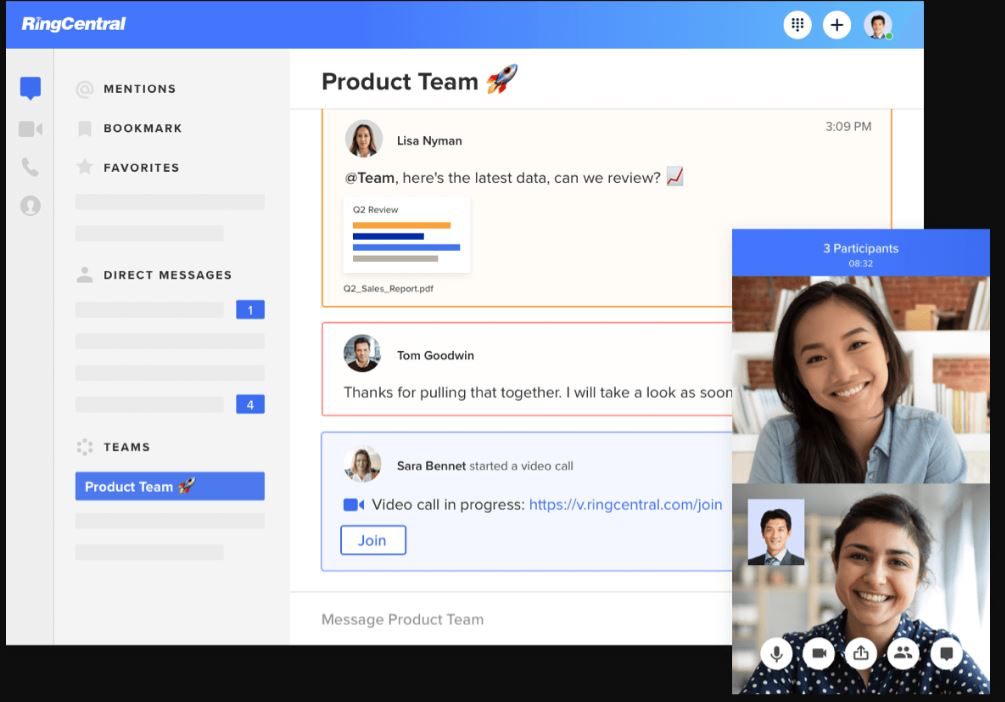
RingCentral includes built-in video conferencing functionality that supports remote collaboration and virtual meetings.
Video Conferencing Features Include:
- HD video meetings
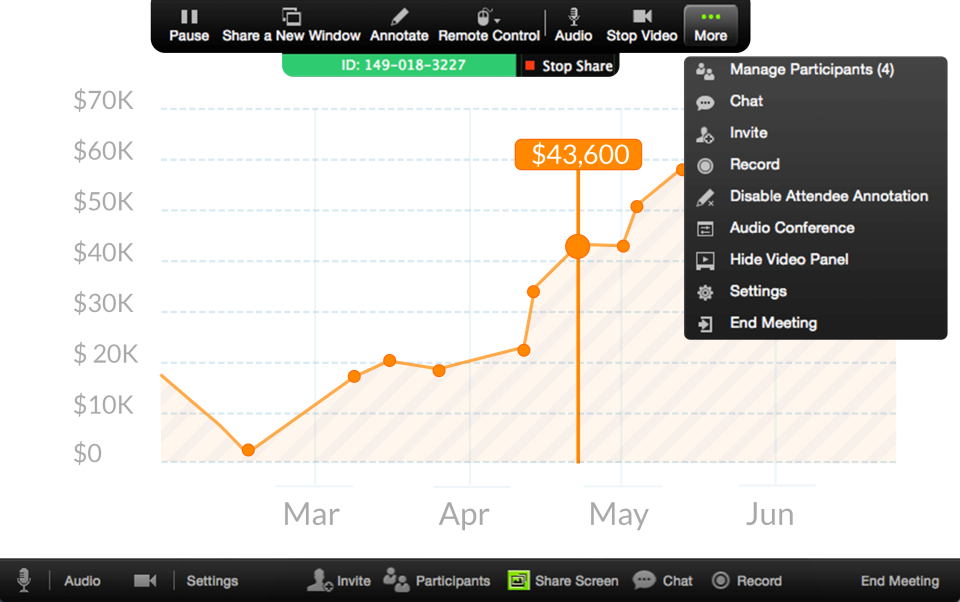
- Screen sharing
- Meeting recording
- Virtual backgrounds
- Breakout rooms
- Meeting scheduling
- In-meeting chat
- Participant management
- Webinar capabilities
- Mobile meeting access
These capabilities help organizations conduct productive meetings regardless of location.
Team Messaging
The platform offers team messaging tools that allow employees to communicate and collaborate in real time.
Team Messaging Features Include:
- One-to-one messaging
- Group chats
- Team channels
- File sharing
- Task collaboration
- Message history
- Mention notifications
- Team discussions
- Real-time communication
- Search functionality
These tools improve internal collaboration and support hybrid work environments.
Contact Center Solutions
RingCentral provides customer engagement and contact center capabilities designed to improve customer service operations.
Contact Center Features Include:
- Omnichannel support
- Intelligent call routing
- Customer interaction management
- Skills-based routing
- Call recording
- Agent monitoring
- Customer analytics
- Workforce management
- Interactive voice response (IVR)
- Customer service automation
These features help businesses deliver consistent customer experiences across communication channels.
Auto-Receptionist
The auto-receptionist feature automatically answers incoming calls and routes them to the appropriate department or employee.
Auto-Receptionist Features Include:
- Automated greetings
- Department routing
- Business hour configuration
- Custom call flows
- Multi-level menus
- Call forwarding rules
- Directory assistance
- Professional call handling
These capabilities improve caller experiences while reducing administrative workload.
Call Management
RingCentral offers advanced call management functionality that helps businesses control and optimize communications.
Call Management Features Include:
- Call forwarding
- Call transfer
- Call blocking
- Call screening
- Call monitoring
- Call whisper
- Call barging
- Hold management
- Call logs
- Missed call tracking
These features improve communication efficiency and customer service quality.
Business SMS and MMS
Businesses can communicate with customers and employees using text messaging directly from the RingCentral platform.
Business Messaging Features Include:
- SMS messaging
- MMS support
- Group texting
- Business text numbers
- Message history
- Team messaging integration
- Customer communication
- Mobile accessibility
These capabilities enable businesses to engage customers through preferred communication channels.
Voicemail Management
RingCentral provides intelligent voicemail functionality that helps businesses manage missed communications effectively.
Voicemail Management Features Include:
- Voicemail-to-email
- Visual voicemail
- Voicemail transcription
- Voicemail notifications
- Shared voicemail
- Voicemail forwarding
- Custom greetings
- Mobile voicemail access
These tools ensure important messages are never overlooked.
Mobile Application
The RingCentral mobile application allows users to manage business communications from smartphones and tablets.
Mobile Application Features Include:
- Mobile calling
- Video meetings
- Team messaging
- Contact management
- Voicemail access
- SMS communication
- Call transfer
- Push notifications
- Remote collaboration
- Business communication on the go
This flexibility supports remote workers and mobile professionals.
Collaboration Tools
RingCentral includes collaboration features that help teams work together efficiently.
Collaboration Features Include:
- Shared workspaces
- Team communication
- File sharing
- Project discussions
- Task coordination
- Cross-department collaboration
- Communication history
- Activity tracking
These capabilities improve workplace productivity and operational efficiency.
Webinar Hosting
Organizations can host webinars and virtual events directly through the RingCentral platform.
Webinar Features Include:
- Large audience support
- Registration management
- Presenter controls
- Audience engagement tools
- Webinar analytics
- Event recording
- Live Q&A
- Polling capabilities
These tools support marketing, training, and customer engagement initiatives.
Analytics and Reporting
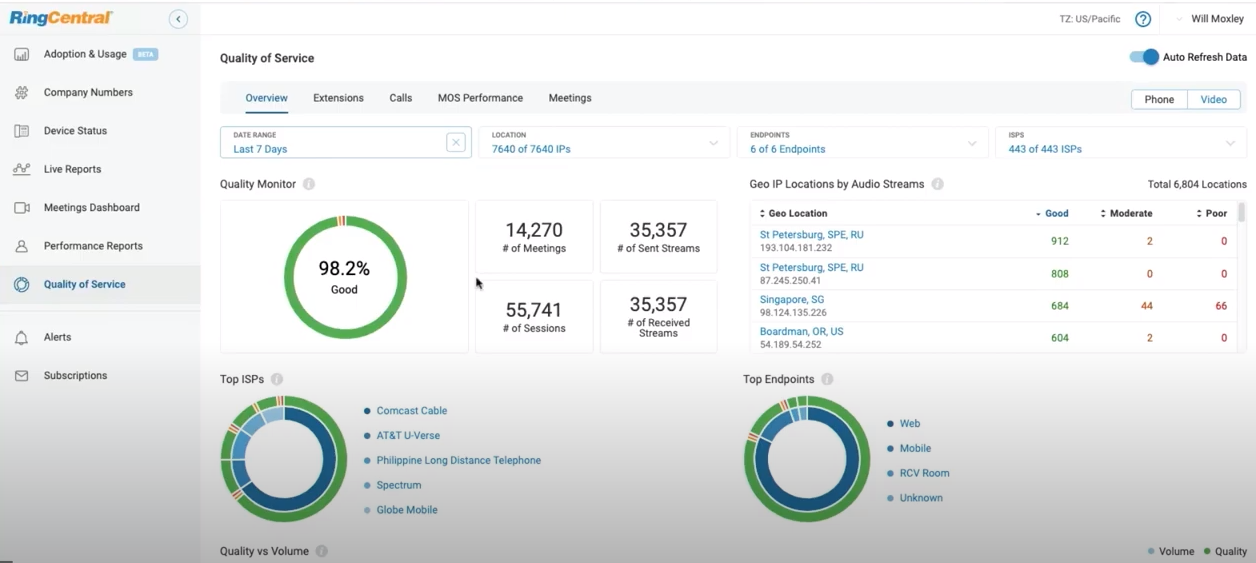
RingCentral provides comprehensive reporting and analytics that help organizations monitor communication performance.
Analytics and Reporting Features Include:
- Call analytics
- Usage reports
- Agent performance tracking
- Customer interaction reports
- Meeting analytics
- Communication insights
- Historical reporting
- Real-time dashboards
- KPI monitoring
- Custom reporting
These insights help businesses optimize communication strategies and improve performance.
Call Recording
Call recording functionality allows businesses to record and review conversations for compliance, training, and quality assurance.
Call Recording Features Include:
- Automatic call recording
- On-demand recording
- Secure storage
- Recording playback
- Compliance support
- Training reviews
- Quality monitoring
- Recording management
These capabilities help organizations improve customer service and maintain compliance standards.
Interactive Voice Response (IVR)
RingCentral provides IVR functionality that automates call handling and improves customer self-service experiences.
IVR Features Include:
- Automated call menus
- Self-service options
- Call routing automation
- Department selection
- Customer guidance
- Multi-level IVR
- Voice prompts
- Personalized call flows
These features reduce wait times and improve customer satisfaction.
Security and Compliance
RingCentral prioritizes enterprise-grade security to protect communications and sensitive business information.
Security and Compliance Features Include:
- Data encryption
- Secure communications
- User authentication
- Access controls
- Compliance support
- Fraud prevention
- Data protection
- Security monitoring
- Regulatory compliance
- Risk management
These measures help businesses maintain secure communication environments.
Integrations
RingCentral integrates with numerous business applications to create a connected workplace ecosystem.
Integration Features Include:
- Salesforce integration
- Microsoft Teams integration
- Microsoft 365 integration
- Google Workspace integration
- HubSpot integration
- Zendesk integration
- ServiceNow integration
- CRM connectivity
- Productivity tool integrations
- API access
These integrations improve workflow efficiency and eliminate communication silos.
Workforce Management
RingCentral provides workforce management tools that help organizations optimize employee productivity and customer service operations.
Workforce Management Features Include:
- Agent scheduling
- Performance monitoring
- Productivity tracking
- Workforce forecasting
- Shift management
- Resource planning
- Team optimization
- Operational reporting
These capabilities support efficient workforce operations and service delivery.
Omnichannel Communication
Businesses can manage customer interactions across multiple communication channels through a unified platform.
Omnichannel Communication Features Include:
- Voice communication
- SMS messaging
- Video meetings
- Team messaging
- Social channel support
- Customer engagement tracking
- Unified communication management
- Cross-channel communication history
These features help organizations deliver seamless customer experiences regardless of communication channel.
Scalability and Enterprise Management
RingCentral is designed to support organizations ranging from small businesses to global enterprises.
Scalability and Enterprise Management Features Include:
- Multi-location support
- Global deployment
- Centralized administration
- User management
- Role-based permissions
- Enterprise controls
- Flexible scaling
- Organizational management
These capabilities ensure businesses can expand communication infrastructure as operational requirements grow.
Benefits of Using RingCentral Software
Improved Communication Efficiency
Businesses can centralize communication activities and reduce reliance on multiple disconnected tools.
Enhanced Employee Collaboration
Teams can collaborate more effectively through integrated messaging, video conferencing, and communication capabilities.
Better Customer Experiences
Organizations can provide faster, more consistent customer service through omnichannel communication tools.
Reduced Infrastructure Costs
Cloud communications eliminate the need for expensive on-premise phone systems and maintenance requirements.
Increased Business Flexibility
Employees can communicate and collaborate from any location using desktop and mobile devices.
Stronger Business Continuity
Cloud-based communications help organizations remain operational during unexpected disruptions.
Improved Productivity
Unified communications reduce workflow interruptions and help employees work more efficiently.
Scalable Communication Infrastructure
Organizations can expand communication capabilities as business needs evolve without significant infrastructure investments.
Integrations of RingCentral Software
Microsoft Teams Integration
Enables businesses to combine RingCentral communication capabilities with Microsoft Teams collaboration environments.
Microsoft 365 Integration
Provides seamless connectivity with Outlook, Excel, Word, and other Microsoft productivity applications.
Google Workspace Integration
Supports communication and collaboration workflows for organizations using Google's business productivity ecosystem.
Salesforce Integration
Allows sales and customer service teams to manage communications directly within Salesforce CRM.
HubSpot Integration
Connects customer relationship management processes with business communications and customer engagement activities.
Zendesk Integration
Improves customer support operations by integrating communication tools with customer service workflows.
ServiceNow Integration
Enhances operational workflows through communication-enabled service management processes.
Additional Business Integrations
Additional Integrations Include:
- Slack
- Zoom
- Dropbox
- Box
- Oracle
- SAP
- Freshdesk
- Freshsales
- Zoho CRM
- Pipedrive
- Microsoft Dynamics 365
- Jira
- Trello
- Asana
- Monday.com
- DocuSign
- Okta
- BambooHR
- Workday
- Active Directory
- QuickBooks
- Xero
- Shopify
- WooCommerce
- Mailchimp
- Marketo
- Intercom
- Drift
- Gong
- Outreach
- Calendly
Pros and Cons of RingCentral Software
Pros | Cons |
Comprehensive unified communications platform | Advanced features may increase overall subscription costs |
Reliable cloud-based phone system | Initial setup can require planning for large organizations |
Strong video conferencing and team messaging capabilities | Some advanced contact center features may require separate licensing |
Extensive third-party integrations | Smaller businesses may not use all available functionality |
Enterprise-grade security and compliance support | Custom configuration can require administrative expertise |
Scalable for businesses of all sizes | Reporting customization may vary across modules |
Supports hybrid and remote work environments | Certain integrations may require additional configuration |
AI-powered communication and productivity features | Learning curve for organizations migrating from legacy systems |
Who Should Use RingCentral Software?
Startups
RingCentral is an excellent solution for startups looking to establish professional communication systems without investing in expensive on-premise infrastructure. Startups can quickly deploy business phone systems, video conferencing, team messaging, and customer communication tools while maintaining flexibility as they grow. The platform's scalability ensures communication systems can evolve alongside business expansion.
Small Businesses
Small businesses often require communication software that is reliable, affordable, and easy to manage. RingCentral helps small organizations centralize communications, improve collaboration, and provide professional customer experiences. Features such as cloud phone systems, video meetings, messaging, and mobile accessibility help smaller teams operate more efficiently.
Mid-Sized Businesses
Growing organizations benefit from RingCentral's ability to unify communications across departments and locations. Mid-sized businesses can improve employee collaboration, manage customer interactions more effectively, and gain visibility into communication performance through advanced analytics and reporting capabilities.
Enterprises
Large enterprises frequently use RingCentral to support complex communication requirements across multiple offices, regions, and teams. Enterprise organizations benefit from advanced security controls, compliance support, workforce engagement tools, contact center functionality, and scalable communication infrastructure capable of supporting thousands of users.
RingCentral Use Cases
Business Phone System Replacement
Organizations use RingCentral to replace traditional PBX systems with cloud-based phone systems that offer greater flexibility, scalability, and cost efficiency.
Hybrid Workforce Communication
Companies support remote and hybrid employees through integrated voice, video, messaging, and collaboration tools accessible from any location.
Customer Support Operations
Customer service teams utilize RingCentral Contact Center capabilities to manage inbound and outbound customer interactions across multiple communication channels.
Sales Team Communication
Sales organizations use RingCentral to manage customer calls, video meetings, prospect engagement, internal collaboration, and communication tracking.
Internal Team Collaboration
Businesses leverage messaging, video conferencing, file sharing, and collaboration features to improve teamwork and project coordination.
Virtual Meetings and Webinars
Organizations host virtual meetings, training sessions, webinars, client presentations, and company-wide events through RingCentral's video conferencing platform.
Multi-Location Business Communication
Companies with distributed offices use RingCentral to create a unified communication environment that connects employees across different locations.
Business Continuity Planning
Organizations implement RingCentral to ensure communication systems remain operational during unexpected disruptions, emergencies, or office closures.
Top RingCentral Alternatives
Microsoft Teams
Microsoft Teams combines collaboration, messaging, video conferencing, and communication capabilities within the Microsoft ecosystem. It is widely used by organizations already invested in Microsoft 365.
Zoom Workplace
Zoom offers video conferencing, team chat, phone services, collaboration tools, and productivity features designed for businesses of all sizes.
Cisco Webex
Webex provides enterprise-grade communication, collaboration, video conferencing, and customer experience solutions for global organizations.
8x8
8x8 delivers unified communications, business phone systems, contact center solutions, and customer engagement tools through a cloud-based platform.
GoTo Connect
GoTo Connect combines business phone systems, video meetings, messaging, and customer communication capabilities into a unified communications platform.
RingCentral vs Competitors
Feature | RingCentral | Microsoft Teams | Zoom Workplace | 8x8 |
Cloud Phone System | ✓ | ✓ | ✓ | ✓ |
Video Conferencing | ✓ | ✓ | ✓ | ✓ |
Team Messaging | ✓ | ✓ | ✓ | ✓ |
Contact Center | ✓ | Limited | Limited | ✓ |
AI-Powered Features | ✓ | ✓ | ✓ | Limited |
Mobile Access | ✓ | ✓ | ✓ | ✓ |
Workflow Integrations | ✓ | ✓ | ✓ | ✓ |
Analytics & Reporting | ✓ | ✓ | ✓ | ✓ |
Enterprise Scalability | ✓ | ✓ | ✓ | ✓ |
Best For | Unified Communications & Contact Centers | Microsoft Ecosystem Users | Video Collaboration | Communications & CX |
Why Choose RingCentral Software?
RingCentral stands out as one of the most comprehensive unified communications software platforms available today. Rather than relying on multiple standalone applications for calling, messaging, meetings, and customer interactions, organizations can centralize communication activities within a single cloud-based platform. This simplifies administration, improves collaboration, and creates a more connected workforce.
One of RingCentral's strongest advantages is its ability to support modern work environments. Whether employees work in offices, remotely, or in hybrid settings, the platform provides consistent access to communication tools across devices and locations. This flexibility has become increasingly important as organizations continue adapting to evolving workplace models.
RingCentral also excels in customer engagement. Through integrated contact center software and omnichannel communication capabilities, businesses can deliver more responsive and personalized customer experiences. Organizations gain visibility into customer interactions while improving service quality and operational efficiency.
The platform's extensive integration ecosystem further enhances its value. Businesses can connect RingCentral with CRM software, help desk systems, productivity suites, HR platforms, project management tools, and business applications to create streamlined workflows. This integration capability helps reduce manual work while improving collaboration between teams.
For organizations seeking scalable, secure, and future-ready communications infrastructure, RingCentral provides a strong combination of reliability, innovation, flexibility, and enterprise-grade functionality that supports both current operational needs and long-term growth strategies.
Frequently Asked Questions
Is RingCentral free to use?
RingCentral offers a range of business communication solutions through subscription-based plans. While free trials may be available for certain products, most advanced calling, messaging, video conferencing, and contact center capabilities are provided through paid plans.
Where can I compare RingCentral with other business communication software?
If you're evaluating RingCentral alongside other unified communications and cloud phone system solutions, platforms like Krowdbase allow you to compare features, use cases, integrations, pros and cons, and software categories side by side. This helps businesses determine which communication platform best aligns with their operational needs.
Where can I find RingCentral alternatives?
Businesses researching RingCentral alternatives can explore software comparison platforms such as Krowdbase to discover comparable communication and collaboration solutions, including Microsoft Teams, Zoom, 8x8, Nextiva, Dialpad, GoTo Connect, and other leading business communication platforms.
How do I choose the best business communication software for my organization?
Choosing the right communication platform depends on factors such as company size, remote work requirements, calling needs, collaboration features, integrations, scalability, security, and budget. Krowdbase helps businesses compare communication software based on features, use cases, industry requirements, and business goals.
Where can I discover software similar to RingCentral?
Software discovery platforms like Krowdbase provide detailed software profiles, feature comparisons, alternative recommendations, and category-based listings that help businesses find solutions similar to RingCentral.
Can I compare communication software features before making a decision?
Yes. Before investing in a communication platform, it is important to compare features such as cloud calling, team messaging, video conferencing, call routing, contact center capabilities, analytics, mobile access, integrations, and security features. Krowdbase enables users to evaluate these factors across multiple communication software solutions.
What are the best business communication software options available today?
The best business communication software depends on organizational requirements, but popular options include RingCentral, Microsoft Teams, Zoom Workplace, 8x8, Nextiva, Dialpad, GoTo Connect, and other leading unified communications platforms. Krowdbase helps businesses discover, compare, and evaluate these solutions in one place.
Which businesses commonly use RingCentral?
RingCentral is used by organizations of various sizes, including small businesses, mid-sized companies, enterprises, customer support teams, sales departments, remote workforces, healthcare providers, educational institutions, and professional service firms that require reliable communication and collaboration tools.
Where can businesses discover new software solutions?
Krowdbase is a software discovery platform where businesses can explore communication software, CRM platforms, project management tools, customer support solutions, HR software, ERP systems, cybersecurity tools, and thousands of other business applications to support growth and operational efficiency.
Why use Krowdbase for software research?
Krowdbase helps businesses make informed software decisions by providing detailed software information, feature breakdowns, use cases, alternatives, comparisons, and category-specific recommendations. This simplifies the software evaluation process and helps organizations identify solutions that align with their communication and business objectives.
Conclusion
RingCentral has established itself as one of the leading unified communications software platforms by providing businesses with a comprehensive cloud-based environment for voice communication, video conferencing, messaging, collaboration, and customer engagement. As organizations continue embracing digital transformation and hybrid work models, the need for reliable communication infrastructure has become more important than ever.
The platform's ability to unify multiple communication channels within a single ecosystem helps organizations simplify operations, improve collaboration, and deliver better customer experiences. Businesses can reduce technology complexity while benefiting from scalable communication solutions that support growth and operational flexibility.
RingCentral's extensive feature set, including cloud phone systems, video meetings, team messaging, contact center software, AI-powered communications, analytics, and enterprise-grade security, makes it suitable for organizations ranging from startups to global enterprises. Its ability to integrate with leading CRM software, productivity tools, customer support platforms, and business applications further enhances its value across departments and industries.
While businesses should evaluate alternatives such as Microsoft Teams, Zoom Workplace, Cisco Webex, 8x8, Vonage, and GoTo Connect based on their specific communication requirements, RingCentral remains a strong choice for organizations seeking a unified communications software solution capable of supporting both internal collaboration and external customer engagement. Its combination of reliability, scalability, innovation, and flexibility continues to make it one of the most trusted communication platforms in the market.
Screenshots

Video
Categories
Features
FAQ
The official website of RingCentral Video is https://www.ringcentral.com/video/
RingCentral Video belongs to the Audio Conferencing, Collaboration, File Sharing, Remote Work, Screen Recording, Screen Sharing, Team Communication, Video Conferencing, Web Conferencing category.
RingCentral Video offers features such as Real-Time Chat, Screen Sharing, Two Way Audio & Video, Audio Capture, Screen Capture, Desktop/Browser Sharing, Real Time Screen Sharing, Audio Calls, Private Chat.
No, RingCentral Video does not offer a free trial.
Need help choosing this software?
Have questions about features, pricing, integrations, or implementation? Send an enquiry to the vendor and get the information you need.
Pricing
Starting at:
$24.99/per month
Free Trial Available