Arina|Oct 24, 2026
Do you want to get notified when new software or services are added to Krowdbase? Sign up for our newsletter and stay ahead with the latest tools, providers, features, and updates.

Aug 10, 2026

Managing people becomes noticeably harder as a business grows. A five-person team may be able to coordinate shifts through messages, spreadsheets, and a shared calendar. Once that team expands across departments, locations, job roles, or states, the same approach quickly becomes difficult to maintain.
Managers need to know who is working, who is available, how many hours employees have logged, whether a shift is adequately staffed, how much overtime is accumulating, and whether approved time is reaching payroll correctly. Employees, meanwhile, expect easy access to schedules, time-off requests, shift changes, and their own attendance information.
That is where workforce management software can make a meaningful difference.
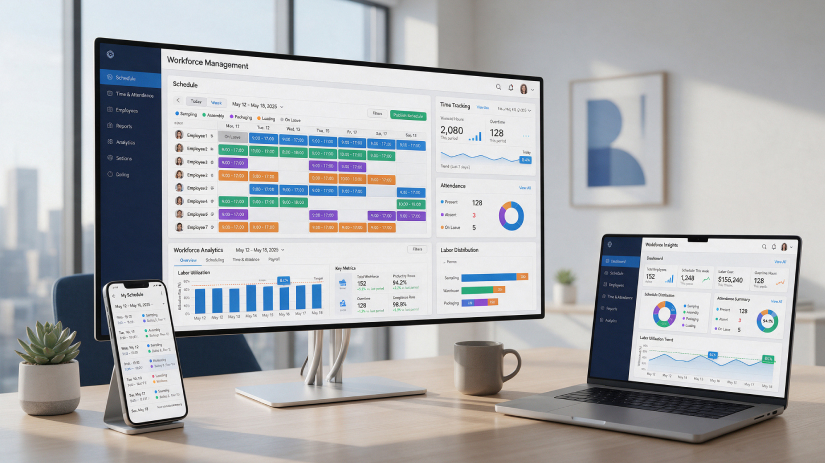
Modern workforce management platforms bring scheduling, time and attendance, absence management, labor planning, employee self-service, reporting, and often payroll or HR integrations into a more connected system. ADP describes workforce management software as technology that helps employers collect workforce data, manage time and attendance, build schedules, and handle overtime and absences.
For businesses searching for the Best Workforce Management Software USA options in 2026, however, there is no single platform that works equally well for every company. A restaurant with 30 hourly employees has very different needs from a hospital network, manufacturer, construction company, retail chain, or enterprise employing thousands of people.
This guide compares 15 notable workforce management solutions and explains where each one fits best.
Krowdbase can also help buyers explore Workforce Management Software USA options side by side using software information such as features, pricing, reviews, integrations, screenshots, and alternatives. Its current workforce management category includes hundreds of products, making comparison particularly useful when your shortlist extends beyond the better-known vendors.
Workforce management software, often shortened to WFM software, is designed to help businesses organize and optimize the day-to-day management of employees.
A basic workforce management system may focus primarily on employee scheduling and time tracking. More advanced products extend into labor forecasting, absence management, shift optimization, overtime monitoring, workforce analytics, employee communication, payroll preparation, compliance controls, and broader human capital management.
The common goal is simple: help organizations have the right employees working at the right time while maintaining accurate workforce information.
Businesses commonly use workforce management tools for:
The feature set matters because workforce management is rarely an isolated HR activity. Scheduling decisions influence overtime. Time records influence payroll. Absences influence staffing. Labor forecasts influence budgets. When these processes operate through disconnected systems, managers often end up reconciling information manually.
That is one reason modern workforce management platforms increasingly connect scheduling, time tracking, payroll, HR, and analytics rather than treating each function as a separate application.
U.S. employers can face considerable complexity when managing hourly, shift-based, distributed, or multi-location workforces.
Consider a company operating stores across several states. Managers may need to coordinate different operating hours, employee availability, overtime, breaks, time-off requests, job roles, labor budgets, and local operational requirements. A spreadsheet can record a schedule, but it cannot necessarily warn a manager about a staffing conflict, automatically update employees after a shift change, compare scheduled versus actual hours, or send approved hours directly to payroll.
This is where workforce management software in the USA becomes more than a scheduling tool.
A capable system can help businesses improve visibility into labor use, reduce repetitive administrative work, standardize workforce processes, and give employees greater control over routine actions such as viewing schedules or submitting availability.
For hourly and shift-heavy organizations, scheduling is particularly important. Modern platforms can combine employee availability, qualifications, staffing requirements and labor costs when schedules are created. Some enterprise systems add demand forecasting and automated scheduling. Dayforce, for example, supports forecasting based on historical information, recent trends and seasonal patterns when generating schedules.
The ideal platform depends heavily on company size and operational complexity.
The following platforms cover a range of needs—from small hourly teams to complex enterprise workforces.
Best for: Large enterprises and complex hourly workforces
UKG is one of the better-known names in workforce and human capital management. UKG Pro Workforce Management is particularly relevant to organizations dealing with complicated scheduling, timekeeping, workforce forecasting, and labor requirements.
Rather than focusing only on creating employee schedules, UKG is designed for organizations where workforce operations have significant scale and complexity.
Companies in healthcare, manufacturing, retail, logistics, and other shift-intensive industries may find this type of system more appropriate than a lightweight scheduling application.
Key areas associated with UKG workforce management include time and attendance, workforce scheduling, labor forecasting, employee self-service, workforce analytics, and compliance-oriented processes. UKG's current guidance on time and attendance also emphasizes connecting accurate time information with scheduling, forecasting and broader workforce decisions.
For a very small company, the breadth of an enterprise platform may be more than necessary. Larger organizations, however, may value the depth and configurability.
UKG Pro Alternatives: Compare UKG Pro alternatives on Krowdbase to evaluate other enterprise workforce management platforms.
Best for: Businesses wanting workforce management closely connected with payroll and HR
ADP Workforce Now is an established HR and payroll platform that can also support workforce management requirements.
ADP's workforce management capabilities cover areas including time and attendance, absence management, employee scheduling, analytics, compliance support, and integration with payroll and HCM systems.
That connected approach can be useful for businesses that want to reduce the number of separate applications used to manage employees.
Instead of moving attendance records manually from one system into another payroll application, organizations can build a more connected flow between workforce data and payroll processing.
ADP can be particularly relevant for organizations already using ADP products or companies that consider payroll integration a major selection criterion.
ADP Workforce Now Alternatives: Explore ADP Workforce Now alternatives on Krowdbase to compare payroll, HR, and workforce management solutions.
Best for: Large organizations seeking integrated HCM and workforce management
Workday is a major enterprise platform covering human capital management alongside broader workforce operations.
Its workforce management offering combines scheduling, time tracking, absence management, labor management, and employee experiences within the Workday environment.
Workday is particularly suited to organizations that want workforce management to operate as part of a broader enterprise HR ecosystem rather than as a standalone scheduling tool.
Employees can interact with time, schedules and workforce processes while managers gain access to workforce information and labor trends.
The biggest consideration is scale. A large organization looking to consolidate HR and workforce systems may see significant value in Workday, while a local business simply needing shift scheduling and a time clock will probably find a simpler platform easier to deploy.
Workday Alternatives: Browse Workday alternatives on Krowdbase when comparing enterprise HCM and workforce management systems.
Best for: Organizations with complex scheduling and time-and-attendance requirements
Dayforce combines workforce management with broader HCM capabilities.
Its workforce management functionality covers employee scheduling, time and attendance, absence-related processes and labor management. Dayforce also provides tools that alert managers to issues such as absenteeism and unplanned overtime, while employee scheduling functionality supports demand forecasting and flexible scheduling.
This makes Dayforce particularly interesting for businesses where employee hours, scheduling decisions and labor costs need to be managed together.
Employees can also gain more flexibility through schedule-related self-service, which can be valuable in industries with variable shifts.
For organizations managing large hourly workforces across multiple locations, those capabilities can make Dayforce a strong candidate.
Dayforce Alternatives: Compare Dayforce alternatives on Krowdbase to identify other HCM and workforce management platforms.
Best for: Growing businesses wanting HR, payroll and workforce operations connected
Rippling has expanded from an HR-focused platform into a broader workforce system covering HR, payroll, IT and workforce-related processes.
Its employee scheduling solution supports scheduling automation, availability, shift swaps, attendance monitoring, labor planning, and rules based on workforce data. Rippling also allows managers to consider information such as employee certifications or time off when creating schedules.
That data-driven approach can be especially useful for growing companies.
A manager is not simply placing a name into an empty shift. The system can consider whether the employee is actually eligible, available and appropriate for the work.
For companies that want to consolidate HR administration and workforce operations, Rippling deserves serious consideration.
Rippling Alternatives: Explore Rippling alternatives on Krowdbase to compare HR, payroll and workforce management platforms.
Best for: Small and mid-sized organizations wanting workforce management plus HCM
Paycor combines time and attendance, employee scheduling and broader HR functions within its HCM platform.
Its workforce management offering focuses on labor spend, accurate scheduling and time management. Features highlighted by Paycor include employee mobile punching, time-off requests, manager approvals, scheduling budgets and employee shift swaps.
This makes Paycor an interesting middle-ground option for businesses that have outgrown basic scheduling software but do not necessarily require the complexity associated with the largest enterprise platforms.
Retail, healthcare, restaurants, manufacturing and professional service companies with growing workforce requirements may find that balance useful.
Paycor Alternatives: Compare Paycor alternatives on Krowdbase to evaluate similar HR, payroll and workforce management solutions.
Best for: Restaurants, retail, hospitality and shift-based businesses
Deputy is strongly associated with employee scheduling and workforce management for hourly teams.
Its appeal is straightforward: managers need to create schedules quickly, know who is available, communicate changes and connect scheduled shifts with actual employee time.
Rather than trying to be a complete enterprise HCM platform, Deputy has a strong scheduling-first identity.
This can make it suitable for restaurants, hospitality businesses, retail stores and other organizations where shift coordination happens every day.
Krowdbase currently includes Deputy among its leading employee scheduling products for small businesses, alongside When I Work, Homebase, ZoomShift and Humanity.
Businesses evaluating Deputy should look carefully at integrations with their current payroll and HR stack.
Deputy Alternatives: Browse Deputy alternatives on Krowdbase for other employee scheduling and workforce management applications.
Best for: Small and mid-sized shift-based teams
When I Work focuses on making employee scheduling and time tracking easier for businesses with shift-based workforces.
Managers can build schedules, manage availability and time off, support shift trading and communicate with employees through desktop and mobile applications.
Its Time Tracker can also compare scheduled shifts against actual clocked hours, providing managers with a straightforward way to see where worked time differs from planned schedules.
That makes When I Work attractive for organizations that prioritize usability rather than extensive enterprise HCM functionality.
Restaurants, retailers, healthcare providers, service businesses and similar employers can use it to replace spreadsheets and fragmented group chats with a centralized scheduling workflow.
When I Work Alternatives: Explore When I Work alternatives on Krowdbase when comparing employee scheduling and time-tracking tools.
Best for: Small businesses managing hourly employees
Homebase is built specifically around hourly team management.
The platform brings employee scheduling, time clocks, timesheets, payroll, hiring, team communication and HR functions together.
That combination makes it particularly relevant to small restaurants, retail shops, salons, service businesses, hospitality companies and other businesses that may not have a dedicated HR department.
For these employers, buying a complex enterprise workforce management platform rarely makes sense. They need something managers can actually use without extensive implementation.
Homebase also provides mobile scheduling and time-clock capabilities, including geofencing and notifications around overtime, missed breaks and scheduling conflicts.
Homebase Alternatives: Compare Homebase alternatives on Krowdbase for other small-business scheduling, time tracking and payroll tools.
Best for: Deskless, field and mobile workforces
Connecteam takes a mobile-first approach to employee management.
It is particularly useful for organizations whose employees are not sitting at desks all day—construction crews, field service teams, cleaners, hospitality workers, healthcare teams and similar mobile workforces.
Its operations tools cover scheduling, time tracking, forms, tasks and daily workforce coordination. Connecteam's time management capabilities include employee availability, qualifications, scheduling, real-time attendance, geofenced clock-ins, digital timesheets and payroll preparation.
The broader platform also supports company communication, training and knowledge sharing, which can be useful when employees rarely work from a central office.
Connecteam Alternatives: Explore Connecteam alternatives on Krowdbase to compare field workforce and employee management platforms.
Best for: Organizations with demanding scheduling and timekeeping needs
TCP Software focuses specifically on workforce management, employee scheduling and time tracking.
Its portfolio includes TimeClock Plus for time and attendance, Humanity Schedule for employee scheduling, and Aladtec for specialized 24/7 staffing scenarios.
This gives TCP a somewhat different position from broad HR suites.
Organizations that view timekeeping and scheduling accuracy as core operational systems—rather than secondary HR features—may appreciate that specialization.
TCP can be particularly relevant for education, government, healthcare and other environments dealing with structured or complex workforce patterns.
TCP Software Alternatives: Compare TCP Software alternatives on Krowdbase when researching dedicated time, attendance and workforce scheduling platforms.
Best for: Businesses prioritizing employee scheduling
Humanity Schedule is part of TCP Software's workforce management portfolio and focuses heavily on employee scheduling.
The software is intended to help organizations close coverage gaps, build schedules and manage changing workforce requirements.
For companies that already have payroll and HR platforms but need a stronger scheduling layer, a scheduling-focused solution can be more practical than replacing the entire technology stack.
Humanity is also listed by Krowdbase among employee scheduling software options, making it useful to compare directly with When I Work, Deputy, Homebase and other scheduling-first products.
Humanity Alternatives: Browse Humanity alternatives on Krowdbase to find comparable workforce scheduling platforms.
Best for: Organizations looking for HR and payroll with workforce-related capabilities
Paycom provides a broader HR and payroll environment in which workforce-related processes can be connected with employee information.
For organizations trying to reduce manual administration between time data, employee records and payroll, an integrated HCM approach can be attractive.
Paycom may therefore appeal more to companies wanting a broader employee-management ecosystem than businesses searching solely for a standalone shift scheduler.
The main evaluation question is whether your organization actually needs the surrounding HR and payroll capabilities. If it does, an integrated suite may create a cleaner workflow. If scheduling is the only challenge, a lighter platform could be more economical and easier to implement.
Paycom Alternatives: Explore Paycom alternatives on Krowdbase to compare payroll, HR and workforce management platforms.
Best for: Businesses primarily needing employee and project time tracking
Clockify is best known as a time-tracking platform rather than a full enterprise workforce management suite.
That distinction matters.
Not every organization needs demand forecasting, automated shift planning and advanced labor optimization. Professional service firms, agencies, consultants, remote teams and project-based businesses may care more about knowing how employee time is being used.
For that type of company, Clockify can provide a simpler entry point into workforce visibility.
It is also currently included among products surfaced in Krowdbase's U.S. workforce management category.
Companies with complex shift scheduling needs, however, should compare it with purpose-built workforce scheduling platforms before deciding.
Clockify Alternatives: Compare Clockify alternatives on Krowdbase for other employee time-tracking and workforce productivity tools.
Best for: Temporary staffing and workforce coordination
Zoho Workerly approaches workforce management from the perspective of temporary staffing and worker coordination.
That makes it different from conventional employee scheduling applications.
Staffing agencies and businesses coordinating temporary workers may require worker databases, job assignments, availability, timesheets and client-related processes rather than traditional enterprise HCM functionality.
Zoho Workerly is currently among the products surfaced in Krowdbase's Workforce Management Software USA listings.
Organizations should therefore evaluate it based on their actual workforce model. For temporary staffing workflows, it can be relevant; for a large permanent enterprise workforce, products such as UKG, Workday or Dayforce may be closer to the requirement.
Zoho Workerly Alternatives: Explore Zoho Workerly alternatives on Krowdbase for temporary staffing and workforce management solutions.
Software | Best For | Key Strength |
UKG Pro WFM | Large enterprises | Advanced workforce management |
ADP Workforce Now | Growing and large businesses | Payroll + workforce integration |
Workday | Large enterprises | Unified HCM and WFM |
Dayforce | Complex hourly workforces | Scheduling + time management |
Rippling | Growing businesses | Connected HR, payroll and workforce data |
Paycor | Small and mid-sized businesses | Workforce management + HCM |
Deputy | Retail and hospitality | Shift scheduling |
When I Work | Shift-based SMBs | Easy scheduling and attendance |
Homebase | Small hourly teams | Scheduling + time clock + payroll |
Connecteam | Deskless teams | Mobile workforce management |
TCP Software | Complex workforce operations | Time and attendance |
Humanity | Shift-based organizations | Employee scheduling |
Paycom | Mid-sized organizations | HR and payroll ecosystem |
Clockify | Project-based teams | Time tracking |
Zoho Workerly | Staffing businesses | Temporary workforce management |
A long feature list should not be the starting point for your decision.
Start with the problem your organization is actually trying to solve.
If managers spend hours building weekly shifts, focus on employee scheduling software. If payroll repeatedly requires correcting timesheets, prioritize time and attendance software. If staffing levels frequently fail to match customer demand, workforce forecasting should move higher on the list.
Here are the factors that matter most.
A 20-person restaurant and a 20,000-person organization should not buy workforce software using the same checklist.
Small businesses usually benefit from ease of implementation, straightforward pricing and a clean mobile experience.
Enterprises may need extensive configuration, role-based permissions, analytics, workforce forecasting and integrations with existing HCM, ERP and payroll systems.
Ask how difficult your schedules really are.
Do employees work fixed hours or rotating shifts? Are qualifications required for specific shifts? Do workers move between locations? Can employees exchange shifts? Do managers need to forecast staffing according to demand?
The more complicated these questions become, the more important advanced workforce scheduling capabilities become.
A good employee time tracking software system should do more than record clock-ins.
Businesses may need overtime alerts, break tracking, digital timesheets, approval workflows, mobile clocking, location controls and comparisons between scheduled and actual hours.
This is one of the most practical considerations.
If a workforce management platform records worked hours but administrators still have to re-enter those hours into payroll, much of the potential efficiency is lost.
Look for native payroll functionality or reliable integrations with the payroll system your company already uses.
For frontline and deskless workers, the mobile application may effectively be the workforce management system.
Employees should be able to perform routine actions without needing a desktop computer, whether that means checking schedules, submitting availability, clocking in, requesting time off or accepting an open shift.
Managers need visibility, not simply more data.
Useful workforce analytics might include overtime trends, labor costs, absenteeism, schedule adherence, staffing coverage and differences between planned and actual hours.
Businesses with multiple locations should also consider whether reporting can be segmented by branch, department, role or manager.
Workforce management software rarely operates alone.
Check compatibility with your:
Integration requirements should ideally be documented before software demos begin.
For smaller companies, simplicity usually matters more than having the longest feature list.
Homebase, When I Work, Deputy and Connecteam are particularly worth evaluating for hourly and shift-based small businesses because their products place significant emphasis on scheduling, time tracking and mobile employee use. Krowdbase's small-business scheduling listings likewise feature When I Work, Deputy and Homebase prominently.
A small company should ask:
Can a manager learn the platform quickly?
Can employees use it without extensive training?
Does it connect with payroll?
Can it scale when another location opens?
Does the business pay for features it actually needs?
The best workforce management software for small business is often the product employees and managers will consistently use, not necessarily the product with the most advanced enterprise features.
Large organizations should generally look more closely at platforms such as UKG, Workday, Dayforce and ADP.
Enterprise workforce management often requires much deeper capabilities around scheduling rules, workforce analytics, integrations, organizational structures, labor forecasting and large-scale employee data.
Implementation also matters considerably more.
Changing a workforce platform for thousands of employees can affect scheduling, timekeeping, payroll and HR operations simultaneously. Enterprises should therefore evaluate not only product features but data migration, configuration, implementation support, integrations and change management.
These terms overlap, but they are not identical.
Employee scheduling software focuses primarily on creating, publishing and maintaining employee work schedules.
Workforce management software generally covers a broader range of workforce operations, potentially including scheduling, time tracking, attendance, absence management, labor forecasting, compliance-related controls and analytics.
A restaurant may start with employee scheduling software and later require broader workforce management.
An enterprise may need those capabilities integrated from the beginning.
If scheduling is your primary requirement, you can also browse Employee Scheduling Software on Krowdbase, which currently provides a large directory of scheduling products with features, pricing and product information.
Workforce management is only one part of managing employees.
Depending on your business requirements, you may also want to browse related software categories on Krowdbase.
Useful for businesses primarily looking to build shifts, manage employee availability and simplify schedule changes.
Payroll platforms help organizations calculate and process employee compensation. Krowdbase also provides dedicated payroll software categories where businesses can compare products by pricing, functionality and other purchasing criteria.
Useful for tracking employee work hours, attendance, overtime, breaks and timesheets.
Broader HR platforms can support employee records, onboarding, workforce administration, performance and other employee lifecycle processes.
These tools can help centralize employee information and everyday workforce administration.
Businesses expanding their workforce may also need recruiting tools for managing candidates, applications and hiring workflows.
Once employees are onboarded, performance management systems can support reviews, objectives, feedback and employee development.
Organizations managing large or regulated workforces may require employee training, certification and ongoing learning tools.
Rather than researching every software category independently across dozens of websites, businesses can use Krowdbase as a software discovery and comparison platform to explore categories, compare vendors and investigate alternatives before building a shortlist.
Choosing workforce software is rarely as easy as picking the most recognizable brand.
The better question is:
Which product fits the way your workforce actually operates?
Krowdbase helps buyers research that question by bringing software discovery information into one place. In its current U.S. workforce management category, users can compare solutions using areas such as features, pricing, reviews, ratings, alternatives and integrations.
This is particularly valuable because the WFM market extends far beyond the 15 names covered in this guide.
A product that is ideal for a hospital may be unnecessary for a small retailer. A field service business may prefer mobile and GPS-focused capabilities. A staffing company may require temporary worker coordination. An enterprise may prioritize forecasting and HCM integration.
Krowdbase gives buyers another way to move from a broad market to a manageable shortlist.
You can start with the Workforce Management Software category and then explore related categories such as Employee Scheduling Software, Payroll Software, Time and Attendance Software, HR Software, Employee Management Software and other business applications.
Finding the Best Workforce Management Software in the USA is less about identifying one universally superior product and more about matching software capabilities to workforce realities.
UKG Pro Workforce Management, Workday and Dayforce are compelling candidates for organizations with complex enterprise requirements. ADP, Rippling and Paycor can be attractive when businesses want workforce management connected more closely with HR and payroll. Deputy, When I Work and Homebase are easier to consider for many shift-based small and mid-sized teams, while Connecteam stands out for deskless operations. TCP Software and Humanity bring deeper scheduling and time-management specialization, while Clockify and Zoho Workerly serve more specific workforce use cases.
Before making a decision, identify the problems that consume the most management time today.
Is scheduling too manual?
Are timesheets regularly corrected before payroll?
Are employees struggling to find current schedules?
Is overtime difficult to control?
Are managers unable to see labor costs until after the fact?
Those answers should shape your shortlist.
The right Workforce Management Software USA solution should make everyday workforce operations easier rather than simply adding another system for managers to maintain.
Use Krowdbase to explore workforce management platforms, compare available features, investigate pricing, and review software alternatives before choosing a solution that fits your workforce size, industry, operational model, and long-term growth plans.