Rippling
Run your business like a mastermind
What is Rippling?
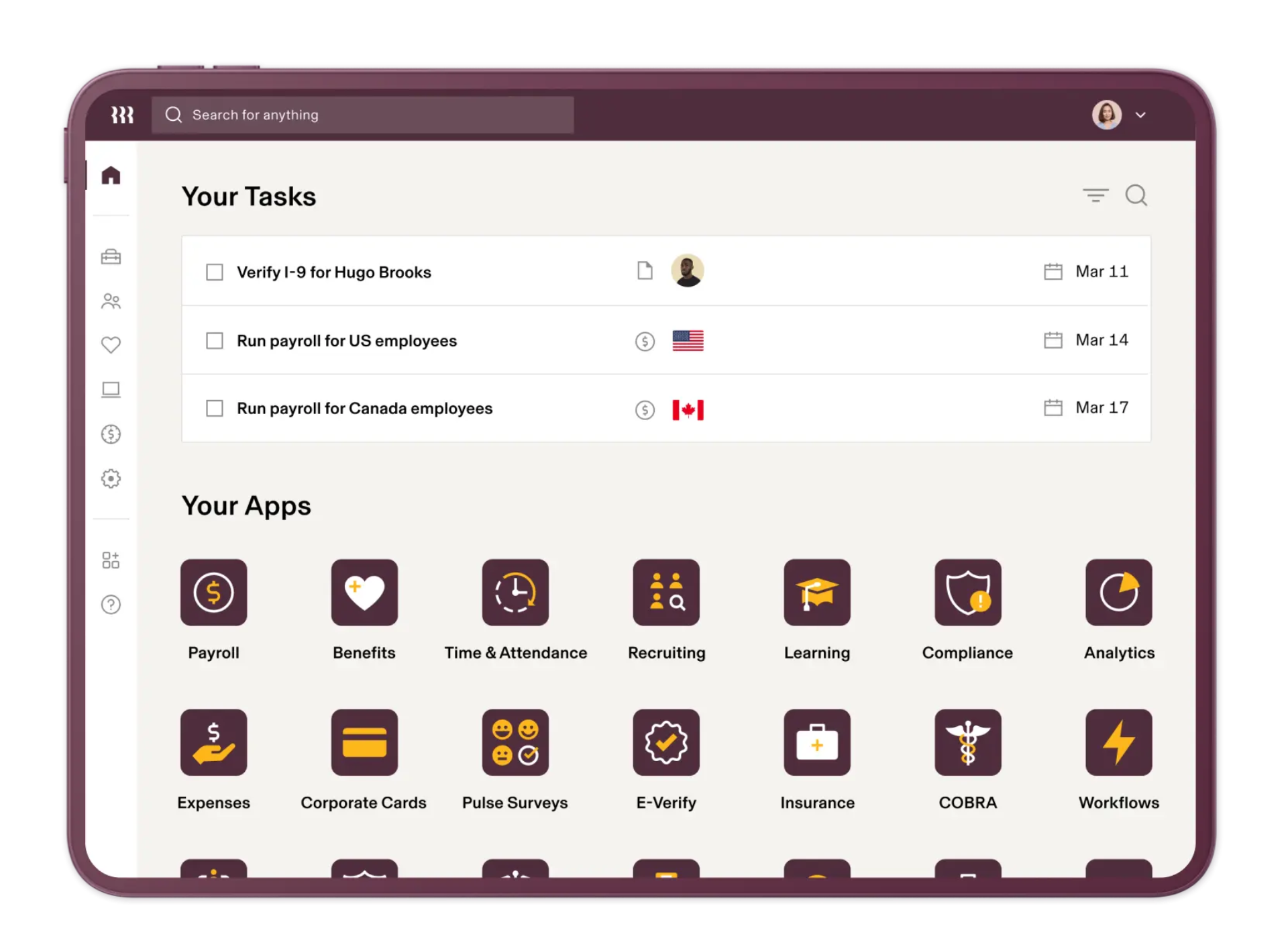
Rippling is a modern workforce management platform that combines Human Resource Software, Payroll Software, IT Management Software, and Employee Management Software into a single unified system. Designed for businesses seeking to automate and streamline workforce operations, Rippling enables organizations to manage employees, payroll, benefits, devices, applications, compliance, and workforce processes from one centralized platform.
As businesses grow, managing employees often requires multiple disconnected systems for payroll, HR administration, onboarding, benefits management, device provisioning, application access, and compliance tracking. Rippling addresses this challenge by bringing these functions together within a unified platform that automates workforce operations and reduces administrative complexity.
One of Rippling's biggest differentiators is its ability to manage both people and technology. Beyond traditional HR capabilities, the platform allows organizations to automate employee onboarding, assign company devices, provision software access, manage security policies, and oversee employee lifecycle events from a single dashboard. This unique combination of HR and IT functionality makes Rippling particularly attractive to fast-growing organizations.
Today, businesses across industries use Rippling to improve operational efficiency, enhance employee experiences, automate compliance tasks, and support workforce growth. Whether managing payroll, employee benefits, global teams, or IT infrastructure, Rippling provides a scalable solution that simplifies workforce management and business operations.
About Rippling
Rippling is a cloud-based workforce management software platform that helps businesses manage human resources, payroll, employee benefits, talent management, IT operations, and compliance through a centralized system. The platform is designed to automate employee lifecycle management while reducing manual administrative work and improving operational visibility.
Unlike many traditional HR platforms that focus solely on employee records and payroll, Rippling extends workforce management into IT administration and security management. Businesses can onboard employees, assign software licenses, provision devices, process payroll, administer benefits, track time, manage expenses, and enforce security policies from one integrated environment.
Rippling serves startups, small businesses, mid-sized organizations, enterprises, and global companies seeking a scalable workforce management platform. Its automation capabilities allow organizations to eliminate repetitive administrative tasks while maintaining compliance and improving workforce efficiency.
By combining Human Resource Software, Payroll Software, Workforce Management Software, IT Management Software, and Employee Management Software, Rippling offers businesses a comprehensive solution for managing both employees and workplace technology.
Key Objectives of Rippling
Centralize Workforce Management
Rippling helps businesses manage employee information, payroll, benefits, devices, applications, and compliance activities from a unified platform.
Automate Employee Lifecycle Management
The platform streamlines hiring, onboarding, promotions, transfers, and offboarding processes through intelligent automation.
Simplify Payroll Operations
Organizations can automate payroll calculations, tax filings, reimbursements, and compliance-related payroll activities.
Improve IT Administration
Rippling enables businesses to manage employee devices, software access, security policies, and IT operations from a centralized dashboard.
Enhance Compliance Management
The platform helps organizations stay compliant with labor laws, payroll regulations, security requirements, and workplace policies.
Support Global Workforce Growth
Rippling provides tools for managing distributed teams, international employees, contractors, and workforce operations across multiple regions.
Rippling Categories
Primary Category
Rippling primarily belongs to the Human Resource Software category. The platform enables organizations to manage employee records, payroll, benefits, workforce operations, onboarding, compliance, and employee lifecycle activities through a centralized HR management system.
Primary Category:
Secondary Categories
Rippling extends beyond traditional HR management by providing payroll administration, IT management, workforce automation, employee onboarding, compliance tracking, and global workforce management capabilities. These features make it a comprehensive workforce operations platform.
Secondary Categories:
- Access Governance Software
- Contractor Management Software
- Customer Identity and Access Management (CIAM) Software
- Direct Deposit Payroll Software
- Employee Scheduling Software
- Endpoint Protection Software
- Entity Management Software
Key Features of Rippling
Employee Management
Rippling centralizes employee information including personal details, job roles, compensation, benefits, documents, and employment history. This provides organizations with a complete workforce management solution that improves visibility and efficiency.
Payroll Processing
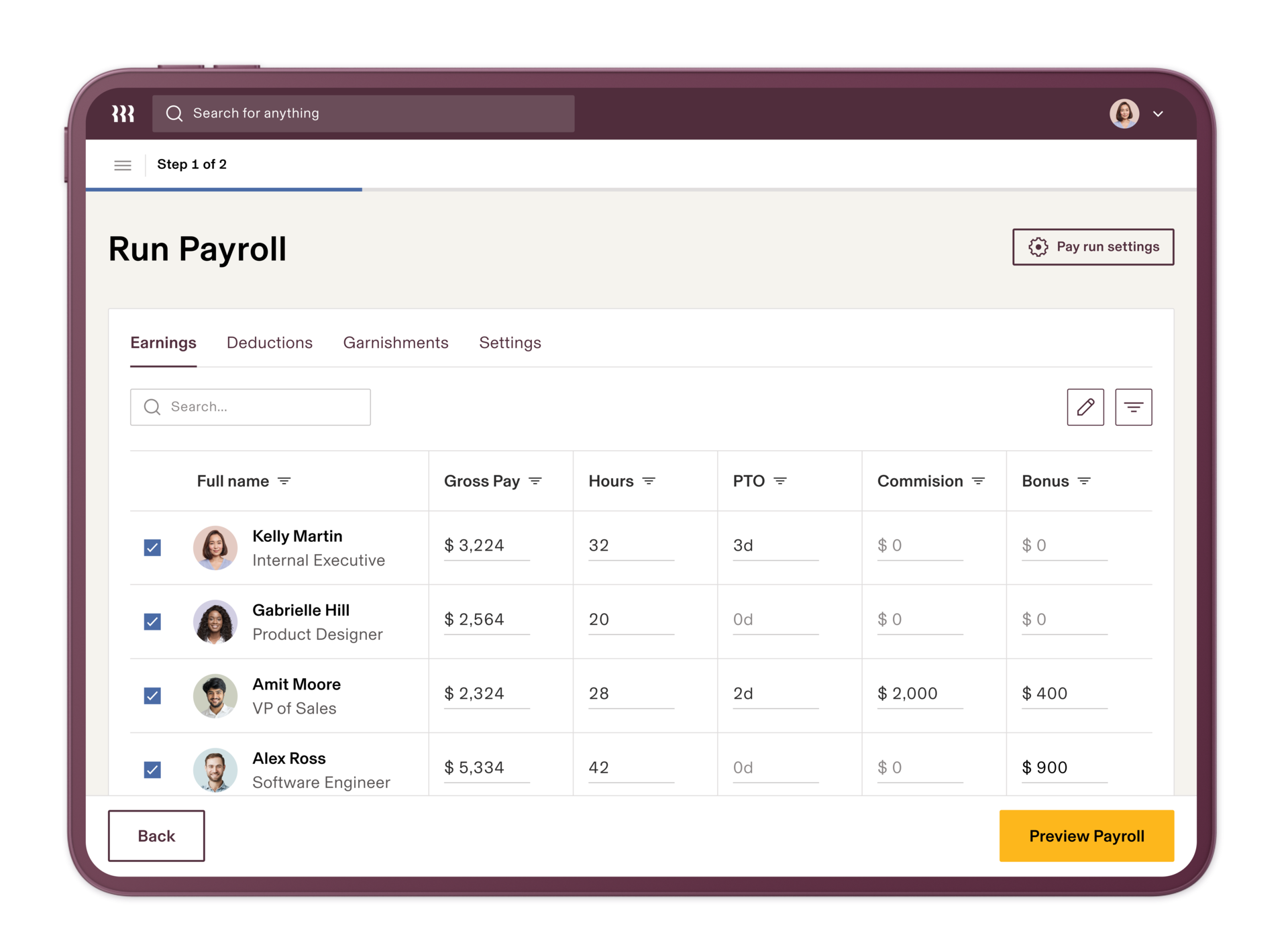
The platform automates payroll calculations, tax filings, deductions, reimbursements, and direct deposits. Businesses can process payroll accurately while maintaining compliance with local regulations.
Global Payroll Management
Rippling supports payroll management for international employees and contractors, helping organizations manage global workforce operations from a single platform.
Employee Onboarding and Offboarding
Organizations can automate onboarding and offboarding processes, including document collection, policy acknowledgments, software access provisioning, and equipment assignment.
Benefits Administration
Rippling enables businesses to manage health insurance, retirement plans, wellness programs, and employee benefits through a centralized administration system.
Time and Attendance Tracking
The platform includes tools for tracking work hours, attendance, paid time off, employee schedules, and workforce productivity metrics.
Device Management
One of Rippling's unique capabilities is device management. Organizations can assign, monitor, secure, and manage employee laptops, computers, and mobile devices directly from the platform.
Application Management
Businesses can automate software provisioning and deprovisioning, ensuring employees receive access to the right tools while maintaining security and compliance standards.
Workflow Automation
Rippling allows organizations to automate repetitive workforce processes including approvals, onboarding workflows, compliance activities, employee updates, and administrative tasks.
Compliance Management
The platform helps businesses manage labor law compliance, payroll regulations, workplace policies, employee documentation, and security requirements.
Reporting and Analytics
Rippling provides workforce reporting and analytics tools that offer insights into payroll expenses, employee trends, benefits utilization, workforce performance, and operational efficiency.
Security and Access Controls
Organizations can manage user permissions, security policies, authentication settings, and software access controls from a centralized platform, helping improve workplace security.
Benefits of Using Rippling
Unified Workforce Management
Businesses can manage HR, payroll, IT, and workforce operations from a single platform rather than relying on multiple systems.
Increased Automation
Automation reduces administrative work while improving operational consistency and accuracy.
Improved Employee Experience
Employees benefit from streamlined onboarding, self-service access, benefits management, and simplified workforce processes.
Stronger Compliance Support
Organizations can automate compliance activities and reduce regulatory risks associated with payroll, labor laws, and workforce management.
Better Security Management
Rippling's IT capabilities help businesses manage devices, software access, and workplace security more effectively.
Scalable Growth
The platform supports growing organizations by providing workforce management capabilities that scale alongside business expansion.
Integrations of Rippling
QuickBooks Integration
Synchronizes payroll and workforce data with accounting systems to improve financial visibility.
Xero Integration
Connects payroll information with accounting workflows for streamlined financial management.
Slack Integration
Supports employee communication, notifications, and collaboration activities.
Google Workspace Integration
Enables user provisioning, account management, and workforce productivity enhancements.
Microsoft 365 Integration
Automates employee account creation, access management, and productivity workflows.
Salesforce Integration
Connects workforce operations with customer relationship management activities.
NetSuite Integration
Supports enterprise financial management and workforce data synchronization.
Additional Business Integrations
Additional Integrations Include:
- BambooHR
- Greenhouse
- Lever
- Workday
- Asana
- Trello
- Monday.com
- Zoom
- DocuSign
- Dropbox
- Box
- GitHub
- Jira
- Okta
- Zendesk
- HubSpot CRM
- Shopify
- Expensify
- Deputy
- Zapier
Pros and Cons of Rippling
Pros | Cons |
Combines HR, Payroll, IT, and Workforce Management in one platform | Pricing can become expensive as additional modules are added |
Powerful workflow automation capabilities | Some advanced features require separate add-ons |
Excellent employee onboarding and offboarding tools | Initial implementation may require planning for larger organizations |
Strong global payroll and workforce management support | Learning curve for businesses new to workforce automation |
Comprehensive device and application management features | Certain international features may vary by region |
Extensive third-party integration ecosystem | Reporting customization can be limited compared to some enterprise platforms |
Scalable platform suitable for growing businesses | Smaller organizations may not need all available functionality |
Who Should Use Rippling?
Startups
Rippling is an excellent choice for startups looking to automate HR, payroll, employee onboarding, device management, and workforce administration from day one. Startups often lack dedicated HR and IT teams, making Rippling's automation capabilities highly valuable. The platform enables founders to focus on business growth while ensuring workforce operations remain organized and compliant.
Small Businesses
Small businesses can use Rippling to simplify payroll processing, benefits administration, employee management, and compliance tracking. By centralizing workforce operations, businesses can reduce manual administrative work and improve employee experiences without investing in multiple software platforms.
Mid-Sized Businesses
Growing organizations benefit significantly from Rippling's ability to scale workforce operations. As employee counts increase, businesses can automate onboarding, payroll, application provisioning, compliance management, and workforce reporting while maintaining operational efficiency.
Enterprises
Enterprise organizations can leverage Rippling to manage complex workforce structures, distributed teams, international employees, device security, software access controls, and compliance requirements. Its extensive automation and integration capabilities make it suitable for organizations seeking unified workforce management.
Rippling Use Cases
Employee Lifecycle Management
Businesses use Rippling to manage the complete employee journey, from recruitment and onboarding to promotions, transfers, and offboarding.
Payroll Administration
Organizations automate payroll processing, tax filings, reimbursements, deductions, and employee payments while maintaining regulatory compliance.
Global Workforce Management
Companies managing international employees and contractors use Rippling to streamline global payroll, workforce administration, and compliance processes.
Employee Onboarding
HR teams automate onboarding workflows including document collection, policy acknowledgments, software provisioning, device assignment, and training processes.
IT Asset Management
Businesses manage employee devices, laptops, software licenses, security policies, and workplace technology resources through a centralized platform.
Application Access Management
Organizations automate user access provisioning and deprovisioning across business applications, improving security and operational efficiency.
Benefits Administration
Companies manage health insurance, retirement plans, employee perks, and wellness programs through integrated benefits management tools.
Compliance Management
Businesses use Rippling to automate compliance-related activities, monitor workforce policies, manage documentation, and reduce regulatory risks.
Top Rippling Alternatives
BambooHR
BambooHR is a popular Human Resource Software platform focused on employee management, onboarding, performance tracking, and workforce administration for growing businesses.
ADP Workforce Now
ADP Workforce Now provides payroll processing, workforce management, compliance support, talent management, and HR administration capabilities for organizations of various sizes.
Workday Human Capital Management
Workday HCM is an enterprise-grade workforce management platform offering HR management, payroll, workforce planning, talent management, and analytics capabilities.
Gusto
Gusto combines payroll software, HR management, employee onboarding, benefits administration, and compliance tools within an easy-to-use platform for small businesses.
Paychex Flex
Paychex Flex provides payroll management, HR administration, workforce management, benefits support, and employee management functionality.
Rippling vs Competitors
Feature | Rippling | BambooHR | Gusto | Workday HCM |
Payroll Processing | ✓ | Limited | ✓ | ✓ |
Employee Management | ✓ | ✓ | ✓ | ✓ |
Benefits Administration | ✓ | ✓ | ✓ | ✓ |
Global Payroll | ✓ | No | Limited | ✓ |
IT Management | ✓ | No | No | Limited |
Device Management | ✓ | No | No | No |
Workflow Automation | ✓ | ✓ | Limited | ✓ |
Employee Onboarding | ✓ | ✓ | ✓ | ✓ |
Reporting & Analytics | ✓ | ✓ | ✓ | ✓ |
Best For | Unified Workforce Operations | HR-Focused Organizations | Small Businesses | Large Enterprises |
Why Choose Rippling?
Rippling stands out in the Human Resource Software market because it extends beyond traditional HR functionality to include payroll management, workforce automation, IT administration, device management, and security controls. This unique combination allows businesses to manage employees and workplace technology from a single platform.
One of the biggest reasons organizations choose Rippling is its automation-first approach. Employee onboarding, payroll processing, software provisioning, compliance tracking, benefits enrollment, and workforce administration can all be automated through customizable workflows. This significantly reduces administrative workloads while improving consistency and accuracy.
Another major advantage is Rippling's ability to manage both HR and IT operations. Organizations can automatically assign devices, provision software access, enforce security policies, and manage user permissions alongside traditional HR activities. This eliminates the need for multiple disconnected systems and improves workforce efficiency.
Rippling also provides strong scalability. Whether managing ten employees or thousands of workers across multiple locations, the platform can adapt to changing workforce requirements. Its extensive integration ecosystem further enhances operational efficiency by connecting accounting, productivity, recruiting, communication, and business management applications.
For businesses seeking Human Resource Software that combines payroll, workforce management, employee administration, compliance support, and IT management capabilities, Rippling offers one of the most comprehensive workforce management solutions available today.
Frequently Asked Questions
What is Rippling?
Rippling is a cloud-based workforce management platform that combines human resources (HR), payroll, IT management, and employee administration into a single system. It helps businesses automate employee onboarding, payroll processing, benefits administration, device management, and workforce operations, making it easier to manage employees throughout their lifecycle.
Is Rippling free?
Rippling does not offer a free plan, but businesses can choose from various subscription options based on the modules and features they require. Organizations can customize their Rippling setup to include HR, payroll, IT, benefits management, and other workforce management capabilities.
Where can I compare Rippling with other HR software?
If you're evaluating Rippling alongside other HR software solutions, platforms like Krowdbase allow you to compare features, use cases, integrations, pros and cons, and software categories side by side. This helps businesses identify the most suitable HR and workforce management solution based on their operational requirements.
Where can I find Rippling alternatives?
Businesses researching Rippling alternatives can explore software comparison platforms such as Krowdbase to discover comparable HR software solutions, including BambooHR, Workday HCM, Gusto, ADP Workforce Now, Paychex Flex, and other leading human resource management platforms. Comparing alternatives helps organizations find software that aligns with their workforce management needs and budget.
How do I choose the best HR software for my business?
Choosing the best HR software depends on factors such as company size, payroll requirements, employee management needs, compliance requirements, integration capabilities, automation features, and budget. Krowdbase helps businesses evaluate and compare HR software solutions based on features, scalability, industry suitability, and business goals.
Where can I discover software similar to Rippling?
Software discovery platforms like Krowdbase provide detailed software profiles, feature comparisons, alternative recommendations, and category-based listings that help businesses find solutions similar to Rippling. This allows organizations to research and compare workforce management platforms before making a purchasing decision.
Can I compare HR software features before making a decision?
Yes. Before selecting an HR platform, it is important to compare features such as employee records management, payroll processing, benefits administration, onboarding, time tracking, compliance management, reporting, workflow automation, and integrations. Krowdbase enables businesses to evaluate these capabilities across multiple HR software solutions.
What are the best HR software options available today?
The best HR software varies depending on business requirements, but popular options include Rippling, BambooHR, Workday, Gusto, ADP Workforce Now, Paycor, and UKG Pro. Krowdbase helps businesses discover, compare, and evaluate these leading HR software solutions in one place.
Where can businesses discover new software solutions?
Krowdbase is a software discovery platform where businesses can explore HR software, payroll software, CRM platforms, project management tools, ERP systems, customer service solutions, marketing automation software, and thousands of other business applications. This helps organizations find software that supports productivity, growth, and operational efficiency.
Why use Krowdbase for software research?
Krowdbase helps businesses make informed software decisions by providing detailed software information, feature breakdowns, use cases, alternatives, comparisons, and category-specific recommendations. Whether you're researching HR software or other business applications, Krowdbase simplifies the evaluation process and helps organizations identify solutions that align with their operational and workforce management goals.
Conclusion
Rippling has emerged as one of the most innovative Human Resource Software platforms by combining workforce management, payroll processing, employee administration, compliance support, IT management, and security controls into a unified system. Its unique ability to manage both employees and workplace technology sets it apart from many traditional HR platforms.
The platform's automation capabilities enable businesses to streamline onboarding, payroll processing, benefits administration, software provisioning, device management, and compliance activities while reducing administrative workloads. This allows organizations to focus on growth and employee development rather than repetitive operational tasks.
Rippling is particularly valuable for businesses seeking a scalable workforce management solution that supports both HR and IT operations. From startups and growing businesses to enterprise organizations, the platform provides the flexibility and automation required to manage modern workforces effectively.
While businesses should evaluate alternatives such as BambooHR, Gusto, ADP Workforce Now, Workday HCM, Paychex Flex, and Zenefits based on specific requirements, Rippling remains one of the most comprehensive Human Resource Software solutions available today for organizations seeking unified workforce management and operational efficiency.
Screenshots
Categories
Features
FAQ
The official website of Rippling is https://www.rippling.com/
Rippling belongs to the Access Governance, Contractor Management, Customer Identity and Access Management (CIAM), Direct Deposit Payroll, Employee Scheduling, Endpoint Protection, Entity Management, Expense Report, HR Analytics, IT Asset Management, Identity Management, Multi-Country Payroll, Multi-Factor Authentication, Onboarding, PEO, Password Management, Patch Management, Payroll, Performance Management System, Privileged Access Management, Recruiting, Self-Service Password Reset (SSPR), Single Sign On, Spend Management, Talent Management, Team Management, Time Clock, Time and Expense, Travel Management, Unified Endpoint Management (UEM), Wireless Expense Management, Applicant Tracking, Attendance Tracking, Benefits Administration, Billing and Invoicing, Cloud Security, Compensation Management, Human Resources, IT Management, Leave Management System, Mobile Device Management, Remote Work, Time Tracking, Workforce Management category.
Rippling offers features such as Access Management, Audit Management, Multi-Factor Authentication, Password Management, Policy Management, Self Service Portal, Single Sign On, Contractor Database, Job Management, Multiple Authentication Methods, Two-Factor Authentication, User Provisioning, Benefits Management, Compensation Management, Employee Profiles, Payroll Management, Payroll Reporting, Tax Compliance, W-2 Preparation, Expense Claims, Mobile Receipt Upload, Reimbursement Management, Spend Control, Compensation Plan Modeling, HR Metrics Library, Leave Tracking, Recruitment Management, Turnover Tracking, Secure Login, Direct Deposit, Vacation/Leave Tracking, Onboarding, Automatic Patch Deployment, 360 Degree Feedback, Interview Management, Resume Parsing, Password Database, HR Management, Overtime Calculation, Remote Access & Monitoring, Move/Add/Change Options, Interview Scheduling, Resume Storage, Benefits Dashboard, Employee Benefits Administration, Health Insurance Administration, HIPAA Compliant, Online Benefits Enrollment, Time & Expense Tracking, Time & Attendance, FMLA Administration, Endpoint Management, Security Management, Software Management, Billable & Non-Billable Hours, Online Time Tracking.
Rippling is used in industries such as Financial Services, Manufacturing.
Rippling is built for Small Business, Mid Size Business, Enterprise
Rippling supports English
Rippling supports Android, Mac, Web-based, Windows, iPhone/iPad devices.
The starting price of Rippling is USD undefined.
No, Rippling does not offer a free trial.
Rippling was founded in 2016.
Rippling has approximately 1000+ employees.
Rippling is located in United States.
Rippling was founded by People Center, Inc.
Need help choosing this software?
Have questions about features, pricing, integrations, or implementation? Send an enquiry to the vendor and get the information you need.
Vendor Details
- Vendor
- People Center, Inc
- Founded
- 2016
- Locations
- United States
- Company Size
- 1000+
- Social Media


