Axure
The most powerful way to plan, prototype, and hand off to developers
What is Axure?
Axure RP is a powerful wireframing, prototyping, and UX design software platform used by designers, product teams, business analysts, and developers to create interactive prototypes, user flows, wireframes, and functional specifications. It is widely recognized as one of the most advanced prototyping tools available for designing complex digital experiences without requiring extensive coding knowledge.
Modern software development projects require teams to validate ideas, test user experiences, and communicate design requirements before development begins. Axure RP helps organizations achieve these goals by providing a comprehensive environment for creating high-fidelity prototypes that closely simulate real-world applications and websites.
Unlike many design tools that focus primarily on visual layouts, Axure RP emphasizes interaction design, logic-based prototyping, conditional workflows, and detailed documentation. This makes it particularly valuable for enterprise projects, SaaS platforms, web applications, mobile apps, and digital product development initiatives where functionality and user behavior must be accurately represented.
Today, Axure RP is used by UX designers, UI designers, product managers, business analysts, consultants, and development teams seeking to improve collaboration, validate concepts, and streamline product design processes.
About Axure RP
Axure RP is a professional UX design and prototyping software solution that enables users to create wireframes, interactive prototypes, user journeys, customer experiences, and detailed product specifications. The platform is designed to bridge the gap between design concepts and development execution by allowing teams to build highly interactive prototypes without writing code.
One of Axure RP's strongest differentiators is its ability to create dynamic and logic-driven prototypes. Users can simulate complex interactions, conditional workflows, adaptive interfaces, and real-world application behavior, helping stakeholders visualize product functionality before development begins.
The software supports collaborative design workflows by allowing teams to share prototypes, gather feedback, document requirements, and maintain alignment throughout the product lifecycle. Its advanced capabilities make it particularly suitable for large-scale digital projects where user experience, interaction design, and functional requirements are critical.
As organizations continue to prioritize user-centered design and digital transformation, Axure RP remains a leading UX prototyping software solution for creating sophisticated digital experiences.
Key Objectives of Axure RP
Improve UX Design Workflows
Axure RP helps teams design, test, and refine user experiences before development begins.
Create Interactive Prototypes
The platform enables users to build realistic prototypes that simulate actual application behavior.
Enhance Stakeholder Communication
Interactive prototypes help stakeholders better understand product functionality and user journeys.
Reduce Development Risks
Teams can identify usability issues and design flaws early in the product development process.
Support Collaboration
Axure RP facilitates collaboration between designers, product managers, developers, and business teams.
Accelerate Product Validation
Organizations can test concepts and gather feedback before investing in development resources.
Primary Category
UX Design Software
Axure RP primarily belongs to the UX Design Software category. It helps organizations design, prototype, validate, and improve user experiences through interactive design workflows and advanced prototyping capabilities.
Primary Category
Secondary Categories
Axure RP also serves multiple design and product development functions beyond UX design, making it relevant across several software categories.
Secondary Categories
Key Features of Axure RP
Interactive Prototyping
Axure RP enables users to create highly interactive prototypes that simulate real-world user experiences. Teams can design clickable interfaces, workflows, and interactions that closely mirror final products.
Key Capabilities Include:
- Interactive prototypes
- Clickable user interfaces
- Workflow simulation
- Dynamic interactions
- User journey testing
- Functional demonstrations
- Experience validation
- Product visualization
Advanced Wireframing
The platform provides comprehensive wireframing tools that help teams create structured layouts and interface designs before development begins.
Key Capabilities Include:
- Low-fidelity wireframes
- High-fidelity wireframes
- Interface planning
- Layout design
- Screen organization
- Product structure visualization
- Design validation
- UX planning
Conditional Logic
Axure RP allows designers to add conditional logic and dynamic behavior to prototypes, creating more realistic user experiences.
Key Capabilities Include:
- Conditional interactions
- Dynamic content
- Logic-driven workflows
- User behavior simulation
- Personalized experiences
- Decision trees
- Advanced interactions
- Functional testing
Dynamic Panels
Dynamic panels help users create responsive and interactive interface elements that change based on user actions.
Key Capabilities Include:
- Dynamic content display
- Interactive components
- Responsive behavior
- UI state management
- Content switching
- Experience simulation
- Design flexibility
- Workflow optimization
Adaptive Views
Designers can create prototypes optimized for different screen sizes and devices through adaptive view functionality.
Key Capabilities Include:
- Responsive design
- Device optimization
- Mobile prototyping
- Tablet layouts
- Desktop interfaces
- Cross-device experiences
- Screen customization
- User experience consistency
Team Collaboration
Axure RP supports collaborative workflows that allow teams to share prototypes, gather feedback, and improve communication.
Key Capabilities Include:
- Team reviews
- Shared projects
- Feedback collection
- Design collaboration
- Stakeholder engagement
- Project alignment
- Version control
- Communication support
Documentation Generation
The platform helps teams generate functional specifications and documentation directly from prototypes.
Key Capabilities Include:
- Design documentation
- Functional specifications
- Product requirements
- Development guidance
- Stakeholder reports
- Project documentation
- Requirement tracking
- Workflow transparency
Widget Libraries
Axure RP includes reusable widget libraries that accelerate prototype development and maintain consistency.
Key Capabilities Include:
- Reusable components
- UI libraries
- Design consistency
- Faster prototyping
- Component management
- Interface standards
- Workflow efficiency
- Rapid design creation
User Flow Mapping
Teams can visualize user journeys and application workflows to improve experience design and navigation.
Key Capabilities Include:
- User journey mapping
- Navigation planning
- Experience visualization
- Workflow creation
- Interaction mapping
- Process documentation
- UX optimization
- User-centered design
Prototype Sharing
Users can publish and share prototypes with stakeholders, clients, and development teams for review and testing.
Key Capabilities Include:
- Cloud sharing
- Stakeholder access
- Prototype publishing
- Feedback workflows
- User testing
- Project collaboration
- Review management
- Design validation
Benefits of Using Axure RP
Improved Design Validation
Interactive prototypes help teams validate concepts before development begins.
Better Stakeholder Alignment
Visual and functional prototypes improve communication across teams.
Reduced Development Costs
Early testing helps identify issues before implementation.
Faster Product Iterations
Teams can quickly update and improve designs based on feedback.
Enhanced User Experience
Designers can test workflows and interactions before launch.
Stronger Product Documentation
Built-in documentation features simplify requirement management.
Integrations of Axure RP
Jira Integration
Supports project management and development workflows.
Microsoft Teams Integration
Facilitates communication and collaboration.
Slack Integration
Enables team discussions around design projects.
Confluence Integration
Supports documentation and knowledge sharing.
Azure DevOps Integration
Improves collaboration between design and development teams.
GitHub Integration
Supports product development workflows.
Figma Integration
Helps teams align design and prototyping processes.
Additional Business Integrations
Additional Integrations Include:
- Trello
- Asana
- Monday.com
- Notion
- Adobe Creative Cloud
- Miro
- Lucidchart
- Zoom
- Google Workspace
- Dropbox
- OneDrive
- SharePoint
- Basecamp
- ClickUp
- Airtable
Pros and Cons of Axure RP
Pros | Cons |
Advanced interactive prototyping capabilities | Higher learning curve compared to some design tools |
Excellent for complex UX and enterprise projects | Interface may feel outdated to some users |
Supports conditional logic and dynamic content | More expensive than basic wireframing tools |
Strong documentation and specification generation | Not primarily focused on visual UI design |
Robust collaboration and prototype sharing features | Can be overwhelming for beginners |
Supports responsive and adaptive prototyping | Requires time to master advanced interactions |
Suitable for detailed product and workflow design | Limited built-in design assets compared to some competitors |
Highly detailed user flow and interaction modeling | Simpler projects may not require its advanced capabilities |
Who Should Use Axure RP?
UX Designers
Axure RP is one of the most widely used UX design software solutions for professionals responsible for creating user experiences, interaction flows, and usability-focused digital products. UX designers can use the platform to build interactive prototypes, validate workflows, and test user journeys before development begins.
Ideal Users Include:
- UX Designers
- Interaction Designers
- Experience Strategists
- User Researchers
- Information Architects
Product Managers
Product managers use Axure RP to communicate ideas, validate product concepts, document requirements, and align stakeholders around product vision and functionality.
Ideal Users Include:
- Product Managers
- Product Owners
- Digital Product Teams
- SaaS Product Leaders
- Business Stakeholders
Business Analysts
Business analysts leverage Axure RP to document workflows, define requirements, visualize processes, and communicate system functionality to development teams.
Ideal Users Include:
- Business Analysts
- Systems Analysts
- Process Consultants
- Solution Architects
- Digital Transformation Teams
UI and Product Design Teams
While Axure RP focuses heavily on UX and interaction design, UI teams can also use the platform to create high-fidelity layouts and validate interface behavior.
Ideal Users Include:
- UI Designers
- Product Designers
- Design Teams
- Design Consultants
- Creative Agencies
Enterprise Organizations
Large organizations frequently use Axure RP for enterprise applications, internal systems, customer portals, software platforms, and digital transformation projects that require detailed prototyping and documentation.
Ideal Users Include:
- Enterprise Teams
- Government Organizations
- Financial Institutions
- Healthcare Providers
- Technology Companies
Axure RP Use Cases
UX Prototyping
Teams use Axure RP to create interactive prototypes that replicate real-world user experiences and application functionality.
Wireframe Creation
The platform helps designers build low-fidelity and high-fidelity wireframes for websites, mobile applications, SaaS platforms, and enterprise systems.
User Flow Design
Organizations use Axure RP to map user journeys, navigation structures, and workflow experiences before development begins.
Product Requirement Documentation
Business analysts and product teams generate specifications and documentation directly from prototypes to improve development alignment.
Enterprise Application Design
Large organizations use Axure RP to design complex software systems that require advanced interactions, workflows, and business logic.
Mobile App Prototyping
Designers create responsive and adaptive mobile experiences that simulate real application functionality.
Stakeholder Presentations
Interactive prototypes help teams present concepts and validate ideas with clients, executives, and decision-makers.
User Testing and Validation
Organizations test product concepts with users before investing in full-scale development efforts.
Top Axure RP Alternatives
Figma
Figma is one of the most popular collaborative UI and UX design software platforms available today. It offers cloud-based design, prototyping, design systems, and team collaboration capabilities that make it suitable for organizations of all sizes.
Adobe XD
Adobe XD is a UX design and prototyping software solution that helps teams create user experiences, wireframes, and interactive prototypes while integrating with Adobe Creative Cloud applications.
Sketch
Sketch is a digital design software platform focused on interface design, wireframing, prototyping, and design system management for web and mobile applications.
Balsamiq
Balsamiq specializes in low-fidelity wireframing and rapid concept development. It is often used by teams seeking simple wireframing software for early-stage planning.
UXPin
UXPin combines design systems, prototyping, collaboration, and product design capabilities within a unified UX design environment.
Axure RP vs Competitors
Feature | Axure RP | Figma | Adobe XD | Balsamiq |
Interactive Prototyping | ✓ | ✓ | ✓ | Limited |
Conditional Logic | ✓ | Limited | Limited | No |
Dynamic Content | ✓ | Limited | Limited | No |
Wireframing | ✓ | ✓ | ✓ | ✓ |
Documentation Generation | ✓ | Limited | Limited | No |
Collaboration | ✓ | ✓ | ✓ | Limited |
Design Systems | Limited | ✓ | ✓ | No |
Responsive Prototyping | ✓ | ✓ | ✓ | Limited |
User Flow Design | ✓ | ✓ | ✓ | Limited |
Best For | Advanced UX Prototyping | Collaborative Design | UI/UX Design | Wireframing |
Why Choose Axure RP?
Advanced Prototyping Capabilities
Axure RP stands out because of its ability to create highly interactive and realistic prototypes. Unlike many design tools that focus primarily on visuals, Axure RP allows users to simulate actual product behavior through conditional logic, dynamic panels, and advanced interactions.
Enterprise-Level Functionality
The platform is particularly well-suited for enterprise organizations, complex applications, and large-scale digital projects that require detailed workflows and extensive requirement documentation.
Comprehensive UX Design Support
Axure RP supports the entire UX design process, from wireframing and user flow creation to prototyping, testing, validation, and stakeholder communication.
Better Communication Between Teams
Interactive prototypes help designers, developers, business analysts, and stakeholders align around product requirements and expected functionality before development begins.
Reduced Project Risks
By identifying usability issues and workflow problems early in the design process, organizations can reduce development costs and improve product outcomes.
Strong Documentation Features
Axure RP's ability to generate documentation directly from prototypes makes it a valuable tool for teams that require detailed specifications and project requirements.
Frequently Asked Questions
What is Axure RP?
Axure RP is a UX design software platform used for wireframing, prototyping, user flow creation, and product design. It helps teams build interactive prototypes that simulate real-world applications and websites without requiring extensive coding. Designers, product managers, and business analysts commonly use Axure RP to validate ideas and improve user experiences before development begins.
What are the key features of Axure RP?
Axure RP includes interactive prototyping, wireframing, conditional logic, dynamic panels, adaptive views, collaboration tools, documentation generation, widget libraries, user flow mapping, and prototype sharing capabilities. These features help teams create realistic digital experiences and improve product planning workflows.
Is Axure RP easy to use?
Axure RP offers powerful functionality, but it has a steeper learning curve than some wireframing and design tools. While beginners can create basic prototypes relatively quickly, mastering advanced interactions, conditional logic, and dynamic content requires additional experience and practice.
Where can I compare Axure RP with other UX design software?
If you're evaluating Axure RP alongside other UX design software solutions, platforms like Krowdbase allow you to compare features, prototyping capabilities, collaboration tools, integrations, supported workflows, pros and cons, and software categories side by side. This helps businesses identify the most suitable design platform.
Where can I find Axure RP alternatives?
Businesses and design professionals researching Axure RP alternatives can explore software comparison platforms such as Krowdbase to discover comparable UX design software solutions including Figma, Adobe XD, Sketch, Balsamiq, UXPin, and other leading design platforms.
How do I choose the best UX design software?
Choosing the best UX design software depends on factors such as prototyping requirements, collaboration needs, design complexity, documentation requirements, integrations, scalability, team size, and budget. Krowdbase helps organizations compare UX design software based on features, use cases, and business requirements.
Where can I discover software similar to Axure RP?
Software discovery platforms like Krowdbase provide detailed software profiles, feature comparisons, category-based listings, alternative recommendations, and competitor analysis that help businesses and designers discover solutions similar to Axure RP.
Can I compare UX design software features before making a decision?
Yes. Before selecting a UX design software platform, it is important to compare capabilities such as wireframing, prototyping, interaction design, collaboration, documentation generation, responsive design support, design systems, and user testing workflows. Krowdbase enables users to evaluate these factors across multiple software solutions.
What are the best UX design software options available today?
Popular UX design software solutions include Axure RP, Figma, Adobe XD, Sketch, UXPin, Proto.io, Balsamiq, and other leading design platforms. The best solution depends on project complexity, team collaboration needs, and design requirements. Krowdbase helps businesses discover and compare these platforms in one place.
Who should use Axure RP?
Axure RP is suitable for UX designers, product managers, business analysts, UI designers, enterprise teams, software development organizations, consultants, and agencies that require advanced prototyping and interaction design capabilities. It is particularly valuable for complex digital products and enterprise applications.
Where can businesses discover new software solutions?
Krowdbase is a software discovery platform where businesses can explore UX design software, wireframing tools, prototyping platforms, CRM software, project management solutions, productivity applications, and thousands of other software products that support business growth and innovation.
Why use Krowdbase for software research?
Krowdbase helps businesses make informed software purchasing decisions by providing detailed software information, feature breakdowns, use cases, alternatives, comparisons, category insights, and software recommendations. This simplifies software evaluation and helps organizations identify solutions that align with their operational goals and design requirements.
Conclusion
Axure RP remains one of the most powerful UX design software and prototyping platforms available for organizations that require advanced interaction design, detailed workflows, and enterprise-level product validation capabilities. Its ability to create highly interactive prototypes, simulate complex user experiences, and generate comprehensive documentation makes it a valuable solution for digital product development.
The platform is particularly well-suited for UX designers, product managers, business analysts, and enterprise teams working on sophisticated applications, websites, and software systems. Through its combination of wireframing, prototyping, collaboration, and documentation capabilities, Axure RP helps organizations reduce development risks, improve stakeholder communication, and create better user experiences.
While businesses should evaluate alternatives such as Figma, Adobe XD, Sketch, UXPin, Proto.io, and Balsamiq based on their specific requirements, Axure RP continues to be a leading choice for teams seeking advanced UX design software and interactive prototyping capabilities. Its focus on functionality, realism, and product validation makes it an essential tool for modern digital product development.
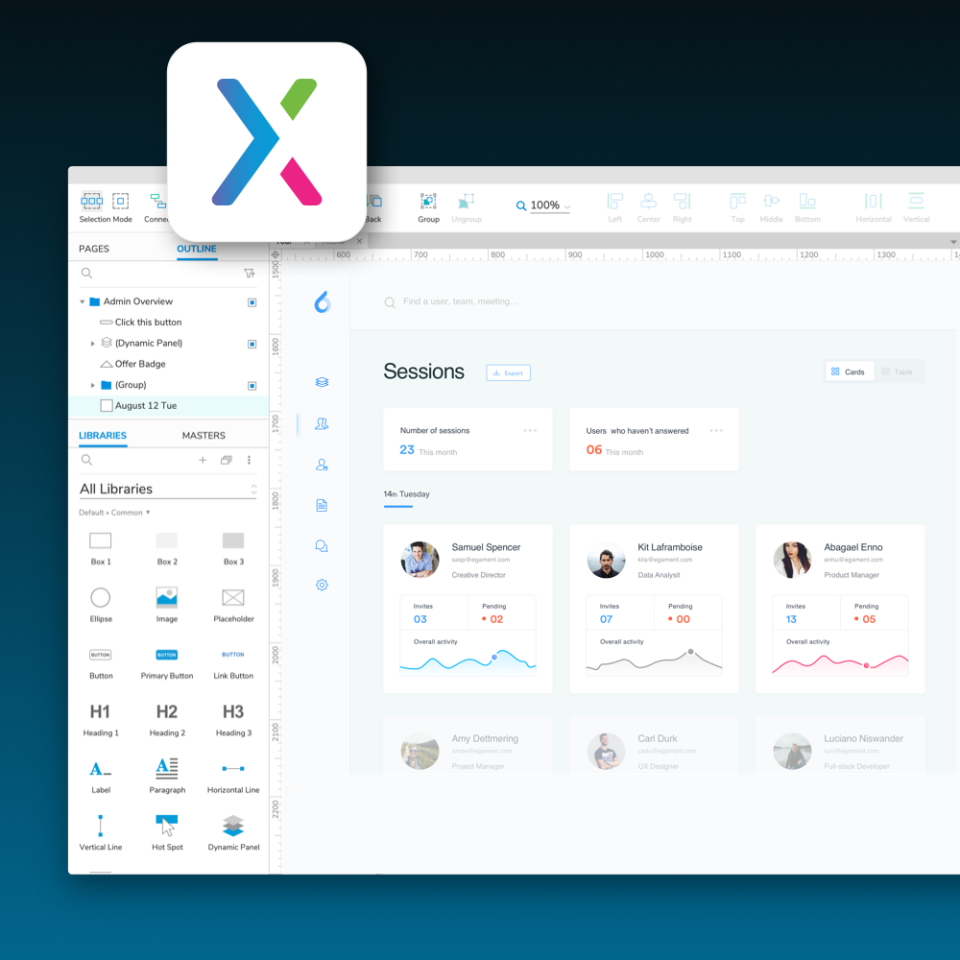
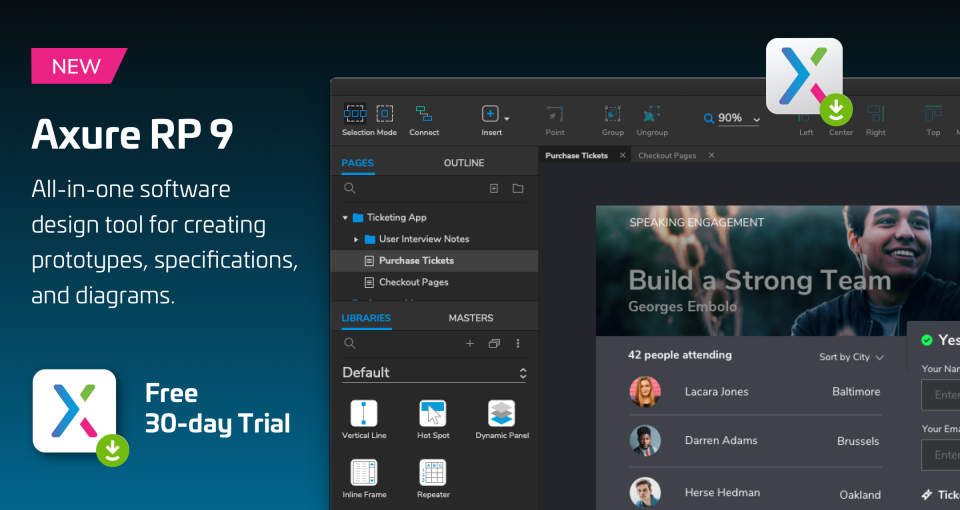
Screenshots
Features
FAQ
The official website of Axure is https://www.axure.com/
Axure belongs to the Prototyping, Application Development, Wireframe category.
Axure offers features such as Software Prototyping, Usability Testing, UX Prototyping, Graphical User Interface, Mockup Creation, Wireframe Creation.
Axure is used in industries such as Information Technology & Services.
Axure is built for Small Business, Mid Size Business, Enterprise
Axure supports English
Axure supports Mac, Windows, iPhone/iPad devices.
The starting price of Axure is USD 29/per month.
Yes, Axure offers a free trial.
Axure was founded in 2002.
Axure has approximately 11-50 employees.
Axure is located in United States.
Axure was founded by Axure Software Solutions.
Need help choosing this software?
Have questions about features, pricing, integrations, or implementation? Send an enquiry to the vendor and get the information you need.
Pricing
Starting at:
$29/per month
Free Trial Available
Vendor Details
- Vendor
- Axure Software Solutions
- Founded
- 2002
- Locations
- United States
- Company Size
- 11-50
- Social Media


