
Email Manager for Microsoft 365
Capture, auto-classify and archive emails right from Outlook 365 to SharePoint & Teams.
What is Email Manager for Microsoft 365?
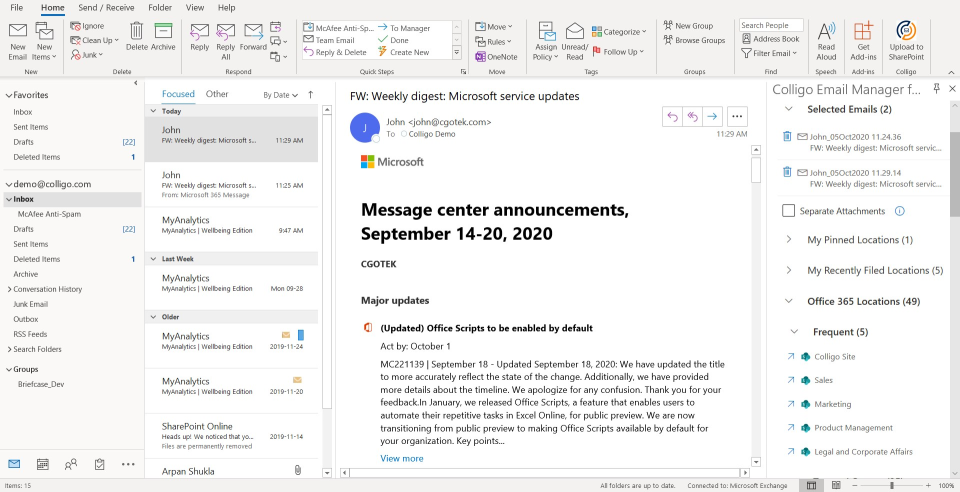
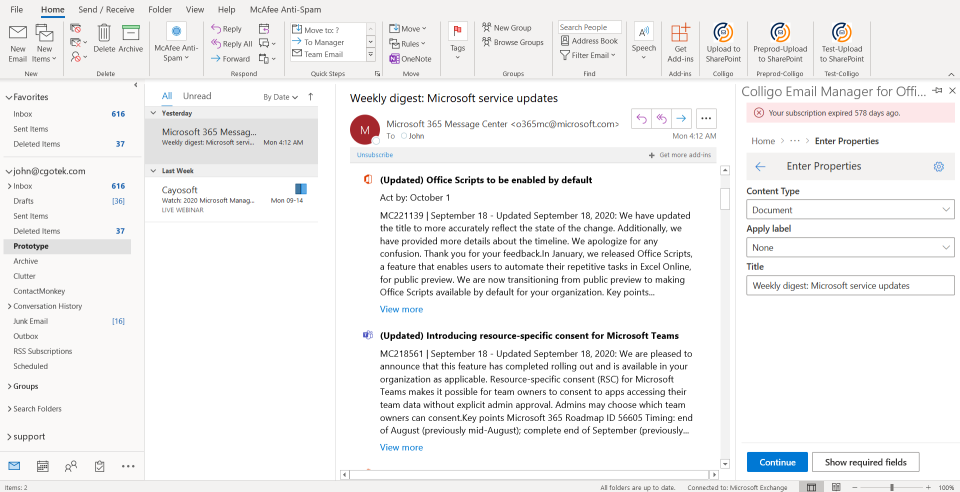
Email capture and collaboration made easy. Rethink knowledge & record capture and sharing in the new era of Microsoft 365 mobility (previously Office 365). Save Outlook emails and attachments into the Microsoft 365 version of SharePoint and Microsoft Teams from any device. Share links to files with peers and file multiple emails & attachments at once on these collaboration platforms. Leverage the power of Microsofts Advanced Data Governance features by tagging your content with labels.
Screenshots


Categories
Features
FAQ
The official website of Email Manager for Microsoft 365 is http://www.colligo.com/
Email capture and collaboration made easy. Rethink knowledge & record capture and sharing in the new era of Microsoft 365 mobility (previously Office 365). Save Outlook emails and attachments into the Microsoft 365 version of SharePoint and Microsoft Teams from any device. Share links to files with peers and file multiple emails & attachments at once on these collaboration platforms. Leverage the power of Microsofts Advanced Data Governance features by tagging your content with labels.
Email Manager for Microsoft 365 belongs to the Archiving, Compliance, Content Management, Document Management, Email Archiving, Email Management, Integration, Legal Document Management category.
Email Manager for Microsoft 365 offers features such as Compliance Management, Data Import/Export, Data Retention Management, Document Management, Match & Merge, Storage Management, Access Controls/Permissions, Compliance Tracking, Risk Management, Version Control, Collaboration Tools, Search/Filter, Document Storage, File Sharing, Secure Data Storage, Archiving & Retention, Deduplication, Reporting/Analytics, Data Management, Case Management, For Legal Professionals, Full Text Search.
No, Email Manager for Microsoft 365 does not offer a free trial.
Reviews(0)
Write a reviewEmail Manager for Microsoft 365 alternatives

Google Docs
Web-based platform designed to store, create and edit spreadsheets, use templates, create charts, comment on documents, and more.

Google Drive
Google Drive is a cloud-based storage platform that allows users and teams to store, access, and share files in one secure place. Flexible storage options with data loss prevention features are available. Using Google AI, this solution can identify i...load more

Dropbox Business
Dropbox Business is the secure file sharing and storage solution that employees love and IT admins trust. Start a free trial today!

Mailchimp
Mailchimp is a marketing platform primarily used by small businesses in marketing and IT services to manage email campaigns and customer outreach. Users value its drag-and-drop editor and real-time analytics for campaign tracking. Its AI growth assis...load more

Google Workspace
Google Workspace's word processing for teams. Work on a single document with team members or people outside your company. See edits as others type, communicate through built-in chat and ask questions by including comments. Create, edit and share docs...load more

WordPress
Open source software that is free to use for creating blogs and websites.

Zoom Workplace
With Team Chat, Phone, AI Companion, and more, Zoom Workplace is the platform for your best work.

Microsoft 365
Microsoft 365 - formerly known as Office 365 - is more than just Word, Excel, PowerPoint, and Outlook. It provides powerful services like business-class email, online storage, and teamwork solutions that you can access from anywhere. Bring teams and ...load more

Gmail
Gmail is a cloud-based solution that enables businesses and teams to send, receive, organize, and schedule emails across multiple user accounts. Gmail provides suggested actions such as Smart Reply, Smart Compose, grammar suggestions, and more. This ...load more

OneDrive
Microsoft OneDrive is a web-based digital asset management solution that allows businesses of all sizes to efficiently manage, collaborate, and share files. Administrators can set up a private or public site for authorized users, who can then create ...load more