GainTools Cloud Importer
migrates email data from local mailbox files to cloud-based email services
What is GainTools Cloud Importer?
GainTools Cloud Importer is a robust software solution designed to simplify the process of migrating email data from local mailbox files to cloud-based email services. For businesses, IT professionals, and individual users, transferring emails manually can be time-consuming, prone to errors, and technically challenging. GainTools Cloud Importer addresses these challenges by providing a reliable and efficient platform for securely moving email data without data loss or disruption to ongoing operations.
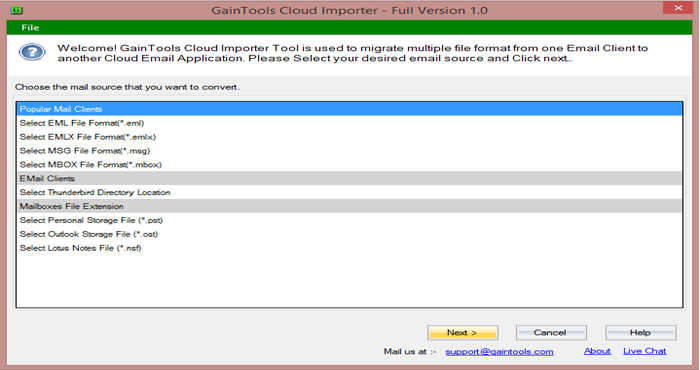
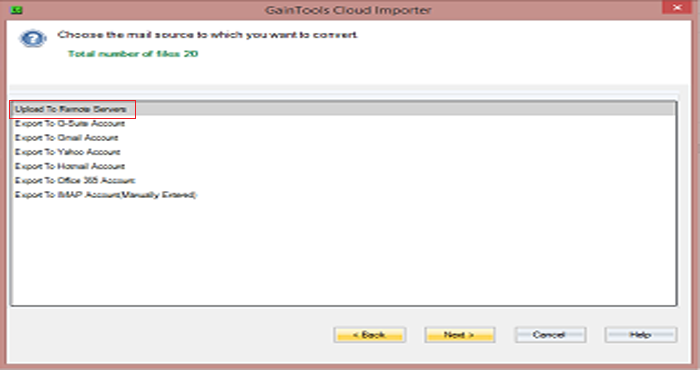
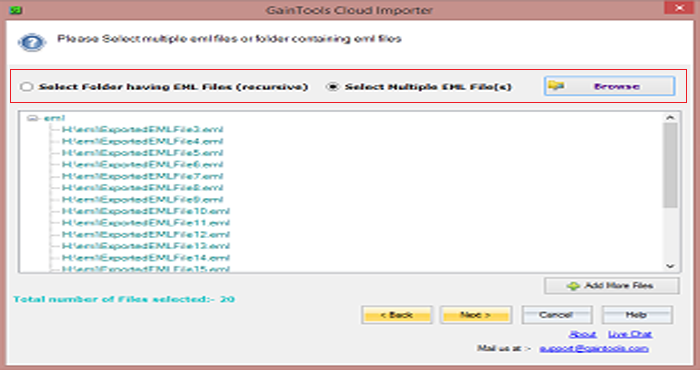
The software works by connecting directly to your local mailbox files, including formats commonly used by desktop email clients, and seamlessly transferring the data to popular cloud email services. Users can select specific folders, entire mailboxes, or particular email items to migrate, allowing for granular control over the transfer process. The software preserves the original structure of mail folders, including subfolders, attachments, metadata, and timestamps, ensuring that all emails retain their original context and accessibility once migrated to the cloud.
One of the key advantages of GainTools Cloud Importer is its user-friendly interface that guides users through each step of the migration. Even those without advanced technical knowledge can navigate the process efficiently. The software supports batch migration, enabling multiple mailbox files to be imported simultaneously, which is especially useful for organizations managing large volumes of email data. Additionally, GainTools Cloud Importer ensures secure authentication with cloud email accounts, protecting sensitive information during transfer and reducing the risk of unauthorized access.
By automating and streamlining the migration process, GainTools Cloud Importer helps users save significant time and minimize the risk of errors that often occur during manual email transfers. The software reduces administrative overhead for IT teams and eliminates the need for complex scripts or third-party tools. It also provides detailed logs and reports of the migration process, allowing users to monitor progress, verify successful transfers, and address any issues promptly.
GainTools Cloud Importer is ideal for a wide range of users. Small and medium-sized businesses looking to move their email infrastructure to the cloud can rely on the software to handle multiple users and large mailbox files efficiently. IT administrators and managed service providers can use it as a dependable tool for client migrations, reducing project timelines and ensuring data integrity. Individual users who want to move personal email accounts from local clients to cloud-based services can also benefit from its straightforward workflow and comprehensive support for various mailbox formats.
Overall, GainTools Cloud Importer offers a dependable, practical solution for anyone seeking to migrate email data safely and efficiently. By combining ease of use, robust functionality, and secure data handling, it addresses the common challenges associated with email migration. Users can transition their email infrastructure to cloud-based platforms with confidence, knowing that their messages, attachments, and metadata will remain intact. Whether for business, IT administration, or personal use, GainTools Cloud Importer provides a trustworthy and efficient way to move email data to the cloud while maintaining continuity, organization, and data integrity.
Screenshots
Video
Categories
Features
FAQ
The official website of GainTools Cloud Importer is https://www.gaintools.com/cloud-importer/
GainTools Cloud Importer is a robust software solution designed to simplify the process of migrating email data from local mailbox files to cloud-based email services. For businesses, IT professionals, and individual users, transferring emails manually can be time-consuming, prone to errors, and technically challenging. GainTools Cloud Importer addresses these challenges by providing a reliable and efficient platform for securely moving email data without data loss or disruption to ongoing operations.
The software works by connecting directly to your local mailbox files, including formats commonly used by desktop email clients, and seamlessly transferring the data to popular cloud email services. Users can select specific folders, entire mailboxes, or particular email items to migrate, allowing for granular control over the transfer process. The software preserves the original structure of mail folders, including subfolders, attachments, metadata, and timestamps, ensuring that all emails retain their original context and accessibility once migrated to the cloud.
One of the key advantages of GainTools Cloud Importer is its user-friendly interface that guides users through each step of the migration. Even those without advanced technical knowledge can navigate the process efficiently. The software supports batch migration, enabling multiple mailbox files to be imported simultaneously, which is especially useful for organizations managing large volumes of email data. Additionally, GainTools Cloud Importer ensures secure authentication with cloud email accounts, protecting sensitive information during transfer and reducing the risk of unauthorized access.
By automating and streamlining the migration process, GainTools Cloud Importer helps users save significant time and minimize the risk of errors that often occur during manual email transfers. The software reduces administrative overhead for IT teams and eliminates the need for complex scripts or third-party tools. It also provides detailed logs and reports of the migration process, allowing users to monitor progress, verify successful transfers, and address any issues promptly.
GainTools Cloud Importer is ideal for a wide range of users. Small and medium-sized businesses looking to move their email infrastructure to the cloud can rely on the software to handle multiple users and large mailbox files efficiently. IT administrators and managed service providers can use it as a dependable tool for client migrations, reducing project timelines and ensuring data integrity. Individual users who want to move personal email accounts from local clients to cloud-based services can also benefit from its straightforward workflow and comprehensive support for various mailbox formats.
Overall, GainTools Cloud Importer offers a dependable, practical solution for anyone seeking to migrate email data safely and efficiently. By combining ease of use, robust functionality, and secure data handling, it addresses the common challenges associated with email migration. Users can transition their email infrastructure to cloud-based platforms with confidence, knowing that their messages, attachments, and metadata will remain intact. Whether for business, IT administration, or personal use, GainTools Cloud Importer provides a trustworthy and efficient way to move email data to the cloud while maintaining continuity, organization, and data integrity.
GainTools Cloud Importer belongs to the Data Management, Email Management, Data Quality, Customer Data Platform category.
GainTools Cloud Importer offers features such as Data Transformation, Email Monitoring, Data Integration.
GainTools Cloud Importer is used in industries such as Computer Software, Utilities, Information Technology & Services.
GainTools Cloud Importer is built for Small Business, Mid Size Business, Enterprise
GainTools Cloud Importer supports English
GainTools Cloud Importer supports Windows devices.
The starting price of GainTools Cloud Importer is USD 99/one time.
Yes, GainTools Cloud Importer offers a free trial.
GainTools Cloud Importer was founded in 2017.
GainTools Cloud Importer has approximately 51-100 employees.
GainTools Cloud Importer is located in United Kingdom.
GainTools Cloud Importer was founded by GainTools.
Pricing
Starting at:
$99/one time
Free Trial Available
Vendor Details
- Vendor
- GainTools
- Founded
- 2017
- Locations
- United Kingdom
- Company Size
- 51-100
- Social Media


Industries
Customer Segments
Languages
Devices
Reviews(0)
Write a reviewGainTools Cloud Importer alternatives

Mailchimp
Mailchimp is a marketing platform primarily used by small businesses in marketing and IT services to manage email campaigns and customer outreach. Users value its drag-and-drop editor and real-time analytics for campaign tracking. Its AI growth assis...load more

Google Workspace
Google Workspace's word processing for teams. Work on a single document with team members or people outside your company. See edits as others type, communicate through built-in chat and ask questions by including comments. Create, edit and share docs...load more

Zoom Workplace
With Team Chat, Phone, AI Companion, and more, Zoom Workplace is the platform for your best work.

Microsoft 365
Microsoft 365 - formerly known as Office 365 - is more than just Word, Excel, PowerPoint, and Outlook. It provides powerful services like business-class email, online storage, and teamwork solutions that you can access from anywhere. Bring teams and ...load more

Gmail
Gmail is a cloud-based solution that enables businesses and teams to send, receive, organize, and schedule emails across multiple user accounts. Gmail provides suggested actions such as Smart Reply, Smart Compose, grammar suggestions, and more. This ...load more

Google Analytics 360
Google Analytics 360 is an enterprise-level analytics platform with in-depth performance indicators, such as ROI analysis reports. The app's primary function is to provide insights into customer behavior interactions with websites and apps to identif...load more

Brevo
All-in-one platform that helps businesses of all sizes manage customer relationships via email, SMS, chat and more.

Pipedrive
Pipedrive is a customer relationship management (CRM) tool built for small businesses in industries such as IT, marketing, and finance. It supports sales, marketing, and admin teams in managing leads and pipelines through visual drag-and-drop workflo...load more

Constant Contact
Insights from verified Capterra reviews from the past 2 years. Constant Contact helps small businesses manage outreach and engagement. Its popular with marketing and admin teams in nonprofits and service-based firms. Reviewers highlight its drag-and-...load more

ActiveCampaign
ActiveCampaign helps small businesses automate email campaigns, manage contacts, and personalize outreach across channels. Its most used by marketing and administrative teams in service-based industries. Its automation depth and segmentation tools ar...load more