
FreshBooks
Krowdbase ShortlistCloud-Based Accounting for Modern Businesses
What is FreshBooks?
FreshBooks is a cloud-based accounting software solution designed to help businesses manage invoicing, expenses, bookkeeping, payments, project accounting, and financial reporting from a centralized platform. Built primarily for freelancers, consultants, agencies, service-based businesses, and small to medium-sized organizations, FreshBooks simplifies financial management through an intuitive and user-friendly interface.
Managing finances manually often leads to inefficiencies, errors, and time-consuming administrative work. FreshBooks addresses these challenges by automating many essential accounting processes, allowing businesses to spend less time on bookkeeping and more time serving customers and growing revenue. The platform enables users to create professional invoices, track expenses, monitor billable hours, accept online payments, manage projects, and generate financial reports with ease.
One of FreshBooks' key strengths is its simplicity. Unlike traditional accounting software that can be overwhelming for non-accountants, FreshBooks is designed for business owners who need powerful financial management capabilities without a steep learning curve. Its cloud-based infrastructure also provides anytime, anywhere access to financial data, making it ideal for modern businesses operating remotely or across multiple locations.
As organizations continue to seek accounting software that combines ease of use, automation, and scalability, FreshBooks remains one of the most recognized solutions in the small business accounting software market.
About FreshBooks
FreshBooks is a cloud accounting software platform that helps businesses manage financial operations, invoicing, expense tracking, payments, project accounting, client billing, and reporting. Since its launch, FreshBooks has evolved from a simple invoicing solution into a comprehensive accounting software platform used by millions of businesses worldwide.
The software is specifically designed to simplify accounting for entrepreneurs and small businesses that may not have dedicated finance teams. FreshBooks allows users to manage daily accounting tasks through an intuitive interface while maintaining accurate financial records and improving visibility into business performance.
FreshBooks supports the complete accounting workflow, from creating estimates and invoices to tracking expenses, reconciling accounts, collecting payments, and generating financial statements. The platform also helps businesses improve cash flow by automating payment reminders, recurring billing, and online payment collection.
With a focus on automation, accessibility, and ease of use, FreshBooks has become a preferred accounting software solution for freelancers, consultants, agencies, creative professionals, contractors, and growing businesses seeking a streamlined financial management platform.
Key Objectives of FreshBooks
Simplify Accounting Processes
FreshBooks helps businesses manage financial operations without requiring extensive accounting knowledge, making bookkeeping more accessible and efficient.
Improve Invoicing Efficiency
The platform enables businesses to create, send, track, and automate invoices while reducing manual administrative work.
Enhance Cash Flow Management
FreshBooks helps organizations improve payment collection, monitor outstanding invoices, and maintain healthy cash flow.
Automate Financial Tasks
Recurring invoices, payment reminders, expense categorization, and reporting can be automated to improve productivity.
Increase Financial Visibility
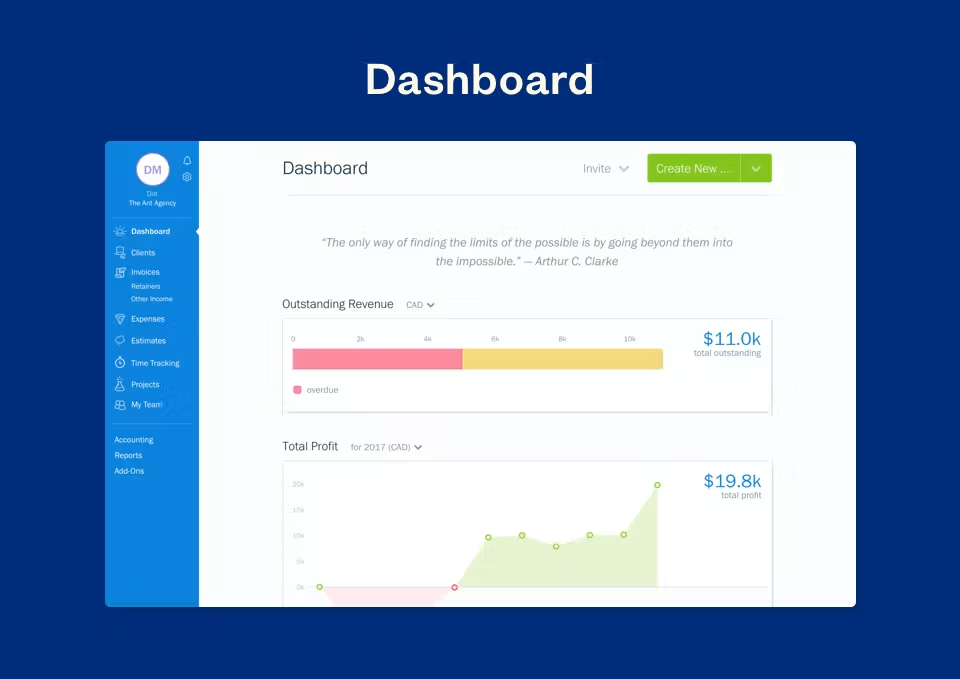
The software provides real-time insights into revenue, expenses, profitability, and overall financial performance.
Support Business Growth
FreshBooks delivers scalable accounting and financial management tools that adapt as businesses expand.
FreshBooks Categories
Primary Category
FreshBooks primarily belongs to the Accounting Software category. The platform helps businesses manage bookkeeping, invoicing, expense tracking, financial reporting, payments, and accounting workflows through a centralized cloud-based system.
Primary Category:
Secondary Categories
FreshBooks extends beyond traditional accounting functionality by offering invoicing, billing, project accounting, expense management, payment processing, and financial reporting capabilities that support broader business operations.
Secondary Categories:
- Accounts Payable Software
- Expense Report Software
- Financial Management Software
- Financial Reporting Software
- Payment Processing Software
- Payroll Software
- Professional Services Automation Software
- Recurring Billing Software
- Time Tracking Software
Key Features of FreshBooks
Invoicing
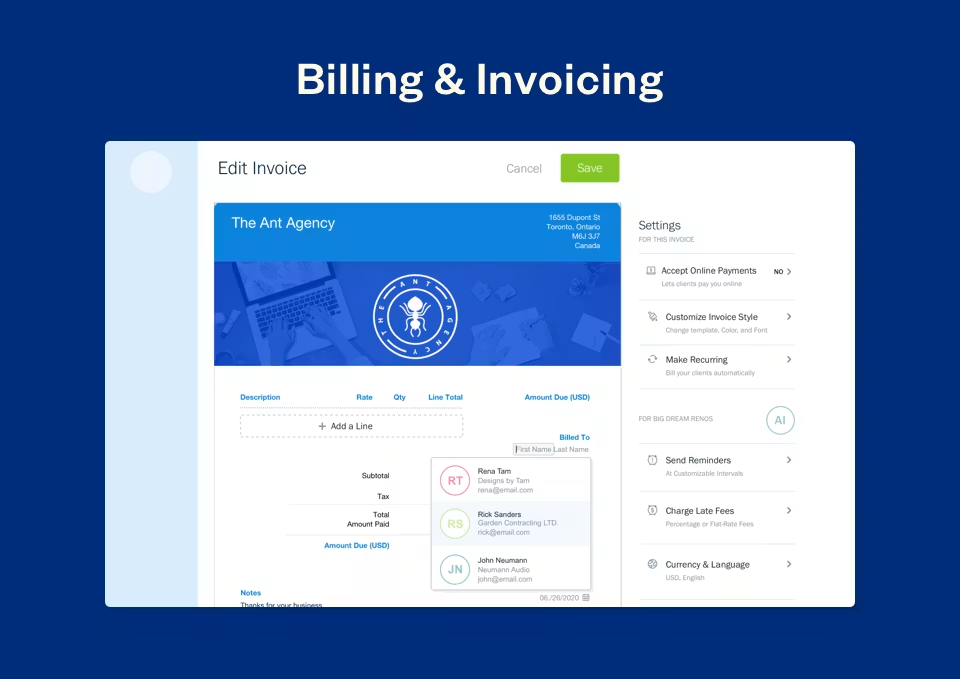
FreshBooks provides advanced invoicing tools that allow businesses to create professional invoices, customize branding, automate recurring invoices, and monitor payment status. Users can quickly generate invoices, send them to clients, and receive notifications when they are viewed or paid.
Expense Tracking
The platform simplifies expense management by allowing businesses to record, categorize, and track expenses automatically. Users can upload receipts, connect bank accounts, and monitor spending patterns to maintain accurate financial records.
Online Payments
FreshBooks enables businesses to accept online payments directly through invoices. Customers can pay using various payment methods, helping organizations improve payment collection speed and cash flow.
Time Tracking
The software includes built-in time tracking capabilities that allow teams to monitor billable hours, track project time, and automatically convert tracked hours into client invoices.
Project Accounting
Businesses can manage projects, monitor budgets, track profitability, collaborate with team members, and maintain visibility into project-related financial activities.
Estimates and Proposals
FreshBooks helps organizations create professional estimates and proposals that can be easily converted into invoices once approved by clients.
Recurring Billing
The platform automates recurring invoices and subscription billing processes, reducing manual effort while ensuring consistent revenue collection.
Financial Reporting
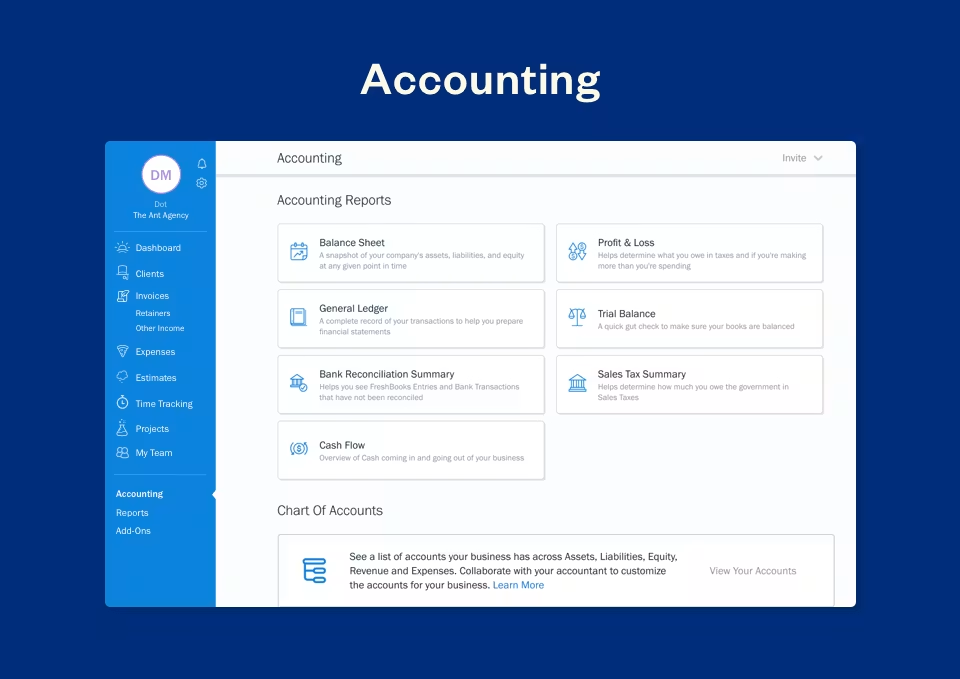
FreshBooks provides comprehensive financial reporting tools that help businesses generate profit and loss statements, expense reports, tax summaries, accounts aging reports, and revenue insights.
Client Management
Users can maintain customer records, communication history, project information, payment activity, and billing details within a centralized client management system.
Mobile Accounting
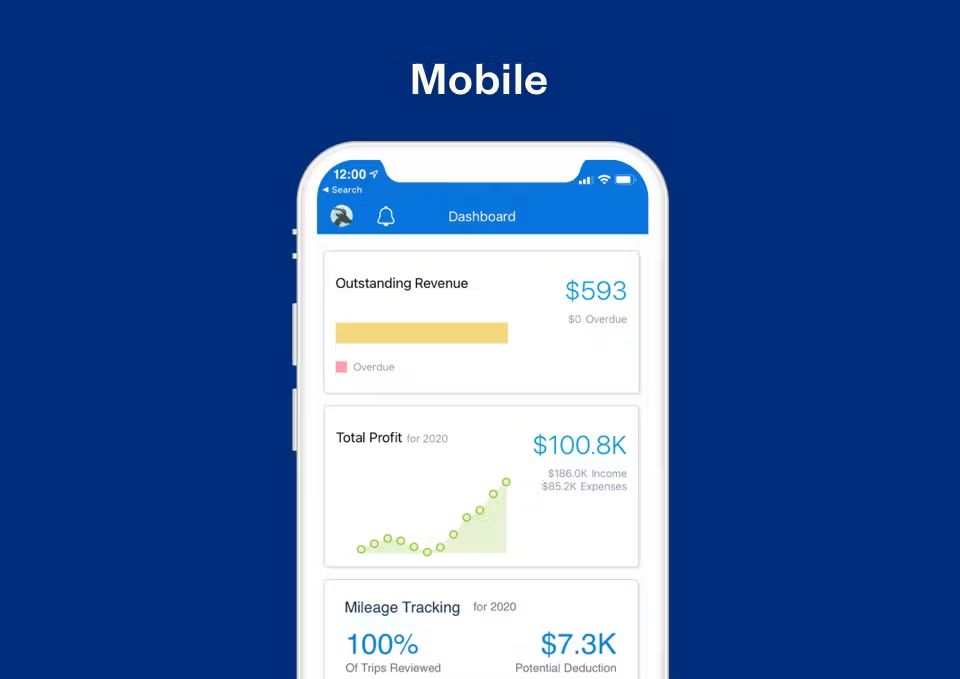
FreshBooks offers mobile applications that enable users to manage invoices, expenses, payments, and financial activities from anywhere.
Benefits of Using FreshBooks
Simplified Financial Management
FreshBooks makes accounting accessible for business owners without advanced accounting expertise.
Faster Payment Collection
Online payments and automated reminders help businesses receive payments more quickly.
Improved Cash Flow Visibility
Real-time financial tracking helps organizations understand revenue and expenses more effectively.
Reduced Administrative Work
Automation reduces the time spent on invoicing, expense tracking, and bookkeeping tasks.
Better Client Management
Centralized customer records improve billing accuracy and customer communication.
Scalability for Growing Businesses
FreshBooks supports business growth through flexible financial management capabilities.
Integrations of FreshBooks
Stripe Integration
Allows businesses to process online payments securely.
PayPal Integration
Enables customers to make payments using PayPal directly through invoices.
Shopify Integration
Connects accounting data with eCommerce sales activities.
G Suite Integration
Supports productivity and document management workflows.
HubSpot CRM Integration
Aligns customer and financial information across systems.
Zapier Integration
Connects FreshBooks with thousands of third-party applications.
Mailchimp Integration
Supports customer communication and marketing activities.
Additional Business Integrations
Additional Integrations Include:
- Microsoft 365
- Square
- BigCommerce
- WooCommerce
- Trello
- Asana
- Monday.com
- Slack
- Zoom
- Salesforce
- QuickBooks Payroll
- Expensify
- Gusto
- Avalara
- Fundbox
- Bench
- Shopify POS
- Calendly
- Typeform
- Jotform
Pros and Cons of FreshBooks
Pros | Cons |
User-friendly interface suitable for non-accountants | Limited inventory management functionality |
Excellent invoicing and billing features | Advanced accounting capabilities may be limited for larger organizations |
Strong expense tracking and automation tools | Fewer customization options compared to some competitors |
Cloud-based access from any location | Payroll functionality may require third-party integrations |
Built-in time tracking and project accounting | Higher-tier features require premium plans |
Automated payment reminders and recurring billing | Not designed for highly complex enterprise accounting |
Strong customer support and onboarding experience | Multi-entity accounting capabilities are limited |
Who Should Use FreshBooks?
Freelancers
Freelancers can use FreshBooks to create invoices, track expenses, manage projects, monitor billable hours, and improve cash flow management.
Small Businesses
Small businesses benefit from FreshBooks by simplifying bookkeeping, invoicing, financial reporting, and payment collection processes.
Agencies
Marketing agencies, creative agencies, and consulting firms can manage client projects, track time, generate invoices, and monitor profitability through a single platform.
Service-Based Businesses
Contractors, consultants, coaches, legal professionals, and other service providers can streamline financial operations while maintaining accurate billing and reporting.
FreshBooks Use Cases
Client Invoicing
Businesses create and manage professional invoices while monitoring payment status and customer activity.
Expense Management
Organizations track spending, categorize expenses, and maintain accurate financial records.
Project Accounting
Teams monitor project budgets, profitability, and billable activities throughout project lifecycles.
Time-Based Billing
Service providers track billable hours and convert them into invoices automatically.
Financial Reporting
Businesses generate financial reports that support strategic decision-making and compliance requirements.
Cash Flow Management
Organizations monitor incoming payments, outstanding invoices, and revenue trends.
Top FreshBooks Alternatives
QuickBooks Online
QuickBooks Online is one of the most popular accounting software solutions offering bookkeeping, payroll, invoicing, and financial reporting capabilities.
Xero
Xero provides cloud accounting software with strong automation, reconciliation, inventory, and reporting functionality.
Zoho Books
Zoho Books offers comprehensive accounting, invoicing, inventory management, and automation tools for growing businesses.
Sage Accounting
Sage Accounting delivers financial management, invoicing, reporting, and bookkeeping capabilities for small and medium-sized organizations.
Wave Accounting
Wave Accounting is a popular accounting software platform that provides invoicing, payments, and bookkeeping functionality for small businesses.
FreshBooks vs Competitors
Feature | FreshBooks | QuickBooks Online | Xero | Zoho Books |
Invoicing | ✓ | ✓ | ✓ | ✓ |
Expense Tracking | ✓ | ✓ | ✓ | ✓ |
Time Tracking | ✓ | Limited | Limited | ✓ |
Project Accounting | ✓ | ✓ | ✓ | ✓ |
Financial Reporting | ✓ | ✓ | ✓ | ✓ |
Inventory Management | Limited | ✓ | ✓ | ✓ |
Mobile Access | ✓ | ✓ | ✓ | ✓ |
Ease of Use | High | Medium | High | High |
Best For | Freelancers & Service Businesses | Broad Accounting Needs | Growing Businesses | SMBs |
Why Choose FreshBooks?
FreshBooks is one of the most user-friendly accounting software solutions available for small businesses, freelancers, agencies, and service-based organizations. Its intuitive interface simplifies financial management while providing essential tools for invoicing, expense tracking, payment processing, project accounting, and reporting.
Businesses often choose FreshBooks because it reduces the complexity associated with traditional accounting software. The platform allows users to manage finances efficiently without requiring extensive accounting knowledge. Features such as recurring invoices, automated payment reminders, online payments, time tracking, and expense management help improve productivity while reducing manual work.
FreshBooks also excels in client-focused financial management. Service providers can track billable hours, manage projects, create estimates, and maintain complete visibility into customer relationships and payment activities. Its cloud-based accessibility ensures that users can manage financial operations from anywhere.
For organizations seeking accounting software that balances simplicity, automation, scalability, and financial visibility, FreshBooks remains a strong choice that supports long-term business growth.
Frequently Asked Questions
What is FreshBooks?
FreshBooks is a cloud-based accounting and invoicing software platform designed to help freelancers, self-employed professionals, small businesses, and service-based organizations manage their finances. It simplifies tasks such as invoicing, expense tracking, time tracking, project management, financial reporting, and client billing from a centralized platform.
Is FreshBooks free?
FreshBooks does not typically offer a permanent free plan, but it often provides a free trial that allows businesses to explore its features before subscribing. Various pricing plans are available to accommodate different business sizes and accounting requirements.
Where can I compare FreshBooks with other accounting software?
If you're evaluating FreshBooks alongside other accounting software solutions, platforms like Krowdbase allow you to compare features, use cases, integrations, pros and cons, pricing models, and software categories side by side. This helps businesses identify the accounting platform that best fits their financial management and operational needs.
Where can I find FreshBooks alternatives?
Businesses researching FreshBooks alternatives can explore software comparison platforms such as Krowdbase to discover comparable accounting software solutions, including QuickBooks, Xero, Zoho Books, Sage Accounting, Wave Accounting, and other leading financial management platforms. Comparing alternatives helps organizations choose software that aligns with their budget and business requirements.
How do I choose the best accounting software for my business?
Choosing the best accounting software depends on factors such as business size, invoicing requirements, expense management needs, tax compliance, reporting capabilities, payroll requirements, integrations, and overall budget. Krowdbase helps businesses compare accounting software based on features, scalability, industry suitability, and operational requirements.
Where can I discover software similar to FreshBooks?
Software discovery platforms like Krowdbase provide detailed software profiles, feature comparisons, alternative recommendations, and category-based listings that help businesses find and evaluate software solutions similar to FreshBooks. This makes it easier to identify accounting platforms that support specific business goals and workflows.
Can I compare accounting software features before making a decision?
Yes. Before selecting an accounting platform, it is important to compare features such as invoicing, expense tracking, time tracking, project accounting, financial reporting, tax management, payment processing, and integrations. Krowdbase enables businesses to evaluate these capabilities across multiple accounting software solutions.
What are the best accounting software options available today?
The best accounting software depends on business requirements, but popular options include FreshBooks, QuickBooks, Xero, Zoho Books, Sage Accounting, and Wave Accounting. Krowdbase helps businesses discover, compare, and evaluate these leading accounting software solutions in one place.
Where can businesses discover new software solutions?
Krowdbase is a software discovery platform where businesses can explore accounting software, CRM systems, project management tools, HR software, ERP platforms, customer support solutions, marketing software, and thousands of other business applications. This helps organizations identify technology solutions that improve efficiency and support long-term growth.
Why use Krowdbase for software research?
Krowdbase helps businesses make informed software decisions by providing detailed software information, feature breakdowns, use cases, alternatives, comparisons, and category-specific recommendations. Whether you're researching FreshBooks or other business software, Krowdbase simplifies the evaluation process and helps organizations identify solutions that align with their operational and financial objectives..
Conclusion
FreshBooks has earned its reputation as one of the most trusted accounting software solutions for freelancers, consultants, agencies, service providers, startups, and small businesses seeking a modern approach to financial management. By combining invoicing, bookkeeping, expense tracking, time tracking, project accounting, online payments, and financial reporting within a single cloud-based platform, FreshBooks helps organizations simplify daily accounting operations while improving overall financial visibility.
One of the platform's biggest strengths is its ability to make accounting accessible to non-accountants. Business owners can create professional invoices, monitor expenses, track billable hours, manage client projects, and generate essential financial reports without requiring extensive accounting knowledge. The platform's automation capabilities further reduce manual workloads by streamlining recurring invoices, payment reminders, expense categorization, and client billing processes.
FreshBooks is particularly valuable for businesses that rely on client services and project-based work. Its integrated time tracking, project accounting, and payment collection tools help organizations improve profitability, accelerate cash flow, and maintain stronger customer relationships. The software also offers flexibility through a wide range of integrations with CRM software, payment gateways, eCommerce platforms, productivity tools, and business applications.
As businesses continue to prioritize efficiency, automation, and real-time financial insights, FreshBooks provides a scalable accounting software solution capable of supporting both current operational needs and future growth. Whether you're a freelancer managing a handful of clients, a growing agency handling multiple projects, or a small business seeking better financial control, FreshBooks delivers the tools necessary to simplify accounting and improve business performance.
While businesses should compare alternatives such as QuickBooks Online, Xero, Zoho Books, Sage Accounting, and Wave Accounting based on their specific requirements, FreshBooks remains a strong contender in the accounting software market due to its ease of use, automation capabilities, client-focused features, and comprehensive financial management functionality. For organizations looking for a reliable cloud accounting software platform that balances simplicity with powerful business tools, FreshBooks continues to be a highly recommended choice.
Screenshots
Video
Categories
Features
FAQ
The official website of FreshBooks is https://www.freshbooks.com/
FreshBooks belongs to the Accounts Payable, Expense Report, Financial Management, Financial Reporting, Payment Processing, Payroll, Professional Services Automation, Recurring Billing, Time Tracking, Time and Expense, Accounts Receivable, Billing and Invoicing, Business Management, Construction Accounting, Construction Estimating, Legal Billing, Mileage Tracking category.
FreshBooks offers features such as Bank Reconciliation, Expense Tracking, General Ledger, Mobile Access, Multi-Currency, Expense Claims, Mobile Receipt Upload, Spend Control, Mobile Payments, Time & Expense Tracking, Invoice Processing, Multi-Period Recurring Billing, Billable & Non-Billable Hours, Online Time Tracking, Online Payments, Billing Portal, Customizable Invoices, Tax Calculation, Job Costing, Multiple Projects, Trip Logs.
FreshBooks is used in industries such as Accounting.
FreshBooks is built for Small Business, Mid Size Business
FreshBooks supports English, French, German, Italian, Swedish, Spanish
FreshBooks supports Android, Mac, Web-based, Windows, iPhone/iPad devices.
The starting price of FreshBooks is USD 21/per month.
Yes, FreshBooks offers a free trial.
FreshBooks was founded in 2003.
FreshBooks has approximately 501-1000 employees.
FreshBooks is located in Canada.
FreshBooks was founded by FreshBooks.
Need help choosing this software?
Have questions about features, pricing, integrations, or implementation? Send an enquiry to the vendor and get the information you need.
Pricing
Starting at:
$21/per month
Free Trial Available
Vendor Details
- Vendor
- FreshBooks
- Founded
- 2003
- Locations
- Canada
- Company Size
- 501-1000
- Social Media

