
Komment
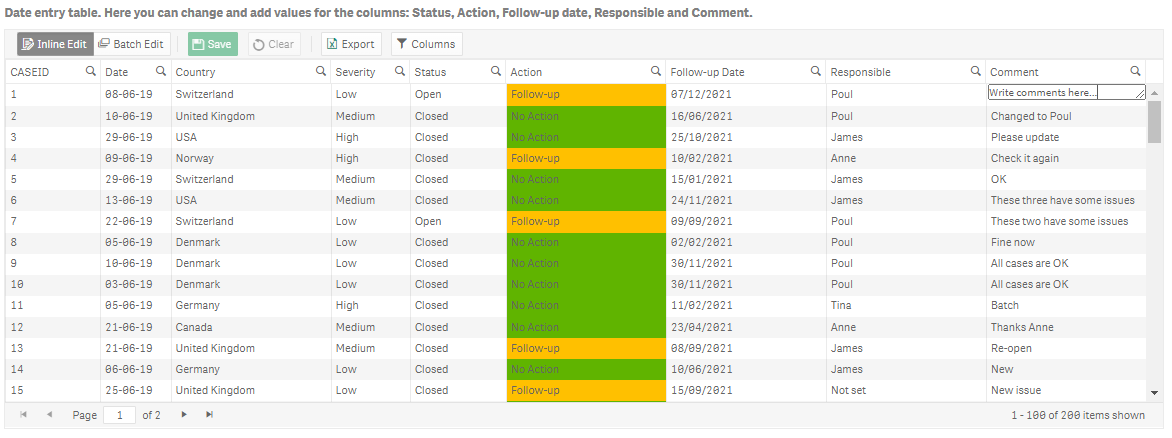
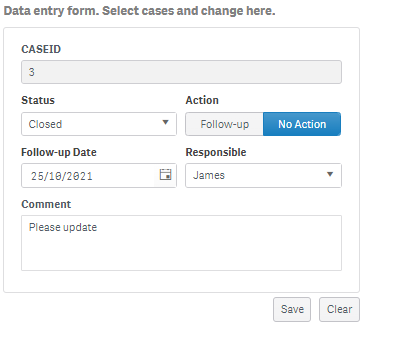
Komment is a writeback extension that helps users directly add comments in Qlik Sense application and create or edit data points.
What is Komment?
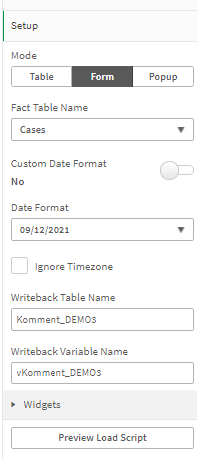
Komment writeback: 1. Unbelievably simple: Configure a fully working writeback app in less than five minutes. 2. Endless opportunities: As we use native Qlik functionality you can customize Komment to match your specific use cases. 3. Priced to match your needs: You can get started for only 90 per month and you can choose the plan that is right for your team. 4. No setup costs: Komment is very easy to install and configure. Therefore, you can do it yourself as a true self-service product.
Screenshots
Video
Features
FAQ
The official website of Komment is http://www.extendbi.com/
Komment writeback: 1. Unbelievably simple: Configure a fully working writeback app in less than five minutes. 2. Endless opportunities: As we use native Qlik functionality you can customize Komment to match your specific use cases. 3. Priced to match your needs: You can get started for only 90 per month and you can choose the plan that is right for your team. 4. No setup costs: Komment is very easy to install and configure. Therefore, you can do it yourself as a true self-service product.
Komment belongs to the Business Intelligence, Dashboard, Data Analysis, Data Entry, Financial Reporting, Reporting category.
Komment offers features such as Collaboration Tools, Dashboard, Data Visualization, Alerts/Notifications, Customizable Forms, Data Quality Control.
No, Komment does not offer a free trial.
Pricing
Starting at:
€2500/per year
Free Trial Available
Reviews(0)
Write a reviewKomment alternatives

PayPal
PayPal helps businesses manage digital payments, invoicing, and mobile transactions across eCommerce and service workflows. Its most used by marketing, IT services, and retail teams. Reviewers highlight its mobile access and real-time alerts, but pri...load more

QuickBooks Enterprise
QuickBooks Enterprise is a payroll platform used mainly by small businesses in accounting, construction, and retail to manage payroll, invoicing, and reporting. Its standout benefit is the ability to customize and automate financial workflows. While ...load more

Jira
Jira is particularly well suited to software development and agile teams. Its versatility, however, extends beyond software development to product management, IT operations, and customer support, and it offers robust issue tracking and task managemen...load more


Wix
Wix empowers small businesses to build and manage websites quickly. Most users rely on it for designing, blogging, and marketing. Its drag-and-drop editor and mobile access stand out for ease of use, while limitations in SEO and advanced customizatio...load more

QuickBooks Online
QuickBooks Online helps small businesses, especially in accounting, construction, and retail manage accounting, billing, and financial reporting with daily-use tools and mobile access. Reviewers highlight its ease of use and ability to connect with o...load more

Google Analytics 360
Google Analytics 360 is an enterprise-level analytics platform with in-depth performance indicators, such as ROI analysis reports. The app's primary function is to provide insights into customer behavior interactions with websites and apps to identif...load more

Dynamics 365
Dynamics 365 helps manage customer relationships, business operations, and reporting through centralized tools. Its most used by administrative and IT teams in software services and support roles. Its contact database and integrated business operatio...load more

monday.com
monday.com helps small businesses manage projects, tasks, and workflows with customizable boards. Its popular in marketing, IT services, and software services, especially among administrative and creative teams. Users value its team collaboration too...load more

FreshBooks
FreshBooks is built for small businesses that need fast, reliable invoicing and expense tracking. Its most used by marketing and IT services teams logging billable hours. Users highlight its automation and financial clarity, though pricing and custom...load more