
Microsoft Project
Project management software for planning, scheduling, and collaboration
What is Microsoft Project?
Microsoft Project is a comprehensive project management software solution developed by Microsoft to help organizations plan, execute, monitor, and manage projects of all sizes and complexities. Designed for project managers, business leaders, PMOs, construction companies, IT teams, engineering firms, and enterprises, Microsoft Project provides powerful tools for scheduling, resource management, budget tracking, collaboration, reporting, and portfolio management.
Managing projects successfully requires careful coordination of tasks, timelines, resources, budgets, stakeholders, and deliverables. As projects become more complex, organizations need advanced project management software that can provide visibility into project performance while helping teams stay aligned with business objectives. Microsoft Project addresses these challenges by offering a centralized platform where users can create project plans, allocate resources, monitor progress, and analyze performance in real time.
One of the key strengths of Microsoft Project is its ability to support both simple and highly complex project environments. Whether managing a small internal initiative, a large construction project, a software development program, or an enterprise-wide portfolio, the platform provides the flexibility and scalability required to meet diverse project management needs.
As organizations increasingly prioritize efficiency, accountability, and strategic project execution, Microsoft Project remains one of the most widely recognized project management software solutions available today.
About Microsoft Project
Microsoft Project is a cloud-based and desktop project management software platform that helps organizations plan projects, schedule tasks, manage resources, track budgets, monitor progress, and improve project delivery outcomes. The platform provides project managers with a comprehensive set of tools designed to support every phase of the project lifecycle.
Originally introduced as a scheduling tool, Microsoft Project has evolved into a sophisticated project and portfolio management solution capable of supporting enterprise-level planning, resource allocation, reporting, collaboration, and strategic project governance. The platform integrates seamlessly with the broader Microsoft ecosystem, including Microsoft Teams, Microsoft 365, Power BI, SharePoint, and Azure.
Microsoft Project enables organizations to create detailed project schedules, define dependencies, allocate resources, forecast workloads, monitor risks, and generate insightful reports. Its advanced scheduling engine helps project managers identify critical paths, optimize resource utilization, and make informed decisions that improve project success rates.
Businesses across industries including construction, engineering, manufacturing, healthcare, technology, government, education, consulting, and professional services rely on Microsoft Project to manage projects more effectively and achieve organizational goals.
Key Objectives of Microsoft Project
Improve Project Planning
Microsoft Project helps organizations create detailed project plans that define tasks, timelines, dependencies, milestones, and deliverables, ensuring projects begin with a clear roadmap for success.
Enhance Resource Management
The platform enables businesses to allocate resources efficiently, balance workloads, and optimize resource utilization across multiple projects.
Increase Project Visibility
Project managers gain real-time visibility into project status, progress, risks, costs, and resource performance through dashboards and reporting tools.
Support Collaboration
Microsoft Project facilitates collaboration among project teams, stakeholders, and leadership through shared plans, updates, communication tools, and integrated workflows.
Improve Budget Control
Organizations can monitor project costs, track expenses, forecast budgets, and maintain financial accountability throughout project execution.
Strengthen Strategic Alignment
The platform helps organizations align projects with business objectives by supporting portfolio management, prioritization, and performance measurement.
Primary Category
Primary Category:
The primary purpose of Microsoft Project is to provide organizations with a robust project management software solution that supports planning, scheduling, execution, resource management, collaboration, and project tracking. The platform helps teams manage projects more effectively while improving visibility, accountability, and overall project success.
Secondary Categories
Secondary Categories:
- Collaboration Software
- Nonprofit Project Management Software
- Project Management Software
- Project Portfolio Management Software
- Project Tracking Software
Key Features of Microsoft Project
Project Planning and Scheduling
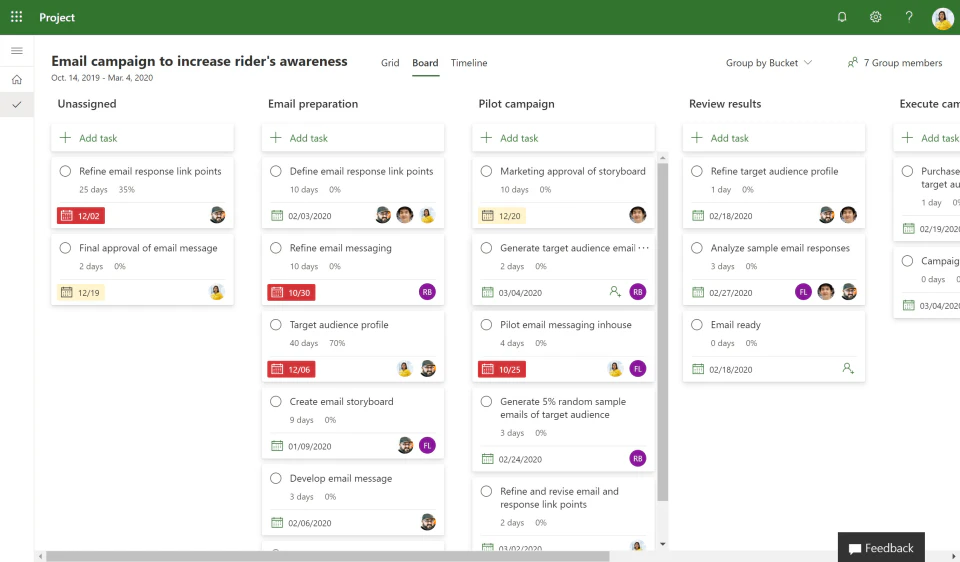
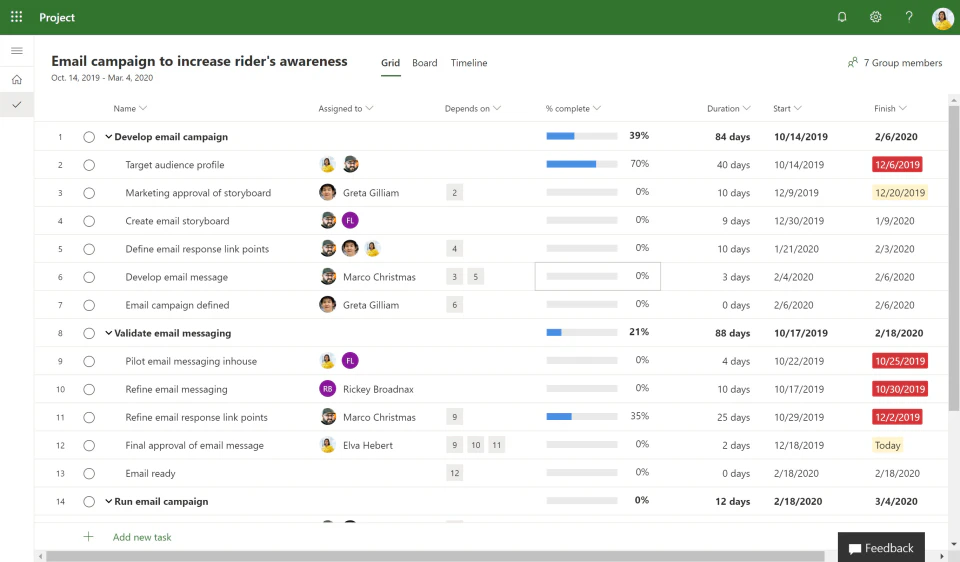
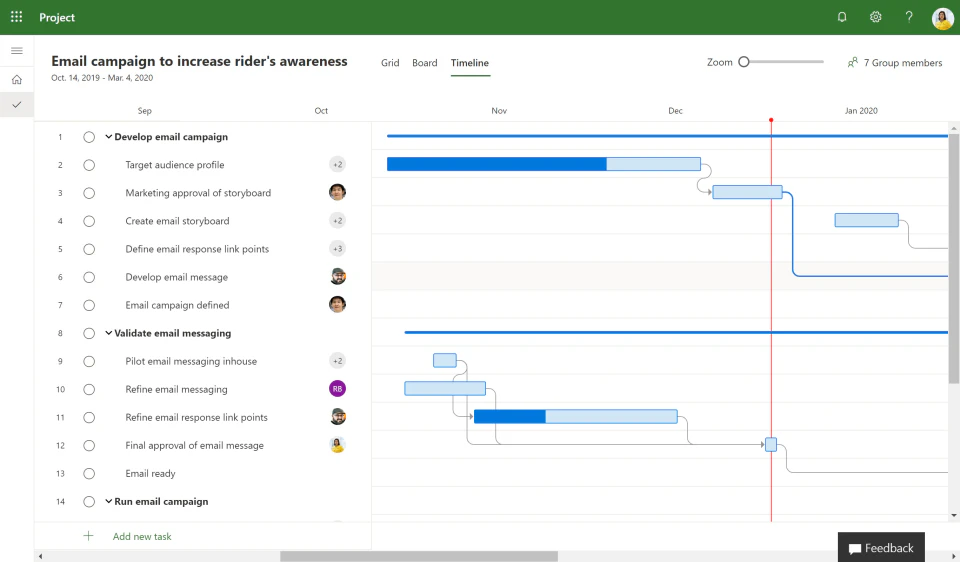
Microsoft Project provides advanced planning and scheduling capabilities that allow project managers to create detailed project timelines, define task dependencies, establish milestones, and manage project deliverables. The platform's scheduling engine automatically adjusts timelines when project variables change, helping teams maintain accurate project plans.
Key capabilities include:
- Gantt charts
- Timeline management
- Milestone tracking
- Task dependencies
- Critical path analysis
- Baseline management
- Schedule forecasting
- Project templates
- Project calendars
- Automated scheduling
Resource Management
Resource management is one of the most valuable capabilities within Microsoft Project. Organizations can assign people, equipment, materials, and budgets to specific tasks while monitoring availability and workload distribution.
Key capabilities include:
- Resource allocation
- Resource leveling
- Capacity planning
- Workload balancing
- Resource forecasting
- Skills management
- Availability tracking
- Utilization reporting
- Team planning
- Resource optimization
Task Management
Microsoft Project enables project teams to organize and manage project tasks efficiently. Managers can define responsibilities, establish deadlines, monitor progress, and ensure accountability throughout the project lifecycle.
Key capabilities include:
- Task creation
- Task assignment
- Task prioritization
- Progress tracking
- Task grouping
- Subtask management
- Status updates
- Deadline management
- Checklist tracking
- Workflow visibility
Budget and Cost Management
Organizations can use Microsoft Project to monitor project budgets, forecast expenses, and maintain financial control throughout project execution. Detailed cost tracking helps businesses identify budget risks before they become major issues.
Key capabilities include:
- Budget planning
- Cost forecasting
- Expense tracking
- Financial reporting
- Cost allocation
- Earned value analysis
- Budget comparisons
- Cost variance analysis
- Project accounting support
- Financial visibility
Portfolio Management
Microsoft Project supports project portfolio management by enabling organizations to evaluate, prioritize, and manage multiple projects simultaneously. This helps leadership teams align projects with strategic objectives and maximize business value.
Key capabilities include:
- Portfolio planning
- Project prioritization
- Strategic alignment
- Portfolio dashboards
- Investment analysis
- Resource optimization
- Project evaluation
- Governance support
- Executive reporting
- Portfolio performance tracking
Collaboration and Team Management
The platform enhances collaboration by providing shared project visibility and communication capabilities. Teams can stay aligned on project objectives, schedules, responsibilities, and updates.
Key capabilities include:
- Team collaboration
- Shared project plans
- Project communication
- Stakeholder visibility
- Status updates
- Team coordination
- Integrated discussions
- File sharing
- Activity tracking
- Project transparency
Reporting and Analytics
Microsoft Project provides comprehensive reporting and analytics tools that help organizations measure project performance and identify areas for improvement.
Key capabilities include:
- Project dashboards
- Performance reporting
- KPI monitoring
- Resource reports
- Cost reports
- Timeline reports
- Progress analysis
- Portfolio insights
- Executive reporting
- Custom reports
Risk and Issue Management
Managing project risks is essential for successful delivery. Microsoft Project helps teams identify, assess, and monitor risks throughout the project lifecycle.
Key capabilities include:
- Risk tracking
- Issue management
- Risk assessment
- Mitigation planning
- Risk monitoring
- Project controls
- Compliance tracking
- Governance support
- Audit visibility
- Escalation management
Project Roadmaps
Microsoft Project enables organizations to visualize multiple projects and initiatives through project roadmaps that support strategic planning and executive oversight.
Key capabilities include:
- Strategic roadmaps
- Multi-project visibility
- Milestone tracking
- Program planning
- Portfolio alignment
- Timeline visualization
- Executive insights
- Initiative management
- Goal tracking
- Business planning
Cloud-Based Project Management
Microsoft Project offers cloud-based accessibility, enabling teams to manage projects from anywhere while maintaining secure access to project data.
Key capabilities include:
- Cloud access
- Remote collaboration
- Real-time updates
- Mobile accessibility
- Secure data management
- Online project planning
- Anywhere access
- Cloud synchronization
- Team connectivity
- Enterprise scalability
Benefits of Using Microsoft Project
Improved Project Visibility
Organizations gain complete visibility into project timelines, resources, budgets, and deliverables.
Better Resource Utilization
Resource management tools help maximize productivity while preventing overallocation and burnout.
Enhanced Collaboration
Teams stay aligned through centralized project information and communication.
Stronger Budget Control
Businesses can monitor costs more effectively and reduce financial risks.
Increased Project Success Rates
Detailed planning and monitoring capabilities help improve project outcomes.
Scalable Project Management
Microsoft Project supports projects ranging from small initiatives to enterprise-wide programs.
Integrations of Microsoft Project
Microsoft Teams Integration
Supports collaboration, communication, and project discussions.
Microsoft 365 Integration
Connects project activities with productivity applications.
Power BI Integration
Provides advanced project analytics and reporting.
SharePoint Integration
Enables document management and collaboration.
Azure Integration
Supports enterprise cloud infrastructure and project environments.
Dynamics 365 Integration
Connects project management with business operations.
Outlook Integration
Synchronizes calendars, meetings, and project communications.
Additional Business Integrations
- Jira
- Salesforce
- SAP
- Oracle
- Trello
- Asana
- Smartsheet
- Tableau
- Slack
- Zoom
- Adobe Acrobat
- GitHub
- GitLab
- ServiceNow
- Workday
- QuickBooks
- Xero
- Monday.com
- Wrike
- DocuSign
Pros and Cons of Microsoft Project
Pros | Cons |
Powerful project planning and scheduling capabilities | Can have a steep learning curve for new users |
Advanced resource management and workload balancing | More complex than many basic project management tools |
Comprehensive reporting and analytics features | Pricing may be higher for small businesses |
Strong integration with Microsoft ecosystem | Initial setup can require project management expertise |
Excellent support for large and complex projects | Interface can feel overwhelming for occasional users |
Robust project portfolio management functionality | Collaboration features may require additional Microsoft products |
Suitable for enterprise project management environments | Not always ideal for teams seeking simple task management |
Who Should Use Microsoft Project?
Startups
Microsoft Project can be beneficial for startups managing multiple projects, product launches, implementation initiatives, or operational growth programs. Startups that require structured project planning, resource management, and scheduling capabilities can leverage the platform to maintain visibility into project progress and improve execution. However, smaller startups with basic project management requirements may initially prefer simpler solutions before transitioning to Microsoft Project as project complexity increases.
Small Businesses
Small businesses that manage client projects, internal initiatives, implementation programs, or operational improvements can use Microsoft Project to improve planning and accountability. The platform helps business owners and project managers allocate resources effectively, monitor budgets, track deliverables, and ensure projects are completed on time and within scope.
Mid-Sized Businesses
Mid-sized organizations often manage multiple concurrent projects across departments. Microsoft Project provides the visibility, resource management, collaboration, and reporting tools required to coordinate projects effectively while maintaining strategic alignment. Businesses can improve resource utilization, reduce project delays, and support organizational growth through standardized project management processes.
Enterprises
Microsoft Project is particularly well-suited for enterprise environments where project complexity, governance requirements, resource allocation, and portfolio visibility are critical. Large organizations can manage extensive project portfolios, monitor strategic initiatives, optimize resource allocation, and provide executive stakeholders with real-time project insights. Its integration with Microsoft 365, Power BI, and enterprise business systems further enhances its value for enterprise project management.
Microsoft Project Use Cases
Project Planning and Scheduling
Organizations use Microsoft Project to create detailed project schedules, define milestones, establish dependencies, and manage timelines throughout the project lifecycle.
Resource Management
Businesses leverage the platform to allocate employees, contractors, equipment, and materials while balancing workloads and maximizing productivity.
Construction Project Management
Construction firms use Microsoft Project to manage project schedules, subcontractors, budgets, resources, timelines, and project deliverables.
IT Project Management
Technology teams utilize the software to plan software development projects, infrastructure upgrades, digital transformation initiatives, and system implementations.
Project Portfolio Management
Executives and PMOs use Microsoft Project to evaluate, prioritize, and manage multiple projects across the organization while aligning initiatives with strategic objectives.
Budget and Cost Control
Organizations use Microsoft Project to forecast budgets, monitor expenses, analyze cost variances, and maintain financial accountability.
Program Management
Large enterprises manage interconnected projects and programs using Microsoft Project's advanced planning and reporting capabilities.
Strategic Planning
Businesses use project roadmaps and portfolio management tools to align project investments with long-term organizational goals.
Top Microsoft Project Alternatives
Asana
Asana is a popular work management and project management software platform that helps teams organize tasks, manage workflows, collaborate effectively, and improve project visibility.
Monday.com
Monday.com provides flexible project management, work management, and team collaboration capabilities suitable for organizations of all sizes.
Smartsheet
Smartsheet combines spreadsheet functionality with project management, resource planning, workflow automation, and reporting capabilities.
Wrike
Wrike is a collaborative project management software solution that supports task management, resource planning, reporting, and enterprise project execution.
Jira
Jira is widely used by software development and IT teams for agile project management, issue tracking, sprint planning, and workflow management.
ClickUp
ClickUp offers project management, productivity, collaboration, task management, and workflow automation capabilities within a highly customizable platform.
Microsoft Project vs Competitors
Feature | Microsoft Project | Asana | Monday.com | Smartsheet |
Project Scheduling | ✓ | Limited | ✓ | ✓ |
Gantt Charts | ✓ | ✓ | ✓ | ✓ |
Resource Management | ✓ | Limited | ✓ | ✓ |
Portfolio Management | ✓ | Limited | Limited | ✓ |
Budget Management | ✓ | Limited | Limited | Limited |
Reporting & Analytics | ✓ | ✓ | ✓ | ✓ |
Workflow Automation | ✓ | ✓ | ✓ | ✓ |
Collaboration Tools | ✓ | ✓ | ✓ | ✓ |
Enterprise Scalability | ✓ | Limited | ✓ | ✓ |
Best For | Complex Project Management | Team Collaboration | Work Management | Project & Resource Planning |
Why Choose Microsoft Project?
Microsoft Project remains one of the most trusted project management software solutions because of its ability to support both simple and highly complex project environments. The platform provides advanced planning, scheduling, resource management, reporting, and portfolio management capabilities that help organizations improve project execution and strategic alignment.
One of the primary reasons businesses choose Microsoft Project is its sophisticated scheduling engine. Project managers can create detailed plans, manage dependencies, identify critical paths, and automatically adjust schedules when project conditions change. These capabilities help organizations reduce delays and maintain project control.
The platform also excels in resource management. Organizations can optimize workforce allocation, monitor utilization, forecast resource needs, and prevent overallocation. This level of visibility helps businesses improve productivity and maximize project outcomes.
Microsoft Project integrates seamlessly with the broader Microsoft ecosystem, including Microsoft Teams, Microsoft 365, SharePoint, Power BI, Outlook, and Dynamics 365. These integrations create a connected environment where teams can collaborate effectively while maintaining centralized project visibility.
For businesses seeking project management software that supports strategic planning, resource optimization, budget control, portfolio management, and enterprise-scale execution, Microsoft Project offers a powerful and scalable solution capable of supporting long-term organizational growth.
Frequently Asked Questions
What is Microsoft Project?
Microsoft Project is a project management software platform developed by Microsoft that helps organizations plan, schedule, manage, and track projects. The software provides tools for project planning, task management, resource allocation, budgeting, reporting, portfolio management, and collaboration. Businesses use Microsoft Project to improve project visibility, optimize resource utilization, and increase project success rates across various industries and project types.
Is Microsoft Project easy to use?
Microsoft Project offers extensive project management capabilities that can be highly valuable for organizations managing complex projects. While new users may require some training to understand advanced scheduling, resource management, and reporting functions, the platform provides a structured environment for project planning and execution. Organizations familiar with Microsoft products often find it easier to adopt because of its integration with Microsoft 365 and other Microsoft applications.
What are the key features of Microsoft Project?
Microsoft Project includes advanced project scheduling, Gantt charts, resource management, project portfolio management, budget tracking, reporting and analytics, collaboration tools, project roadmaps, risk management, workflow automation, and cloud-based project management capabilities. These features help organizations manage projects more effectively while maintaining visibility into timelines, costs, resources, and performance.
What industries use Microsoft Project?
Microsoft Project is widely used across industries such as construction, engineering, manufacturing, healthcare, technology, government, education, consulting, financial services, telecommunications, and professional services. Organizations that manage projects, programs, and portfolios often rely on Microsoft Project to improve planning, execution, and project governance.
Does Microsoft Project integrate with other business software?
Yes. Microsoft Project integrates with Microsoft Teams, Microsoft 365, Power BI, SharePoint, Outlook, Dynamics 365, Azure, Jira, Salesforce, SAP, Oracle, Slack, Zoom, Smartsheet, and numerous other business applications. These integrations help organizations streamline workflows and create connected project management environments.
What are the benefits of using Microsoft Project?
Microsoft Project helps organizations improve project planning, increase resource utilization, enhance collaboration, strengthen budget control, improve project visibility, support portfolio management, and increase project success rates. The platform provides the tools needed to manage projects more efficiently while aligning initiatives with strategic business goals.
Where can I compare Microsoft Project with other project management software?
If you're evaluating Microsoft Project alongside other project management software solutions, platforms like Krowdbase allow you to compare project planning capabilities, scheduling features, resource management tools, reporting functionality, integrations, pros and cons, supported workflows, and software categories side by side. This helps businesses identify the project management solution that best fits their operational and strategic requirements.
Where can I find Microsoft Project alternatives?
Businesses researching Microsoft Project alternatives can explore software comparison platforms such as Krowdbase to discover comparable project management software solutions, including Asana, Monday.com, Smartsheet, Wrike, ClickUp, Jira, and other leading project management platforms. Comparing alternatives helps organizations evaluate scalability, functionality, pricing, and implementation requirements.
How do I choose the best project management software?
Choosing the best project management software depends on project complexity, team size, collaboration requirements, resource planning needs, reporting expectations, workflow automation capabilities, integrations, scalability, and budget. Krowdbase helps organizations compare project management software solutions based on features, use cases, industry requirements, and business objectives to support informed decision-making.
Where can I discover software similar to Microsoft Project?
Software discovery platforms like Krowdbase provide detailed software profiles, feature comparisons, competitor analysis, alternative recommendations, category-based listings, and buyer guides that help businesses identify solutions similar to Microsoft Project. This enables organizations to evaluate multiple project management platforms before selecting the right solution.
Can I compare project management software features before making a decision?
Yes. Before selecting a project management software platform, businesses should compare features such as scheduling, resource management, Gantt charts, portfolio management, reporting, collaboration, workflow automation, budget tracking, integrations, and scalability. Krowdbase allows organizations to compare these capabilities across multiple project management software solutions.
What are the best project management software options available today?
The best project management software depends on organizational requirements and project complexity. Popular options include Microsoft Project, Asana, Monday.com, Smartsheet, Wrike, Jira, ClickUp, Teamwork, Basecamp, and Zoho Projects. Krowdbase helps businesses discover, compare, and evaluate these project management software solutions in one centralized platform.
Who should use Microsoft Project?
Microsoft Project is suitable for project managers, PMOs, business leaders, construction companies, engineering firms, IT teams, consultants, government agencies, healthcare organizations, manufacturing companies, and enterprises that require structured project planning and execution capabilities. Organizations managing complex projects and resource-intensive initiatives often benefit significantly from the platform.
Where can businesses discover new software solutions?
Krowdbase is a software discovery platform where businesses can explore project management software, CRM software, marketing software, productivity tools, collaboration platforms, analytics solutions, ERP systems, and thousands of other business software products. This helps organizations identify technologies that support efficiency, growth, and digital transformation.
Why use Krowdbase for software research?
Krowdbase helps businesses make informed software decisions by providing detailed software profiles, feature breakdowns, competitor comparisons, use cases, alternatives, buyer guides, category insights, and software recommendations. Whether evaluating project management software, productivity tools, CRM solutions, or enterprise applications, Krowdbase simplifies software research and helps organizations identify solutions aligned with their business goals.
Conclusion
Microsoft Project continues to be one of the most powerful and widely adopted project management software solutions available for organizations that require advanced planning, scheduling, resource management, and portfolio oversight capabilities. Its comprehensive feature set supports every stage of the project lifecycle, helping businesses improve execution, visibility, and accountability.
From project scheduling and resource allocation to portfolio management and executive reporting, Microsoft Project provides organizations with the tools needed to manage projects efficiently and strategically. Its integration with the Microsoft ecosystem further enhances collaboration, reporting, and operational efficiency.
The platform is particularly valuable for organizations managing complex projects, large teams, multiple stakeholders, and resource-intensive initiatives. Its scalability makes it suitable for small businesses, mid-sized organizations, and large enterprises alike.
While businesses should evaluate alternatives such as Asana, Monday.com, Smartsheet, Wrike, Jira, and ClickUp based on their specific needs, Microsoft Project remains a leading choice for organizations seeking a robust project management software platform capable of supporting long-term project success and business growth.
Screenshots

Video
Categories
Features
FAQ
The official website of Microsoft Project is https://www.microsoft.com/en-us/microsoft-365/project/project-management-software
Microsoft Project belongs to the Collaboration, Nonprofit Project Management, Project Management, Project Portfolio Management, Project Tracking category.
Microsoft Project offers features such as Reporting/Project Tracking, Project Time Tracking.
Microsoft Project is used in industries such as Information Technology & Services.
Microsoft Project is built for Mid Size Business, Enterprise
Microsoft Project supports English
Microsoft Project supports Windows, Web-based, iPhone/iPad, Android devices.
The starting price of Microsoft Project is USD 10/per month.
Yes, Microsoft Project offers a free trial.
Microsoft Project was founded in 1975.
Microsoft Project has approximately 1000+ employees.
Microsoft Project is located in United States.
Microsoft Project was founded by Microsoft.
Need help choosing this software?
Have questions about features, pricing, integrations, or implementation? Send an enquiry to the vendor and get the information you need.
Pricing
Starting at:
$10/per month
Free Trial Available
Vendor Details
- Vendor
- Microsoft
- Founded
- 1975
- Locations
- United States
- Company Size
- 1000+
- Social Media


