
GoTo Meeting
Krowdbase ShortlistProfessional Online Meetings, Video Conferencing & Collaboration by GoTo
What is GoTo Meeting?
GoTo Meeting is a cloud-based online meeting and video conferencing software designed to help businesses conduct virtual meetings, webinars, team collaborations, client presentations, and remote communication efficiently. Developed to support modern hybrid and remote work environments, GoTo Meeting enables organizations to connect employees, customers, partners, and stakeholders regardless of location.
As businesses increasingly adopt remote work and distributed teams, reliable video conferencing software has become essential for maintaining productivity and communication. GoTo Meeting addresses this need by providing high-quality video conferencing, screen sharing, meeting recording, collaboration tools, mobile accessibility, and scheduling capabilities within a secure and user-friendly platform.
The software is widely used by small businesses, mid-sized organizations, enterprises, educational institutions, consultants, healthcare providers, and professional service firms that require dependable virtual meeting solutions. Its ability to support online collaboration, team communication, and customer engagement has made it a trusted platform across multiple industries.
Whether businesses need to conduct internal meetings, client consultations, sales presentations, remote training sessions, or virtual collaboration activities, GoTo Meeting provides a scalable online meeting software solution that supports efficient communication and business continuity.
About GoTo Meeting Software
GoTo Meeting is a web conferencing and virtual meeting software platform that enables users to host, join, and manage online meetings from desktops, laptops, tablets, and mobile devices. The platform is designed to simplify remote communication while providing businesses with the tools needed for collaboration, presentations, and team engagement.
The software supports video conferencing, audio conferencing, screen sharing, meeting recording, scheduling, chat functionality, meeting analytics, and mobile participation. These capabilities allow organizations to conduct professional virtual meetings without requiring complex technical infrastructure.
GoTo Meeting serves businesses of all sizes and industries, offering a reliable platform for team collaboration, customer communication, employee training, project discussions, and executive meetings. Its secure architecture and enterprise-grade reliability make it particularly attractive for organizations that require dependable communication solutions.
By combining video conferencing software, online meeting software, virtual collaboration tools, and communication management capabilities, GoTo Meeting helps businesses improve productivity, reduce travel costs, and support flexible work environments.
Key Objectives of GoTo Meeting Software
Enable Seamless Virtual Communication
GoTo Meeting helps organizations conduct professional online meetings that support collaboration and communication regardless of participant location.
Improve Team Collaboration
The platform enables teams to work together effectively through video conferencing, screen sharing, and real-time communication tools.
Support Remote and Hybrid Work
Businesses can maintain productivity and employee engagement by providing reliable virtual meeting capabilities for distributed workforces.
Enhance Customer Engagement
Organizations can conduct virtual consultations, sales presentations, client meetings, and support sessions through a centralized platform.
Reduce Operational Costs
By minimizing travel requirements and enabling virtual collaboration, businesses can reduce communication-related expenses.
Increase Meeting Productivity
The software provides tools that help teams organize, manage, and document meetings more efficiently.
GoTo Meeting Categories
Primary Category
GoTo Meeting primarily belongs to the Video Conferencing Software category. The platform is designed to facilitate virtual meetings, online collaboration, video communication, and remote team engagement through secure and reliable conferencing capabilities.
Primary Category:
Secondary Categories
GoTo Meeting also supports business communication, online collaboration, remote work, webinar hosting, and virtual event management. These capabilities expand its value beyond standard video conferencing functionality.
Secondary Categories:
- Internal Communications Software
- Presentation Software
- Screen Recording Software
- Screen Sharing Software
- Video Conferencing Software
- Virtual Classroom Software
Key Features of GoTo Meeting Software
HD Video Conferencing
GoTo Meeting provides high-definition video conferencing capabilities that allow participants to communicate clearly and effectively. The platform supports professional virtual meetings with reliable video quality that enhances collaboration and engagement.
Screen Sharing
Users can share their screens during meetings to present documents, applications, reports, demonstrations, and presentations. Screen sharing helps improve communication and simplifies information sharing among participants.
Meeting Recording
The software includes meeting recording functionality that enables users to capture discussions, presentations, training sessions, and important meetings for future reference or compliance purposes.
Audio Conferencing
GoTo Meeting supports integrated audio conferencing through VoIP and dial-in options. Participants can join meetings using internet-based audio or traditional phone connections.
Meeting Scheduling
Businesses can schedule meetings in advance, send invitations, manage calendars, and coordinate participation through built-in scheduling capabilities that simplify meeting management.
Mobile Access
The platform offers mobile applications that allow users to join, host, and manage meetings from smartphones and tablets, supporting productivity while working remotely or traveling.
Meeting Transcription
GoTo Meeting provides transcription capabilities that automatically generate meeting transcripts, helping users review discussions and document important information.
In-Meeting Chat
Participants can communicate through chat functionality during meetings, allowing questions, comments, and collaboration without interrupting presenters.
Virtual Whiteboard
The platform includes collaboration tools such as virtual whiteboards that support brainstorming, planning sessions, and interactive team discussions.
Security and Encryption
GoTo Meeting incorporates enterprise-grade security features including encrypted communications, secure meeting access controls, and participant management capabilities that help protect sensitive business information.
Benefits of Using GoTo Meeting Software
Improved Communication
Businesses can maintain consistent communication between employees, customers, and stakeholders regardless of geographic location.
Enhanced Collaboration
Interactive meeting tools support teamwork, brainstorming, project discussions, and decision-making processes.
Reduced Travel Costs
Organizations can conduct meetings virtually, reducing expenses associated with business travel and in-person gatherings.
Increased Flexibility
Employees can participate in meetings from virtually any location using desktop or mobile devices.
Better Meeting Documentation
Recording and transcription features help businesses retain important meeting information for future reference.
Support for Hybrid Work Environments
GoTo Meeting enables organizations to effectively manage communication between in-office and remote employees.
Integrations of GoTo Meeting Software
Microsoft Outlook Integration
Allows users to schedule and manage meetings directly from Outlook calendars.
Google Calendar Integration
Synchronizes meeting schedules and invitations with Google Calendar.
Microsoft Teams Integration
Supports collaboration between communication and conferencing environments.
Slack Integration
Enables users to launch and manage meetings directly from Slack conversations.
Salesforce Integration
Supports customer-facing meetings and sales activities within Salesforce workflows.
Microsoft 365 Integration
Improves productivity by connecting GoTo Meeting with Microsoft's business applications.
Zapier Integration
Connects GoTo Meeting with thousands of third-party business applications.
Additional Business Integrations
Additional Integrations Include:
- Gmail
- Google Workspace
- HubSpot CRM
- Zoho CRM
- Pipedrive
- Trello
- Asana
- Monday.com
- ClickUp
- Jira
- Dropbox
- OneDrive
- SharePoint
- Box
- DocuSign
- Zendesk
- Freshdesk
- Calendly
- ActiveCampaign
- Mailchimp
Pros and Cons of GoTo Meeting Software
Pros | Cons |
Reliable and high-quality video conferencing platform | Webinar capabilities are less extensive than dedicated webinar platforms |
Easy-to-use interface for hosts and participants | Advanced collaboration features may be limited compared to some competitors |
Strong meeting scheduling and calendar integrations | Free plan functionality is limited |
Supports meeting recording and transcription | Large virtual event management features may require additional solutions |
Enterprise-grade security and encryption | Some advanced features are available only in higher-tier plans |
Mobile-friendly access for remote teams | Customization options are limited compared to enterprise collaboration suites |
Excellent audio and video performance | Competitive platforms may offer broader collaboration ecosystems |
Who Should Use GoTo Meeting Software?
Small Businesses
GoTo Meeting is ideal for small businesses seeking a reliable video conferencing software solution for team meetings, customer discussions, and remote collaboration. Its simple interface, scheduling tools, and secure communication capabilities make it easy for smaller teams to stay connected and productive.
Mid-Sized Businesses
Growing organizations can use GoTo Meeting to support internal collaboration, employee training, client communication, and project management activities. The platform helps teams maintain effective communication across multiple locations while supporting business scalability.
Enterprises
Large organizations benefit from GoTo Meeting's security, reliability, meeting management tools, and enterprise-grade communication capabilities. Enterprises can use the platform for executive meetings, departmental collaboration, remote workforce communication, and customer engagement.
Educational Institutions
Schools, colleges, universities, and training providers use GoTo Meeting to conduct virtual classrooms, online workshops, remote learning sessions, and faculty collaboration activities.
GoTo Meeting Use Cases
Internal Team Meetings
Organizations use GoTo Meeting to conduct daily standups, departmental meetings, executive discussions, and team collaboration sessions.
Client Consultations
Businesses can host virtual client meetings, project reviews, strategy discussions, and customer presentations through secure video conferencing.
Sales Demonstrations
Sales teams use GoTo Meeting to deliver product demonstrations, conduct discovery calls, and engage prospects remotely.
Employee Training
Companies leverage the platform for onboarding programs, employee development sessions, compliance training, and knowledge-sharing initiatives.
Remote Workforce Collaboration
Distributed teams use GoTo Meeting to maintain communication, coordinate projects, and collaborate effectively across multiple locations.
Webinars and Presentations
Organizations conduct educational sessions, partner meetings, and online presentations using GoTo Meeting's conferencing and screen-sharing capabilities.
Customer Support Sessions
Support teams use virtual meetings to troubleshoot issues, guide customers through solutions, and improve customer experiences.
Project Management Discussions
Teams use GoTo Meeting for planning sessions, status updates, brainstorming activities, and project reviews.
Top GoTo Meeting Alternatives
Zoom
Zoom is one of the most popular video conferencing software platforms, offering virtual meetings, webinars, collaboration tools, and large-scale event capabilities.
Microsoft Teams
Microsoft Teams combines video conferencing, team communication, collaboration, file sharing, and productivity tools within the Microsoft ecosystem.
Google Meet
Google Meet provides secure video conferencing and collaboration capabilities integrated with Google Workspace applications.
Cisco Webex
Webex offers enterprise-grade video conferencing, collaboration, communication, and virtual event management solutions.
RingCentral Video
RingCentral Video combines video meetings, messaging, communication, and collaboration capabilities within a unified communications platform.
GoTo Meeting vs Competitors
Feature | GoTo Meeting | Zoom | Microsoft Teams | Google Meet |
HD Video Conferencing | ✓ | ✓ | ✓ | ✓ |
Screen Sharing | ✓ | ✓ | ✓ | ✓ |
Meeting Recording | ✓ | ✓ | ✓ | ✓ |
Meeting Transcription | ✓ | ✓ | ✓ | Limited |
Mobile Access | ✓ | ✓ | ✓ | ✓ |
Calendar Integration | ✓ | ✓ | ✓ | ✓ |
Webinar Support | ✓ | ✓ | Limited | Limited |
Security Features | ✓ | ✓ | ✓ | ✓ |
Ease of Use | High | High | Medium | High |
Best For | Business Meetings | General Collaboration | Microsoft Users | Google Workspace Users |
Why Choose GoTo Meeting Software?
GoTo Meeting is a trusted video conferencing software solution designed to help organizations conduct secure, reliable, and productive virtual meetings. Its focus on business communication, ease of use, and enterprise-grade reliability makes it a strong choice for organizations that depend on virtual collaboration.
One of the platform's greatest strengths is its simplicity. Businesses can quickly schedule meetings, invite participants, share content, and collaborate without requiring extensive training or technical expertise. This ease of adoption helps teams maximize productivity while minimizing implementation challenges.
GoTo Meeting also offers strong security and compliance capabilities, making it suitable for organizations that handle sensitive information. Features such as encrypted communications, secure meeting controls, participant management, and recording capabilities help businesses maintain professional communication standards.
The platform's integration ecosystem further enhances productivity by connecting with popular tools such as Microsoft Outlook, Google Calendar, Microsoft Teams, Slack, Salesforce, and numerous business applications. These integrations help organizations streamline workflows and improve communication efficiency.
For businesses seeking dependable online meeting software, video conferencing software, and remote collaboration software, GoTo Meeting provides a well-rounded solution capable of supporting hybrid work, customer engagement, employee communication, and business growth.
Frequently Asked Questions
Is GoTo Meeting easy to use?
GoTo Meeting is designed to provide a straightforward and reliable online meeting experience. Its intuitive interface allows users to schedule, host, and join virtual meetings with minimal setup, making it suitable for businesses, remote teams, and professionals of all technical skill levels.
Where can I compare GoTo Meeting with other video conferencing software?
If you're evaluating GoTo Meeting alongside other video conferencing and online meeting platforms, Krowdbase allows you to compare features, use cases, integrations, collaboration capabilities, pros and cons, and software categories side by side. This helps organizations identify the best solution for their communication needs.
Where can I find GoTo Meeting alternatives?
Businesses and professionals looking for GoTo Meeting alternatives can explore software comparison platforms such as Krowdbase to discover similar solutions, including Zoom, Microsoft Teams, Google Meet, Webex, RingCentral, and other leading virtual meeting platforms.
How do I choose the best video conferencing software for my business?
Choosing the right video conferencing software depends on factors such as meeting capacity, video and audio quality, collaboration tools, security features, integrations, scalability, ease of use, and budget. Krowdbase helps businesses compare and evaluate solutions based on their specific requirements.
Where can I discover software similar to GoTo Meeting?
Software discovery platforms like Krowdbase provide detailed software profiles, feature comparisons, alternative recommendations, and category-based listings that help businesses find solutions similar to GoTo Meeting.
Can I compare video conferencing software features before making a decision?
Yes. Before selecting a video conferencing platform, it is important to compare features such as screen sharing, meeting recording, virtual backgrounds, webinar capabilities, collaboration tools, mobile access, security controls, and third-party integrations. Krowdbase enables users to evaluate these capabilities across multiple software solutions.
What are the best video conferencing software options available today?
The best video conferencing software depends on business requirements, but popular options include GoTo Meeting, Zoom, Microsoft Teams, Google Meet, Cisco Webex, RingCentral Video, and other leading online meeting platforms. Krowdbase helps businesses discover, compare, and evaluate these solutions in one place.
Who should use GoTo Meeting?
GoTo Meeting is suitable for businesses, remote teams, educators, consultants, sales professionals, customer support teams, and organizations that require reliable virtual meetings, team collaboration, client communication, and online presentations.
Where can businesses discover new software solutions?
Krowdbase is a software discovery platform where businesses can explore video conferencing software, collaboration tools, CRM platforms, project management software, HR solutions, marketing tools, cybersecurity software, and thousands of other business applications that support growth and productivity.
Why use Krowdbase for software research?
Krowdbase helps businesses make informed software decisions by providing detailed software information, feature breakdowns, use cases, alternatives, comparisons, and category-specific recommendations. This simplifies the software evaluation process and helps organizations identify solutions that align with their operational goals and business requirements.
Conclusion
GoTo Meeting remains one of the most recognized video conferencing software solutions for businesses seeking reliable virtual communication and collaboration tools. The platform combines HD video conferencing, screen sharing, meeting recording, scheduling, mobile accessibility, and enterprise-grade security within an easy-to-use environment.
Organizations use GoTo Meeting to support remote work, hybrid collaboration, customer engagement, employee training, project management, and executive communication activities. Its dependable performance and strong integration ecosystem help businesses improve communication while reducing operational complexities.
Whether supporting small business collaboration, enterprise communication, educational programs, or customer-facing interactions, GoTo Meeting provides the functionality needed to maintain productive virtual engagement. For organizations evaluating video conferencing software, GoTo Meeting remains a trusted solution capable of supporting modern communication and collaboration requirements.
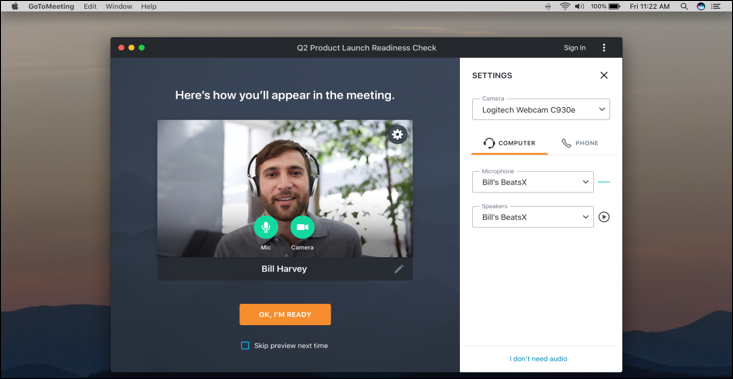
Screenshots



Categories
Features
FAQ
The official website of GoTo Meeting is https://www.goto.com/meeting
GoTo Meeting belongs to the Internal Communications, Presentation, Screen Recording, Screen Sharing, Video Conferencing, Virtual Classroom, VoIP, Web Conferencing, Webinar, Collaboration, Digital Workplace, Live Streaming, Meeting, Productivity, Remote Work, Team Communication category.
GoTo Meeting offers features such as Audio Capture, Multi-Screen Recording, Screen Capture, YouTube Uploading, Desktop/Browser Sharing, Mobile Screen Sharing, Multi-Participant Screen Sharing, Presenter Control Management, Real Time Screen Sharing, Screen Mirroring, Targeted/Locked Screen Sharing, Private Chat, Interactive Whiteboard, Real-time Broadcasting, Session Recording, Virtual Classroom, HD Audio/Video, Live Streaming Production, Host Controls, Audio Calls.
GoTo Meeting is used in industries such as Information Technology & Services.
GoTo Meeting is built for Small Business, Mid Size Business, Enterprise
GoTo Meeting supports English, French, German, Spanish, Italian, Portuguese, Japanese
GoTo Meeting supports Android, Web-based, Windows, iPhone/iPad, Mac devices.
The starting price of GoTo Meeting is USD 14/per month.
Yes, GoTo Meeting offers a free trial.
GoTo Meeting was founded in 2003.
GoTo Meeting has approximately 1000+ employees.
GoTo Meeting is located in United States.
GoTo Meeting was founded by GoTo Technologies USA, Inc..
Need help choosing this software?
Have questions about features, pricing, integrations, or implementation? Send an enquiry to the vendor and get the information you need.
Pricing
Starting at:
$14/per month
Free Trial Available
Vendor Details
- Vendor
- GoTo Technologies USA, Inc.
- Founded
- 2003
- Locations
- United States
- Company Size
- 1000+
- Social Media

