
Webex Suite
All-in-one, AI-powered collaboration
What is Webex Suite?
Webex is a leading cloud-based video conferencing and collaboration software platform developed by Cisco. Designed to support modern communication and hybrid work environments, Webex enables organizations to connect employees, customers, partners, and stakeholders through video meetings, messaging, webinars, calling, and collaboration tools. Businesses of all sizes rely on Webex to improve communication, streamline workflows, and enhance productivity across distributed teams.
As remote work and hybrid workplaces continue to evolve, organizations require reliable collaboration software that can support virtual meetings, team communication, online events, and secure business interactions. Webex addresses these requirements by providing a comprehensive suite of communication tools within a single platform. From one-on-one meetings to large-scale virtual conferences, Webex helps organizations maintain seamless communication regardless of location.
One of the platform's strongest advantages is its focus on enterprise-grade security, scalability, and collaboration. Webex combines artificial intelligence, advanced meeting features, cloud calling, messaging, and event management capabilities to create a connected workplace experience. The platform also integrates with numerous business applications, helping organizations centralize communication and collaboration activities.
Today, Webex is widely used across industries such as education, healthcare, government, finance, technology, manufacturing, and professional services. Whether businesses need video conferencing software, webinar software, team collaboration software, or unified communication solutions, Webex offers a flexible and scalable platform that supports modern business operations.
About Webex
Webex is a cloud-based communication and collaboration software platform developed by Cisco that helps businesses connect teams through video conferencing, messaging, webinars, cloud calling, and collaboration tools. The platform is designed to facilitate real-time communication, improve team productivity, and support digital workplace initiatives.
Originally launched as a web conferencing solution, Webex has evolved into a complete unified communications platform. Today, organizations use Webex for virtual meetings, online training sessions, webinars, customer support interactions, team collaboration, project discussions, and enterprise communications. The platform supports both internal and external communication while maintaining enterprise-level security and reliability.
Webex is known for its high-quality video conferencing capabilities, AI-powered meeting enhancements, secure communication infrastructure, and extensive integration ecosystem. Businesses can host meetings, collaborate on projects, share content, manage webinars, and communicate across multiple channels from a centralized environment.
By combining video conferencing software, collaboration software, webinar software, business messaging software, and cloud communication tools, Webex enables organizations to improve operational efficiency and support modern workplace collaboration.
Key Objectives of Webex
Improve Business Communication
Webex helps organizations facilitate real-time communication through video meetings, messaging, calling, and collaboration tools that connect teams regardless of location.
Support Hybrid Work Environments
The platform enables businesses to create flexible work environments where remote and in-office employees can collaborate effectively.
Enhance Team Collaboration
Webex provides collaboration tools that allow employees to share content, communicate instantly, and work together on projects in real time.
Simplify Virtual Meetings
The platform streamlines meeting management through scheduling, recording, screen sharing, AI-powered assistance, and participant engagement features.
Improve Customer and Partner Engagement
Organizations can use Webex to host customer meetings, partner discussions, webinars, and virtual events that strengthen business relationships.
Increase Productivity
By centralizing communication and collaboration activities, Webex helps teams reduce inefficiencies and improve overall productivity.
Primary Category
Webex primarily belongs to the Video Conferencing Software category. The platform enables organizations to host virtual meetings, online conferences, video calls, webinars, and remote collaboration sessions through secure cloud-based communication technology.
Primary Category:
Secondary Categories
Webex extends beyond video conferencing by providing messaging, webinar hosting, cloud calling, team collaboration, event management, and workplace communication capabilities. These additional features help businesses create a comprehensive communication and collaboration ecosystem.
Secondary Categories:
- Remote Work Software
- Call Center Software
- Customer Service Software
- Exam Software
- Hybrid Events Software
- Registration Software
- Remote Support Software
Key Features of Webex
Video Conferencing
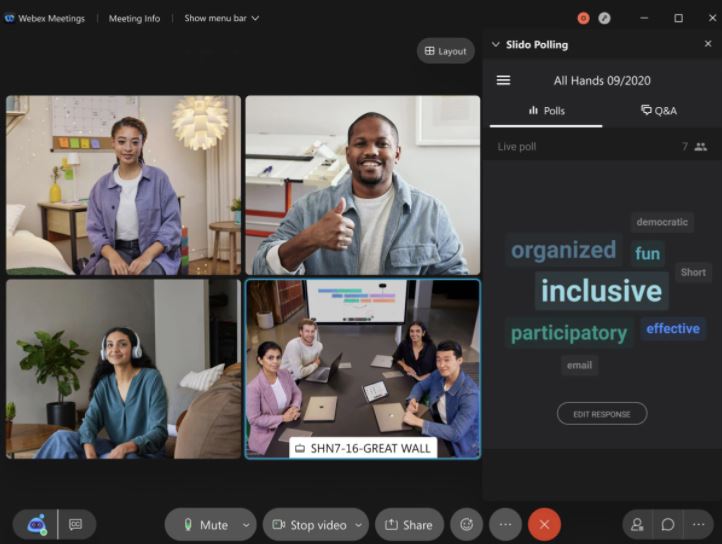
Webex provides enterprise-grade video conferencing capabilities that enable organizations to host virtual meetings with high-quality video, audio, and screen-sharing functionality. Businesses can conduct internal meetings, client discussions, remote training sessions, and executive presentations while maintaining reliable communication experiences.
The platform supports large-scale meetings, breakout sessions, recording capabilities, virtual backgrounds, participant management, and collaboration tools that enhance engagement and productivity. AI-powered meeting enhancements further improve the meeting experience through automated features and intelligent insights.
Key capabilities include:
- HD video conferencing
- Screen sharing
- Meeting recording
- Virtual backgrounds
- Breakout rooms
- Participant management
- Meeting scheduling
- Live captions
- Noise removal
- AI meeting enhancements
Team Messaging
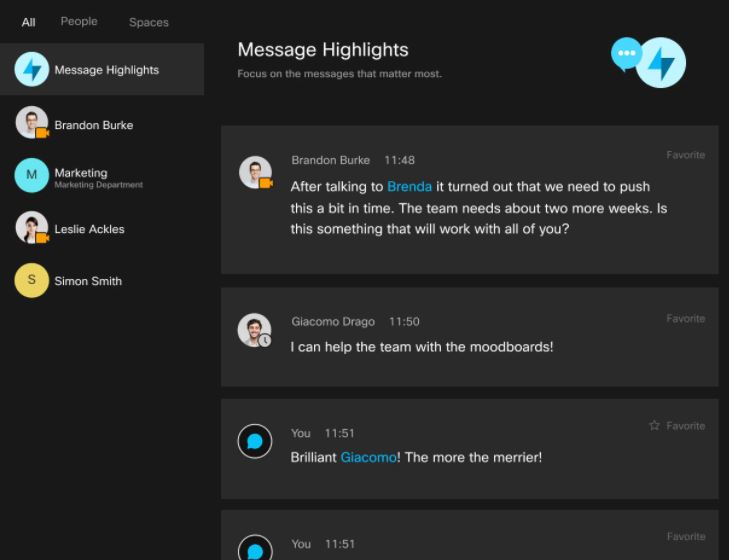
Webex includes persistent team messaging functionality that allows employees to communicate through direct messages, group chats, and dedicated collaboration spaces. Teams can maintain ongoing conversations, share files, coordinate projects, and improve communication efficiency without relying solely on email.
The messaging environment supports collaboration across departments while helping teams remain connected regardless of physical location.
Key capabilities include:
- Team chat
- Direct messaging
- Group conversations
- File sharing
- Collaboration spaces
- Search functionality
- Message history
- Mobile messaging
- Rich media sharing
- Cross-device synchronization
Webinars and Virtual Events
Webex provides webinar and virtual event capabilities that enable organizations to host large-scale online presentations, customer events, training sessions, and industry conferences. Businesses can engage audiences through interactive features while maintaining professional event experiences.
The platform supports attendee management, audience engagement tools, registration workflows, event analytics, and content sharing capabilities.
Key capabilities include:
- Webinar hosting
- Event registration
- Audience engagement tools
- Polling and surveys
- Q&A management
- Presentation tools
- Event analytics
- Attendance tracking
- On-demand recordings
- Large audience support
Cloud Calling
Webex includes cloud-based calling functionality that allows businesses to replace traditional phone systems with modern communication infrastructure. Employees can make and receive business calls from desktop and mobile devices while maintaining professional communication standards.
Key capabilities include:
- Business calling
- VoIP communication
- Call routing
- Call forwarding
- Voicemail
- Mobile calling
- Contact management
- Call analytics
- Enterprise telephony
- Unified communications
AI-Powered Meeting Assistance
Webex utilizes artificial intelligence to improve meeting productivity and collaboration. AI features help automate administrative tasks, generate insights, and improve participant engagement during meetings.
Key capabilities include:
- Automated meeting summaries
- AI-generated highlights
- Action item detection
- Real-time transcription
- Meeting insights
- Smart search
- Noise suppression
- Speaker recognition
- Automated captions
- Productivity recommendations
Content Sharing and Collaboration
Webex enables teams to collaborate through shared content, presentations, documents, and real-time communication. Users can work together efficiently during meetings and ongoing projects.
Key capabilities include:
- Screen sharing
- File collaboration
- Presentation sharing
- Whiteboarding
- Document management
- Real-time collaboration
- Annotation tools
- Content storage
- Shared workspaces
- Team collaboration
Security and Compliance
Security is a core component of Webex. The platform provides enterprise-grade security controls, encryption, compliance certifications, and administrative management capabilities to protect sensitive communications and data.
Key capabilities include:
- End-to-end encryption
- Administrative controls
- Compliance support
- Data protection
- Identity management
- Access controls
- Secure meetings
- Security monitoring
- Compliance reporting
- Enterprise security standards
Mobile Accessibility
Webex provides mobile applications that allow users to participate in meetings, communicate with teams, manage calls, and collaborate remotely from smartphones and tablets.
Key capabilities include:
- Mobile meetings
- Mobile messaging
- Mobile calling
- Cross-device access
- Push notifications
- Calendar integration
- Meeting scheduling
- File sharing
- Remote collaboration
- Mobile productivity
Reporting and Analytics
Organizations can use Webex analytics to evaluate communication performance, meeting participation, user adoption, and collaboration effectiveness. These insights help businesses optimize communication strategies and improve workplace productivity.
Key capabilities include:
- Meeting analytics
- User engagement reporting
- Adoption metrics
- Communication insights
- Performance dashboards
- Attendance tracking
- Webinar analytics
- Collaboration reporting
- Usage monitoring
- Productivity analytics
Integrations and Workflow Automation
Webex integrates with popular business applications, allowing organizations to connect communication workflows with productivity, CRM, project management, and collaboration systems.
Key capabilities include:
- CRM integrations
- Productivity integrations
- Workflow automation
- Third-party app support
- Calendar synchronization
- Project management integration
- Business application connectivity
- Collaboration workflows
- API support
- Custom integrations
Benefits of Using Webex
Improved Communication Across Teams
Webex enables organizations to establish seamless communication between employees, departments, customers, and partners regardless of location. Teams can collaborate through video meetings, messaging, cloud calling, and virtual workspaces, ensuring communication remains consistent and effective. This improves organizational alignment and reduces communication silos that often impact productivity.
Enhanced Hybrid Work Support
As hybrid work environments become increasingly common, businesses need tools that allow employees to work effectively from anywhere. Webex provides flexible collaboration capabilities that support both remote and in-office employees. Teams can participate in meetings, access shared content, communicate instantly, and remain productive regardless of their physical location.
Increased Employee Productivity
By centralizing communication and collaboration activities within a single platform, Webex reduces the need for employees to switch between multiple applications. AI-powered meeting assistance, automated summaries, integrated messaging, and workflow automation help users save time and focus on more strategic activities.
Better Customer Engagement
Organizations use Webex to conduct customer meetings, sales presentations, support sessions, and virtual consultations. High-quality video conferencing and communication capabilities help businesses deliver professional customer experiences that strengthen relationships and improve satisfaction.
Scalable Collaboration Infrastructure
Webex supports organizations of all sizes, from small businesses to large enterprises. The platform can scale alongside business growth while maintaining reliability, security, and performance across increasing numbers of users and communication activities.
Enterprise-Grade Security
Security is critical for business communication, and Webex provides advanced encryption, access controls, compliance certifications, and administrative oversight. These capabilities help organizations protect sensitive information while maintaining compliance with industry regulations.
Integrations of Webex
Microsoft 365 Integration
Webex integrates with Microsoft 365, enabling users to schedule meetings, collaborate within Outlook, access calendars, and streamline communication workflows directly from Microsoft applications.
Google Workspace Integration
Organizations can connect Webex with Google Calendar, Gmail, Google Drive, and other Google Workspace applications to improve scheduling, collaboration, and productivity.
Salesforce Integration
Sales teams can connect Webex with Salesforce to manage customer interactions, schedule meetings, and improve collaboration directly within the CRM environment.
Microsoft Teams Integration
Businesses can integrate Webex functionality with Microsoft Teams environments, helping users leverage collaboration tools while maintaining communication flexibility.
Slack Integration
Webex integrates with Slack to improve team collaboration, meeting scheduling, notifications, and communication workflows across distributed teams.
ServiceNow Integration
Organizations can streamline IT service management and support operations through Webex integrations with ServiceNow.
HubSpot Integration
Webex supports HubSpot integration to improve communication and collaboration between sales, marketing, and customer-facing teams.
Additional Business Integrations
Additional Integrations Include:
- Zendesk
- Jira
- Asana
- Trello
- Monday.com
- Dropbox
- Box
- SharePoint
- Adobe Acrobat
- Miro
- Notion
- Smartsheet
- Okta
- OneLogin
- Active Directory
- Zoom Phone
- DocuSign
- Marketo
- SAP
- Oracle Cloud
Pros and Cons of Webex
Pros | Cons |
Enterprise-grade security and compliance features | Can be more expensive than some competitors |
High-quality video and audio performance | Advanced features may require premium plans |
Strong support for hybrid work environments | User interface can feel complex for new users |
AI-powered meeting assistance and automation | Initial setup may require administrative configuration |
Robust webinar and virtual event capabilities | Smaller businesses may not need all available features |
Extensive integration ecosystem | Customization options may vary by plan |
Reliable cloud calling and communication tools | Large-scale deployments may require IT support |
Who Should Use Webex?
Startups
Startups can use Webex to establish professional communication infrastructure without investing heavily in on-premise systems. The platform provides video conferencing, messaging, collaboration, and virtual meeting capabilities that help growing teams remain connected and productive while scaling operations.
Small Businesses
Small businesses benefit from Webex's ability to centralize communication activities within a single platform. Teams can host client meetings, conduct virtual consultations, collaborate on projects, and improve communication efficiency while maintaining professional interactions.
Mid-Sized Businesses
Mid-sized organizations often require more sophisticated communication and collaboration tools as teams grow. Webex helps businesses improve internal communication, support hybrid work, manage customer interactions, and streamline operational workflows across multiple departments.
Enterprises
Large enterprises frequently choose Webex due to its scalability, security, compliance capabilities, and advanced collaboration features. Enterprise organizations can manage global communication networks, host large-scale meetings, support remote workforces, and maintain regulatory compliance through a unified platform.
Webex Use Cases
Virtual Team Meetings
Organizations use Webex to conduct daily team meetings, departmental discussions, executive updates, and project collaboration sessions across distributed workforces.
Remote Work Collaboration
Businesses support remote and hybrid employees through Webex's video conferencing, messaging, content sharing, and collaboration capabilities.
Customer and Client Meetings
Sales teams, consultants, and customer success professionals use Webex to engage customers, conduct presentations, provide support, and strengthen business relationships.
Online Training and Education
Educational institutions and corporate training departments leverage Webex for virtual classrooms, employee development programs, certification courses, and remote learning initiatives.
Webinars and Virtual Events
Organizations host product launches, marketing webinars, conferences, thought leadership events, and customer engagement programs through Webex's webinar functionality.
Business Communication
Companies use Webex cloud calling and messaging capabilities to replace traditional communication systems and support unified communications strategies.
Project Collaboration
Teams collaborate on projects through shared workspaces, messaging channels, content sharing, and real-time communication tools.
Executive Communication
Leadership teams utilize Webex for board meetings, strategic planning sessions, stakeholder communications, and executive collaboration activities.
Top Webex Alternatives
Zoom
Zoom is one of the most widely used video conferencing software platforms, offering virtual meetings, webinars, collaboration tools, and communication capabilities for organizations of all sizes.
Microsoft Teams
Microsoft Teams combines video conferencing, messaging, file collaboration, calling, and workplace communication tools within the Microsoft ecosystem.
Google Meet
Google Meet provides cloud-based video conferencing functionality integrated with Google Workspace applications and productivity tools.
RingCentral
RingCentral offers unified communications capabilities that include business calling, messaging, video conferencing, and collaboration tools.
GoTo Meeting
GoTo Meeting delivers online meeting, webinar, and virtual collaboration solutions designed for businesses and remote teams.
Webex vs Competitors
Feature | Webex | Zoom | Microsoft Teams | Google Meet |
Video Conferencing | ✓ | ✓ | ✓ | ✓ |
Team Messaging | ✓ | Limited | ✓ | Limited |
Cloud Calling | ✓ | ✓ | ✓ | Limited |
Webinar Hosting | ✓ | ✓ | Limited | Limited |
AI Meeting Features | ✓ | ✓ | ✓ | Limited |
Security & Compliance | ✓ | ✓ | ✓ | ✓ |
Enterprise Scalability | ✓ | ✓ | ✓ | Limited |
Workflow Integrations | ✓ | ✓ | ✓ | ✓ |
Mobile Access | ✓ | ✓ | ✓ | ✓ |
Best For | Enterprise Collaboration | Virtual Meetings | Microsoft Ecosystem | Google Workspace Users |
Why Choose Webex?
Webex is one of the most comprehensive communication and collaboration software platforms available today. Organizations choose Webex because it combines video conferencing, messaging, cloud calling, webinars, collaboration tools, artificial intelligence, and enterprise security within a single ecosystem. This unified approach reduces complexity while improving communication effectiveness across the organization.
A major advantage of Webex is its enterprise-grade reliability and security. Businesses operating in highly regulated industries such as healthcare, finance, government, and education often require communication platforms that meet strict compliance and security standards. Webex provides the infrastructure necessary to support these requirements while maintaining performance and scalability.
The platform's AI-powered capabilities further enhance productivity by automating meeting summaries, generating insights, identifying action items, and improving collaboration efficiency. Combined with extensive integration options and hybrid work support, Webex enables organizations to modernize communication strategies and improve operational effectiveness.
For businesses seeking a scalable video conferencing software and collaboration platform that supports communication, engagement, and productivity across distributed teams, Webex remains one of the strongest solutions available.
Frequently Asked Questions
What is Webex?
Webex is a cloud-based video conferencing, online meeting, team collaboration, and communication platform developed by Cisco. It helps businesses, educational institutions, and remote teams connect through virtual meetings, webinars, messaging, calling, and collaboration tools from a single unified platform.
Is Webex free?
Webex offers a free plan that includes basic video conferencing and collaboration features for individuals and small teams. Organizations that require advanced meeting controls, larger participant limits, webinars, cloud calling, enhanced security, and administrative tools can choose from its paid subscription plans.
Where can I compare Webex with other video conferencing software?
If you're evaluating Webex alongside other video conferencing software solutions, platforms like Krowdbase allow you to compare features, use cases, integrations, pros and cons, pricing models, and software categories side by side. This helps businesses identify the collaboration platform that best fits their communication and productivity requirements.
Where can I find Webex alternatives?
Businesses researching Webex alternatives can explore software comparison platforms such as Krowdbase to discover comparable video conferencing and collaboration solutions, including Zoom, Microsoft Teams, Google Meet, GoTo Meeting, RingCentral, and other leading communication platforms. Comparing alternatives helps organizations choose the right solution based on team size, collaboration needs, and budget.
How do I choose the best video conferencing software for my business?
Choosing the best video conferencing software depends on factors such as meeting size, collaboration requirements, security standards, integration capabilities, remote work needs, ease of use, and budget. Krowdbase helps businesses evaluate and compare video conferencing software based on features, scalability, industry requirements, and business objectives.
Where can I discover software similar to Webex?
Software discovery platforms like Krowdbase provide detailed software profiles, feature comparisons, alternative recommendations, and category-based listings that help businesses find solutions similar to Webex. This enables organizations to research multiple collaboration platforms and make informed software decisions.
Can I compare video conferencing software features before making a decision?
Yes. Before selecting a video conferencing platform, it is important to compare features such as HD video meetings, screen sharing, webinar hosting, team messaging, cloud calling, recording capabilities, meeting security, participant capacity, and third-party integrations. Krowdbase enables businesses to evaluate these capabilities across multiple collaboration software solutions.
What are the best video conferencing software options available today?
The best video conferencing software depends on specific business requirements, but popular options include Webex, Zoom, Microsoft Teams, Google Meet, GoTo Meeting, and RingCentral Video. Krowdbase helps businesses discover, compare, and evaluate these leading communication and collaboration platforms in one place.
Where can businesses discover new software solutions?
Krowdbase is a software discovery platform where businesses can explore video conferencing software, collaboration platforms, CRM solutions, project management tools, HR software, ERP systems, marketing software, and thousands of other business applications. This helps organizations identify solutions that improve productivity, communication, and operational efficiency.
Why use Krowdbase for software research?
Krowdbase helps businesses make informed software decisions by providing detailed software information, feature breakdowns, use cases, alternatives, comparisons, and category-specific recommendations. Whether you're researching video conferencing software, collaboration tools, or other business applications, Krowdbase simplifies the software discovery process and helps organizations find solutions that align with their goals and requirement
Conclusion
Webex has established itself as one of the most comprehensive video conferencing and collaboration software platforms available in today's business environment. Developed by Cisco, the platform combines video conferencing, team messaging, cloud calling, webinars, virtual events, AI-powered meeting assistance, and collaboration capabilities within a secure and scalable ecosystem.
Organizations increasingly require communication solutions that support hybrid work, remote collaboration, customer engagement, employee productivity, and digital transformation initiatives. Webex addresses these challenges by providing businesses with a unified communication platform that enables employees, customers, partners, and stakeholders to connect effectively regardless of location.
The platform's extensive feature set, enterprise-grade security, AI-driven productivity tools, and integration ecosystem make it suitable for startups, small businesses, mid-sized organizations, educational institutions, healthcare providers, government agencies, and global enterprises. Businesses can streamline communication workflows, improve collaboration, host virtual events, and enhance customer interactions while maintaining operational efficiency.
Although organizations should evaluate alternatives such as Zoom, Microsoft Teams, Google Meet, RingCentral, GoTo Meeting, and BlueJeans based on their specific requirements, Webex remains a leading choice for businesses seeking reliable, secure, and scalable communication software. Its ability to combine video conferencing software, webinar software, cloud calling software, and collaboration tools within a single platform continues to make Webex a valuable solution for modern organizations focused on communication excellence and long-term growth.
Screenshots
Video
Features
FAQ
The official website of Webex Suite is https://www.webex.com/suite
Webex Suite belongs to the Remote Work, Call Center, Customer Service, Exam, Hybrid Events, Registration, Remote Support, Screen Sharing, Ticketing, Video Conferencing, Virtual Event, VoIP, Web Conferencing, Webinar, Cloud Communication Platform, Cloud PBX, Collaboration, Community, Conference, Contact Center, Event Management, Lead Capture, Live Streaming, Meeting, Mobile Event Apps, Team Communication category.
Webex Suite offers features such as Video Conferencing, Queue Management, Chat/Messaging, Desktop/Browser Sharing, Mobile Screen Sharing, Multi-Participant Screen Sharing, Presenter Control Management, Real Time Screen Sharing, Screen Mirroring, Targeted/Locked Screen Sharing, Private Chat, Attendee Management, Live Streaming, HD Audio/Video, Multi hosts, On-Demand Webinars, IVR, Auto-Dialer, Automated Routing, Audience Engagement, Live Streaming Production, Multistreaming, Real-time Broadcasting, Session Recording, Social Media Streaming, Split/Multi-Screen, Host Controls, Audio Calls.
Webex Suite is used in industries such as Information Technology & Services, E-learning, Financial Services.
Webex Suite is built for Small Business, Mid Size Business, Enterprise
Webex Suite supports English, Chinese, French, Italian, German, Japanese, Korean, Portuguese, Spanish
Webex Suite supports Android, Windows, iPhone/iPad, Web-based, Mac devices.
The starting price of Webex Suite is USD 12/per month.
Yes, Webex Suite offers a free trial.
Webex Suite was founded in 1995.
Webex Suite has approximately 1000+ employees.
Webex Suite is located in United States.
Webex Suite was founded by Cisco Systems.
Need help choosing this software?
Have questions about features, pricing, integrations, or implementation? Send an enquiry to the vendor and get the information you need.
Pricing
Starting at:
$12/per month
Free Trial Available
Vendor Details
- Vendor
- Cisco Systems
- Founded
- 1995
- Locations
- United States
- Company Size
- 1000+
- Social Media


